
Overview
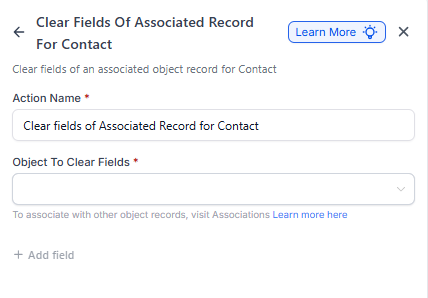
The Clear Fields of an Associated Record action lets you reset specific fields within a custom object connected to a parent or family. This is helpful when you need to clear outdated information, reset form entries, or handle special conditions in your automations.
Action Name
Clear Fields of Associated Record for Parent
Action Description
This action lets you select specific fields within a custom object and clear their values while keeping the record intact. The associated label determines which records should have their fields cleared.
Action Details
Before using this action, you need to:
- Create custom objects in your account
- Create an association label between at least one of those objects and parents
- Have at least one association between the custom object and the parent for the action to work
Important things to know:
- You can select multiple fields to be reset at once
- This action only clears the selected fields — it doesn't delete the entire record
- The parent's core information remains unchanged
Example: Tracking Tour Attendance
Let's say your center tracks tour attendance using a Tour Tracking custom object. When a family completes their scheduled tour, you want to clear certain fields to prepare for their next interaction.
Example Setup
- Object to Update: Tour Tracking
- Association Label: Family Tours
-
Fields to Clear:
- Scheduled Tour Date
- Tour Reminder Sent
How It Works
When a family completes their tour, an automation is triggered to clear the Scheduled Tour Date and Tour Reminder Sent fields. This prevents duplicate reminders from being sent while keeping the family's tour history intact.
You can trigger this action based on events like:
- When a tour is marked as completed
- When a family's enrollment status changes
- When a specific form is submitted
Pro Tip: This is especially useful for resetting temporary tracking fields without losing the parent's entire record. For example, you might clear "Last Contact Date" fields when starting a new enrollment cycle while preserving all their enrollment history.
Setting Up the Action
To add this action to your automation:
- Open your automation in the Automation Builder
- Click the + icon where you want to add the action
- Search for "Clear Fields of Associated Record for Parent"
- Select the Object to Update from your custom objects
- Choose the Association Label that connects the object to parents
- Select which Fields to Clear from the available options
- Save your automation
Pro Tip: Use this action carefully — once fields are cleared, that data is gone unless you have it stored elsewhere. Consider testing your automation with a sample parent record first.