
Overview
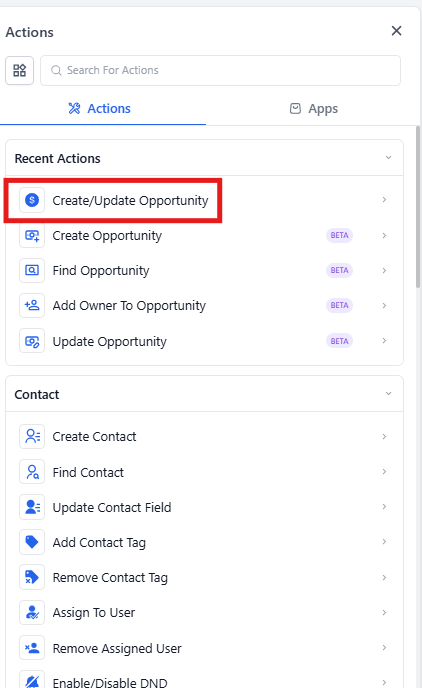
The Create or Update Enrollment Opportunity action helps you automatically manage enrollment opportunities in your pipeline. When a prospective family takes action — like booking a tour or submitting an inquiry — this automation creates or updates an opportunity to track their enrollment journey.
What This Action Does
This action creates a new enrollment opportunity or updates an existing one within your chosen pipeline and stage. It helps you track prospective families and manage their progress through your enrollment process.
Important limitations:
- This action does not automatically update the opportunity that triggered the automation
- It does not use opportunities found by a "Find Opportunity" action
- It operates independently based on the settings you configure
Pro Tip: Enrollio is phasing out this combined action. For new automations, use the separate Create Opportunity or Update Opportunity actions instead — they offer more control and additional features. Your existing automations using this action will continue working normally.
How to Configure This Action
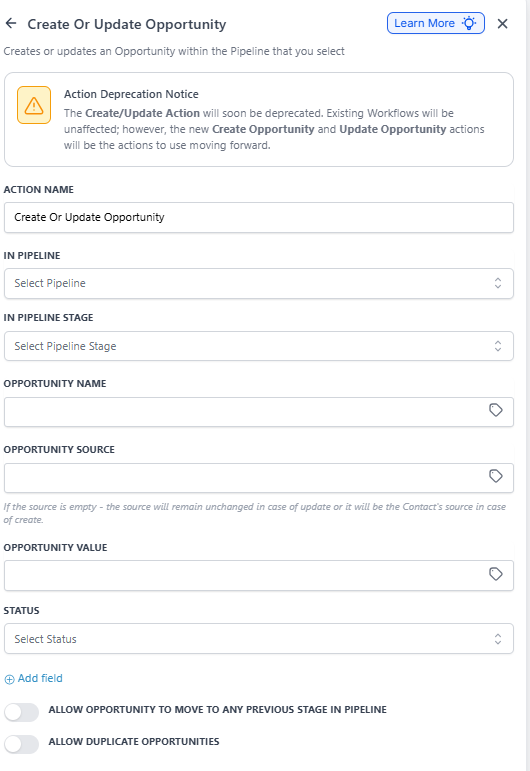
Here's what each field does when you set up this action:
| Field | What It Does | Required? |
|---|---|---|
| Action Name | Name this action so you can identify it in your automation | Yes |
| In Pipeline | Choose which enrollment pipeline to create or update the opportunity in | Yes |
| In Pipeline Stage | Select which stage to place the opportunity (e.g., "New Inquiry" or "Tour Scheduled") | Yes |
| Opportunity Name | Give the opportunity a descriptive name for easy identification | Yes |
| Opportunity Source | Indicate where this prospective family came from (e.g., "Website Form" or "Tour Booking") | Yes |
| Lead Value | Enter the estimated enrollment value if you track this | No |
| Status | Set whether the opportunity is open or closed | Yes |
| Allow Opportunity to Move to Any Previous Stage | Enable this if you want flexibility to move opportunities backward in your pipeline | No |
| Allow Duplicate Opportunities | Enable this if the same family can have multiple enrollment opportunities | No |
Example: Tracking Tour Bookings
Scenario: You want to create an enrollment opportunity every time a prospective family books a tour through your website. This ensures every interested family is tracked and followed up with properly.
How to set it up:
- Set your automation trigger to "Tour Booking Submitted"
- Add the Create or Update Enrollment Opportunity action
- Name the action "Create Tour Opportunity"
- Select your main enrollment pipeline (e.g., "Infant Enrollment Pipeline")
- Choose the initial stage "Tour Scheduled"
- Set the opportunity name to something like "[Family Name] - Tour Inquiry"
- Set the source to "Website Tour Booking"
- Optionally, enter your average enrollment value
- Set status to "Open"
- Leave duplicate opportunities disabled unless the same family can enroll multiple children
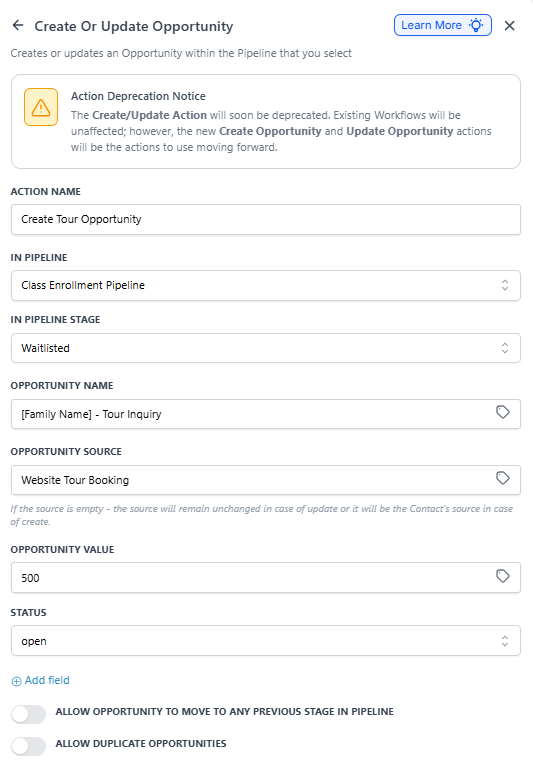
Result: Every time a family books a tour, an enrollment opportunity is automatically created and placed in your pipeline at the "Tour Scheduled" stage. Your staff can then follow your enrollment process to move the family through each stage until they enroll.
Pro Tip: Combine this action with follow-up text messages or emails to remind families about their tour and keep them engaged throughout the enrollment process.