
Overview
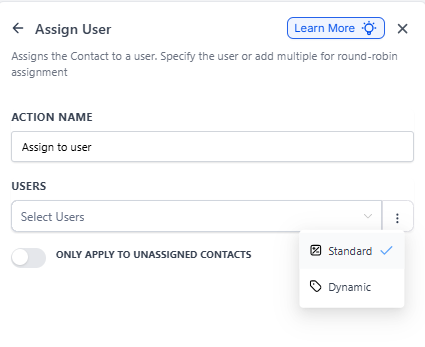
The Assign Staff Member action lets you automatically assign prospective families or enrolled families to specific team members. This keeps your enrollment process organized and ensures every family gets the attention they deserve.
Use this action to distribute families evenly across your team or assign them to specific staff members based on your center's workflow.
How It Works
When this action runs in your automation, it assigns a family to one or more staff members in your Enrollio account. You can assign families directly to specific people, or use round-robin assignment to distribute families evenly across multiple team members.
You also have the option to only assign families that don't already have a staff member assigned — perfect for preventing duplicate assignments.
Configuration Fields
| Field | Description | Required |
|---|---|---|
| Action Name | Give this action a clear name like "Assign to Tour Coordinator" or "Round Robin to Enrollment Team" | Yes |
| Staff Members | Choose one or more staff members who should receive assignments. Select multiple people for round-robin distribution. | Yes |
| Only Apply to Unassigned Families | Turn this on to avoid reassigning families who already have a staff member. Leave it off if you want to reassign everyone who meets your automation criteria. | No |
Setting It Up
- Add the Assign Staff Member action to your automation
- Enter a descriptive name like "Assign New Tour Request" in the Action Name field
- Click the Staff Members dropdown and select one or more team members
- If you want round-robin assignment, select multiple staff members
- Toggle "Only Apply to Unassigned Families" on if you only want to assign families who don't already have someone assigned
- Save your action
Common Use Cases
New Tour Request Distribution
Automatically assign new tour requests to your enrollment coordinators using round-robin. This ensures every coordinator gets an equal number of families to follow up with.
Waitlist Assignment
When a family joins your waitlist, assign them to the teacher for their desired classroom so that teacher can reach out when spots open up.
Re-enrollment Campaign
When a current family indicates they're considering leaving, automatically assign them to your director for a personal conversation.
Works Great With These Triggers
- Form Submitted: Assign families immediately when they submit your inquiry or tour request form
- Tag Added: Assign families when they're tagged as "Ready to Enroll" or "Needs Follow-up"
- Enrollment Opportunity Created: Assign families to an enrollment coordinator when a new opportunity enters your pipeline
- Family Updated: Reassign families when their status or interests change
Real Example
Your center gets tour requests through your website form. You want to distribute these evenly among your three enrollment coordinators.
Setup:
- Action Name: "Assign New Tour Request"
- Staff Members: Sarah Johnson, Mike Chen, Amanda Rodriguez
- Only Apply to Unassigned Families: On
Your Automation:
- Trigger: Form Submitted - Tour Request Form
- Action: Assign Staff Member (configured as above with round-robin)
- Action: Send Text Message - Notify the assigned coordinator about their new tour request
- Action: Send Email - Send a welcome email to the family
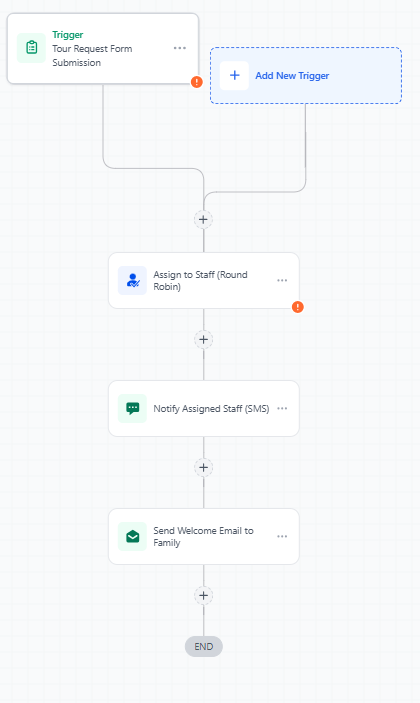
Now when a family submits your tour form, they're automatically assigned to the next coordinator in rotation, that coordinator gets a text notification, and the family receives a welcome email — all without anyone lifting a finger.