
Automation Trigger: Enrollment Opportunity Created
This trigger fires automatically when a new enrollment opportunity is created in your pipeline. Use it to start follow-up sequences, notify your team, or update your records right when a family begins their enrollment journey.
How It Works
When you create an enrollment opportunity — whether manually or through a form submission — this trigger activates immediately. Your automation can then take actions like sending a welcome text, assigning the opportunity to a staff member, or creating follow-up tasks.
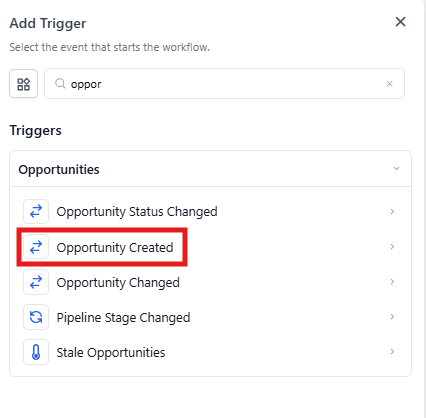
Setting Up the Trigger
- Navigate to Automations in your Enrollio dashboard
- Click Create Automation
- Select Enrollment Opportunity Created from the trigger options
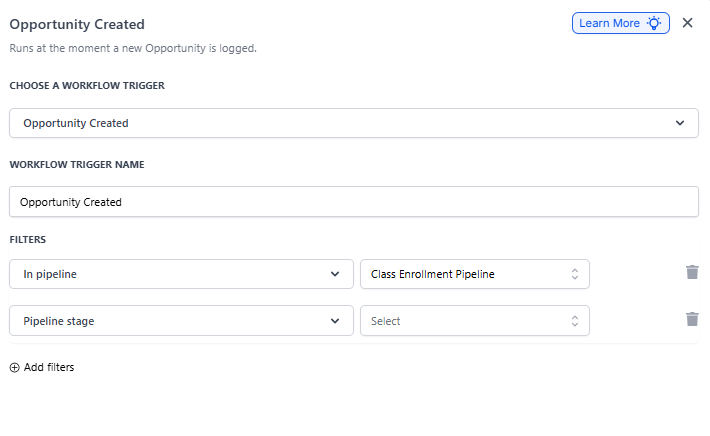
- Add any filters to narrow when this trigger fires (optional)
- Build your automation steps below the trigger
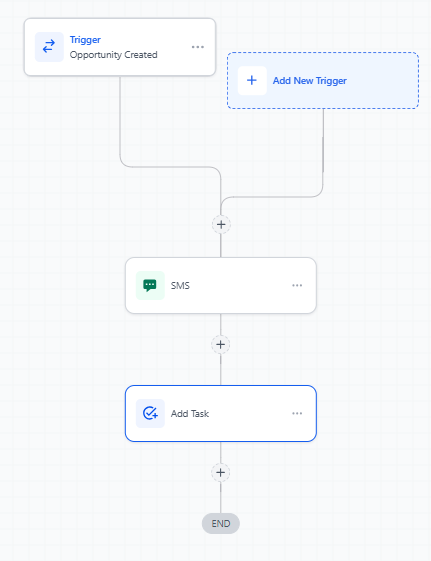
Using Filters
Filters let you control exactly when this automation runs. For example, you might only want it to fire for opportunities in a specific enrollment pipeline or for families interested in particular programs.
Common filters include:
- Pipeline name (e.g., "Infant Care Enrollments")
- Pipeline stage (e.g., "New Inquiry")
- Program type custom field
- Source (how the family found you)
Custom Values
You can pull information from the newly created opportunity into your automation steps using custom values. These let you personalize messages or pass data to other actions.
Available custom values include:
- Opportunity name
- Pipeline and stage
- Monetary value
- Parent/family contact information
- Any custom fields attached to the opportunity
Common Use Cases
Welcome new families: Send an immediate welcome text and email when an opportunity is created, introducing your center and next steps.
Notify your team: Alert your enrollment coordinator via text or Slack when a new opportunity comes in, so they can follow up quickly.
Start nurture sequences: Begin a series of educational emails about your programs, curriculum, and what makes your center special.
Track in other systems: Create tasks in your project management system or update spreadsheets when opportunities are created.
Related Triggers
You might also want to set up automations for these related events:
- Enrollment Opportunity Changed: Fires when any field on the opportunity is updated
- Pipeline Stage Changed: Triggers when an opportunity moves to a new stage
- Stale Opportunities: Catches opportunities that haven't been updated in a set timeframe
Questions about setting up your enrollment automations? Reach out to our support team — we're here to help you streamline your enrollment process.