
Overview
The Parent Engagement Score trigger helps you automatically add parents and families to an automation based on how engaged they are with your center. Use this to follow up with highly interested families or re-engage those who've gone quiet.
What This Trigger Does
This trigger filters parents into an automation based on their engagement score and other details you choose. Your engagement score tracks how families interact with your center — opening emails, clicking links, visiting your enrollment site, and more.
Use this to automate follow-ups, segment your most engaged families, or adjust your outreach based on specific criteria.
Available Filters
| Filter | Description | Required |
|---|---|---|
| Score | The parent's engagement score. Set conditions based on how engaged they are. | Yes |
| Business Niche | The type of childcare you offer (e.g., Infant Care, Preschool, After School). | No |
Score Operators
- Equals to — Triggers when the score matches exactly
- Greater than — Triggers when the score is higher than your value
- Greater than or Equal to — Triggers at or above your value
- Less than — Triggers when the score is lower than your value
- Less than or Equal to — Triggers at or below your value
- Is empty — Triggers when no score exists
- Is not empty — Triggers when a score exists
- Contains Phrase — Triggers when a field contains specific text
- Does not contain Phrase — Triggers when a field doesn't contain specific text
How to Set It Up
Step 1: In the automation builder, click the trigger dropdown and select "Parent Engagement Score."
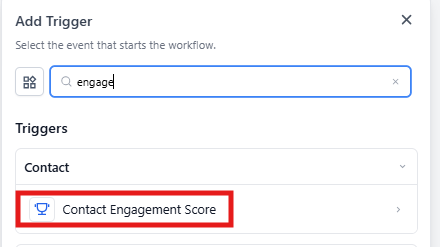
Step 2: Give your trigger a clear name like "Highly Engaged Families" or "Low Engagement Follow-Up."
Step 3: Set your filters to define which families enter this automation.
- Click Add Filter
- Select Score from the dropdown
- Choose an operator like Greater than
- Enter your threshold (e.g., 195)
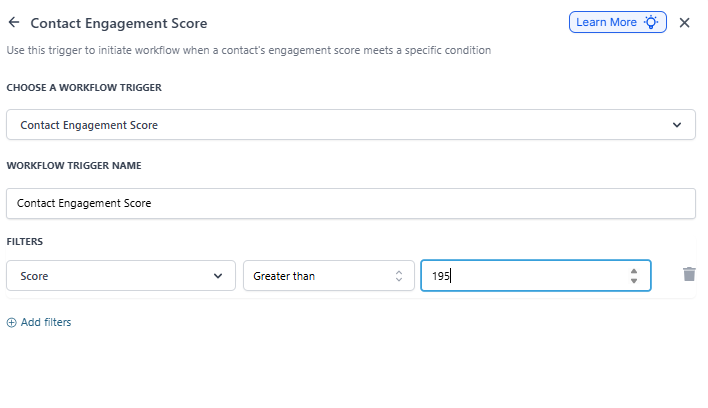
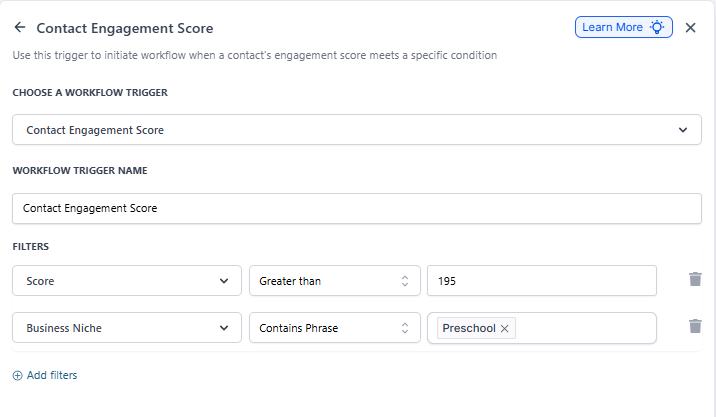
Step 4: (Optional) Add more filters to get specific. For example, add a Business Niche filter set to "Contains Phrase" and enter "Preschool" to target only preschool families.
Step 5: Click Save and continue building your automation with follow-up actions.
Example: Following Up with Hot Leads
Let's say you want to reach out to families who are clearly interested in your preschool program.
Set up the Parent Engagement Score trigger with:
- Score: Greater than 195
- Business Niche: Contains Phrase "Preschool"
When a family meets both criteria, they'll enter your automation. You might send them a personalized email about available spots, offer a tour, or have your enrollment coordinator reach out directly.
What Affects Engagement Scores?
Scores increase when families:
- Open your emails
- Click links in your messages
- Visit your enrollment pages
- Book tours or appointments
- Reply to texts or emails
Scores decrease when families:
- Don't open emails over time
- Unsubscribe from communications
- Mark emails as spam