
Overview
The Task Added trigger lets you start an automation whenever someone adds a new task to a parent or family record. Use this to automatically notify your team, update task details, or send follow-up messages when tasks are created.
This is perfect for keeping your staff in the loop about enrollment follow-ups, tour scheduling, or any other task-based workflows in your childcare center.
Trigger Name
Task Added
How It Works
This trigger activates the moment a new task is added to a parent or family record in Enrollio. You can use filters to control exactly which tasks should start the automation — like tasks assigned to specific staff members or tasks with certain keywords.
How to Configure
1. Choose Your Trigger
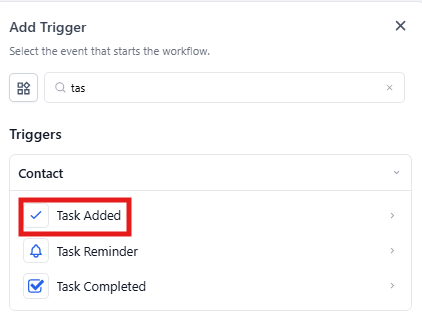
In your automation builder, select Task Added from the list of available triggers.
2. Name Your Trigger
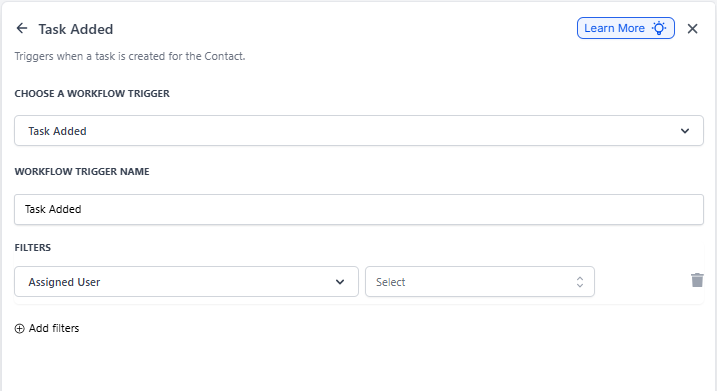
Give your trigger a clear, descriptive name like "Task Added" or "New Enrollment Task."
3. Add Filters (Optional)
Use filters to specify which tasks should activate this automation. This keeps your automations focused and relevant.
| Filter | Description | Required? |
|---|---|---|
| Assigned User | Select specific staff members to trigger the automation only when tasks are assigned to them. You can choose one or multiple users. | No |
Example: Notify Staff of New Tasks
Let's say you want to automatically notify your enrollment coordinator whenever a new task is assigned to them for following up with prospective families.
Trigger Setup:
- Trigger Name: "New Task for Enrollment Coordinator"
- Filter - Assigned User: "Sarah Johnson" (your enrollment coordinator)
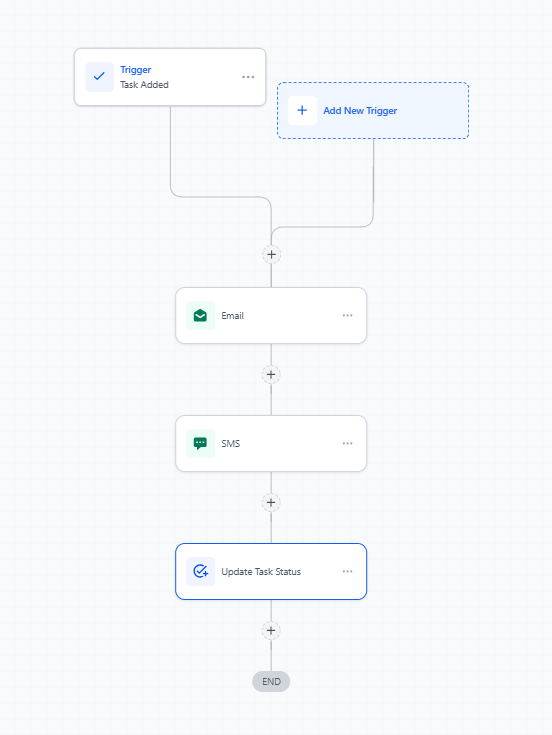
Automation Steps:
- Trigger: Task Added (configured as above)
- Action: Send Email — Notify Sarah about the new task with details
- Action: Send Text Message — Send a quick text alert to Sarah's phone
- Action: Update Task Status — Mark the task as "Notified"
Related Automations
You might also want to explore these related triggers:
- Task Completed — Automate actions when tasks are marked as done
- Task Reminder — Set up notifications before task due dates
- Parent/Family Changed — Trigger automations when parent records are updated