
What is the Birthday Reminder Automation Trigger?
The Birthday Reminder trigger helps you automatically send birthday greetings, special offers, or reminders to families based on their child's birthdate. This automation runs daily at 8 AM (your account time zone), scanning all parent and family records to check if anyone has a birthday that day.
When a match is found, your automation activates — sending birthday wishes, promotional discounts, or personalized messages. You can customize the timing using time delays or filters to trigger actions a few days before or after the birthday.
This trigger eliminates manual tracking and ensures timely, personal engagement with the families you serve.
Key Benefits of Birthday Reminder Automation
- Automates Family Engagement: Send birthday messages automatically without manually tracking dates, ensuring consistent touchpoints with families.
- Enhances Personalization: Customize templates with the child's name, family details, special offers, and personalized greetings.
- Builds Stronger Relationships: Recognizing a child's birthday strengthens your connection with families, increasing retention and referrals.
- Increases Enrollments: Offering birthday discounts or incentives (like waived registration fees) can encourage families to refer friends or enroll additional children.
- Flexible Timing: Use time delays and filters to send messages at the optimal time — a few days before, on the day, or after the birthday.
Configuring the Birthday Reminder Automation Trigger
Step 1: Create a New Automation
Navigate to Automations and click + Create Automation.
Choose + Start from Scratch or edit an existing automation.
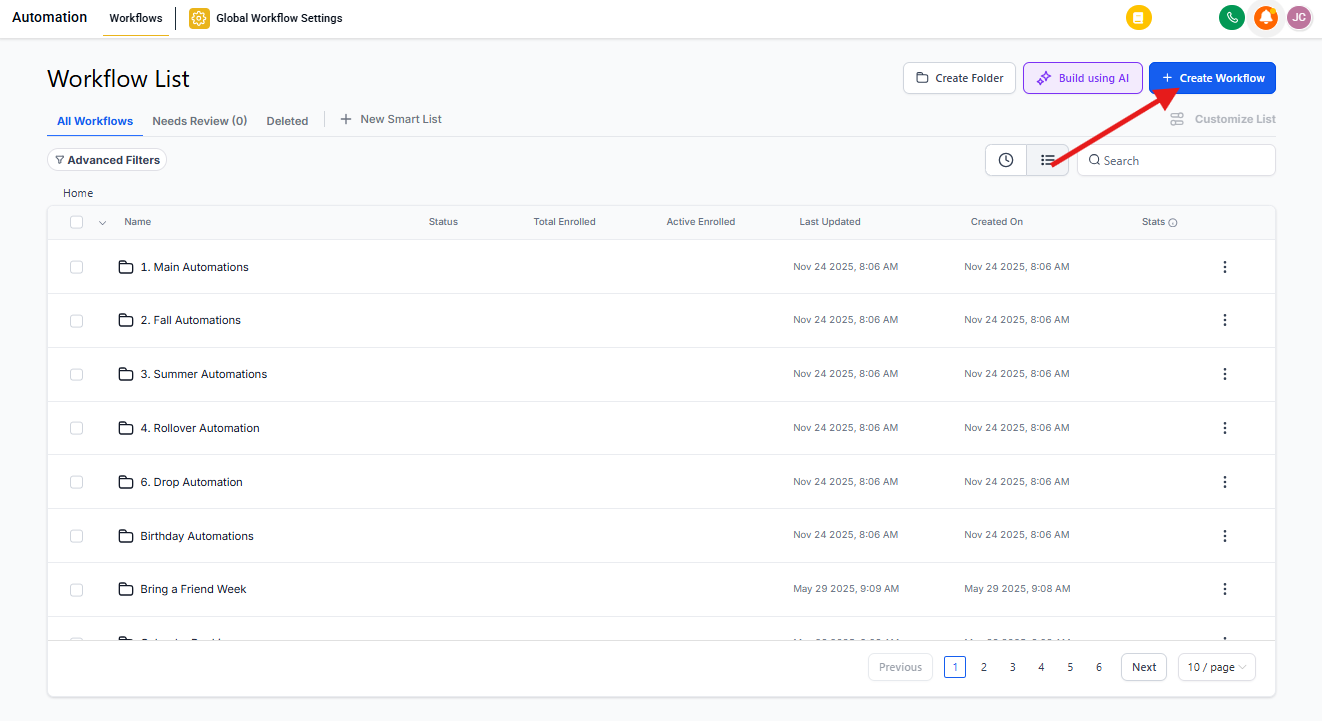
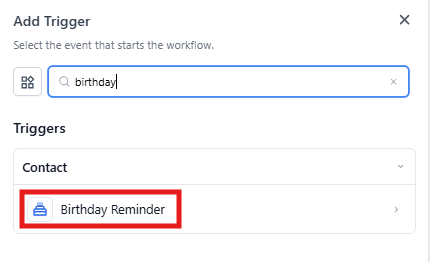
Step 2: Add the Birthday Reminder Trigger
Click Add New Trigger and select Birthday Reminder from the list.
This configures your automation to scan parent and family records daily for birthdays.
Step 3: Customize the Trigger Timing
By default, the Birthday Reminder triggers on the exact birthday at 8 AM. However, you can use filters to modify when it activates, giving you more flexibility in delivering personalized messages.
For example, you can send a pre-birthday offer, a birthday greeting on the day, or a post-birthday follow-up.
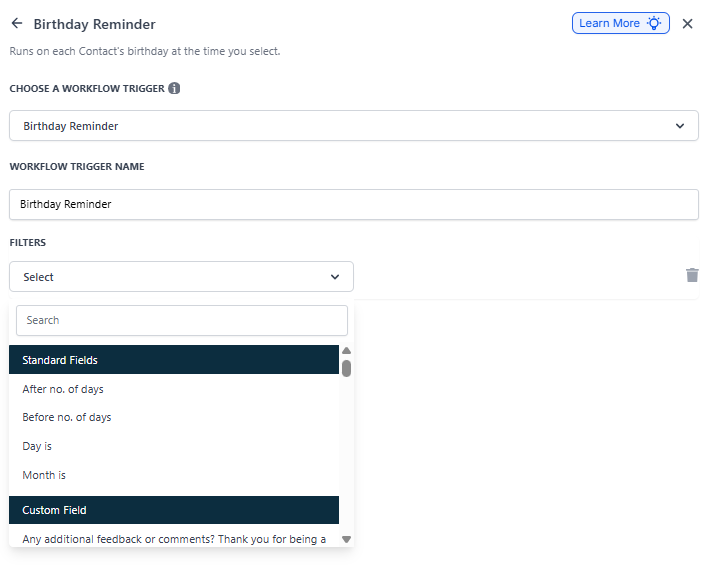
Available Timing Filters:
- After Number of Days: Activates the automation a specific number of days after the birthday. Useful for post-birthday follow-ups, like an extended discount offer or a request for feedback.
- Before Number of Days: Activates the automation a specific number of days before the birthday. Perfect for sending pre-birthday reminders or special discounts to make families feel valued.
- Day Is: Triggers the automation on a specific day of the month, rather than the exact birthday. Helpful for batch birthday campaigns where all families with birthdays in a given period receive messages on a single day.
- Month Is: Activates based on the birth month rather than an exact day. Commonly used for grouping families by birth month and sending exclusive birthday invitations or month-long offers.
Frequently Asked Questions
Can I send birthday messages a few days before or after the actual birthday?
Yes. Use the timing filters to customize when your automation triggers. For example, set it to trigger 3 days before the birthday to send a pre-birthday discount, or 1 day after to follow up with a special offer.
Will the automation trigger if a family's birthdate is missing?
No. The automation only triggers for records with a valid birthdate stored in their profile. If the birthdate field is empty or incorrectly formatted, they'll be skipped.
Can I limit birthday messages to specific groups of families?
Yes. Apply filters to send birthday messages only to families with specific tags (like "Active Enrollment" or "VIP") or those meeting certain criteria, such as enrollment duration or payment status.
How can I ensure birthday messages comply with privacy regulations?
Ensure families have provided consent to receive marketing communications during enrollment. Include an opt-out option in emails and text messages, and maintain consent records in Enrollio.
What happens if multiple children have birthdays on the same day?
The system processes all matching records daily at 8 AM, ensuring each eligible family receives their message without manual intervention.