Overview
The "Text Message Delivery Error" trigger lets you automatically start an automation whenever a text message fails to deliver and returns a specific error code. This helps you keep your parent contact list clean and improves your overall message delivery rates.
When to Use This Trigger
Use this trigger to automatically respond when texts fail to reach parents. For example, you can remove invalid numbers, tag families who've opted out, or flag numbers that need updating.
How to Set It Up
Step 1: Choose Your Trigger
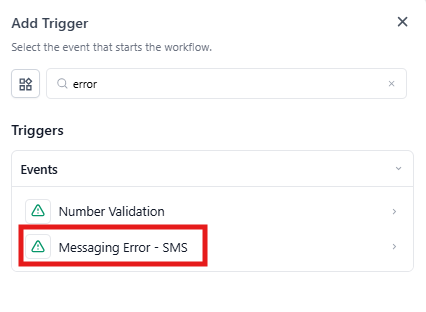
When creating a new automation, select "Text Message Delivery Error" from the trigger dropdown.
Step 2: Name Your Trigger
Give your trigger a clear name that describes what it does, like "Remove Invalid Phone Numbers" or "Tag Opted-Out Families."
Step 3: Add Error Code Filters
Choose which specific error codes should activate this automation. Here are the error codes you can filter by:
| Code | What It Means |
|---|---|
| 30007 | Carrier Violation |
| 30034 | A2P Registration Pending on Number |
| 30032 | Toll Free Number not Verified |
| 30005 | Number Inactive/Does Not Exist |
| 30003 | Unreachable/Out of Service Number |
| 30004 | Do Not Want SMS/DND Enabled |
| 30006 | Landline/Cannot Receive SMS |
| 30023 | Daily Message Cap Reached |
| 21408 | SMS Not Enabled for Region |
| 30008 | Unknown Error |
| 21606 | Invalid 'From' Phone Number |
| 21211 | Invalid 'To' Phone Number |
| 21614 | 'To' Number Is Not Valid Mobile |
| 21610 | Parent Replied with STOP (Opted Out) |
| 30011 | MMS Not Supported |
| 30033 | A2P Campaign Suspended or Deleted |
| 21661 | 'From' Number Is Not SMS-Capable |
| 21635 | 'To' Number Cannot Be a Landline |
| 30037 | Outbound Messaging Disabled |
| 30002 | Client Account Suspended |
Example: Auto-Tag Carrier Violations
Let's say you're texting families about upcoming enrollment events. You want to automatically tag any families whose numbers trigger a carrier violation so you can follow up with them about updating their contact info.
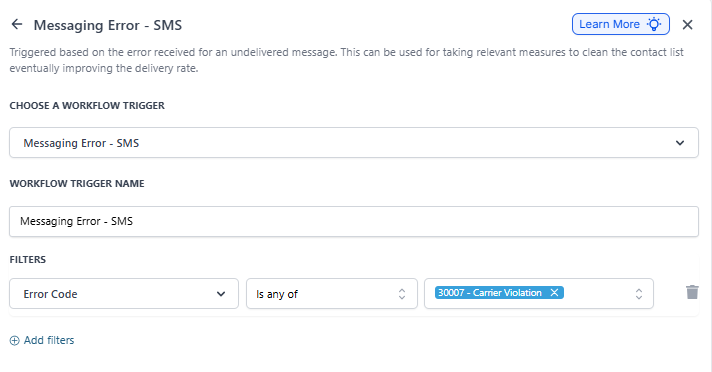
Trigger Setup:
- Trigger: Text Message Delivery Error
- Name: Tag Carrier Violation Numbers
- Filter: Error Code is 30007 - Carrier Violation
Action: Add a tag like "Phone - Carrier Issue" to the family's record.
Using Multiple Error Codes
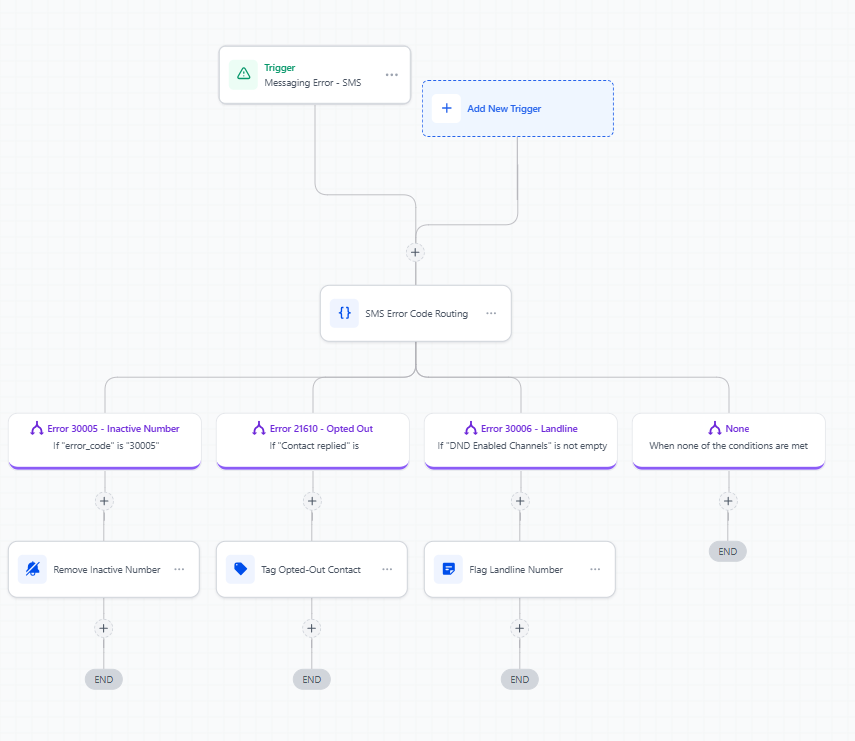
You can create different actions based on different error codes using if/else conditions in your automation. For example:
- If error code is 30005 (inactive number) → Remove from active list
- If error code is 21610 (opted out) → Add "Do Not Text" tag
- If error code is 30006 (landline) → Flag for phone number update