
Overview
The TikTok Form Submitted trigger starts an automation whenever a form is submitted through TikTok. Use this to capture prospective families from TikTok lead ads, automatically follow up with interested parents, or gather information from your TikTok audience.
Trigger Name
TikTok Form Submit
How It Works
This trigger activates your automation when a specific TikTok form is submitted. You can use filters to control which form submissions start the automation, ensuring only relevant leads enter your enrollment pipeline.
How to Configure
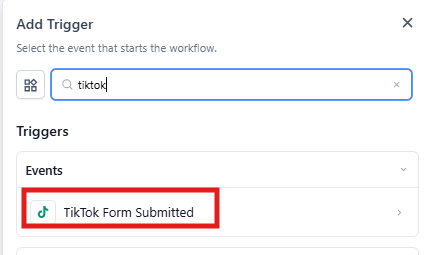
1. Choose Your Trigger
Select TikTok Form Submitted from the list of available automation triggers.
2. Name Your Trigger
Enter a descriptive name that identifies this automation, such as "TikTok Lead Capture" or "TikTok Tour Request."
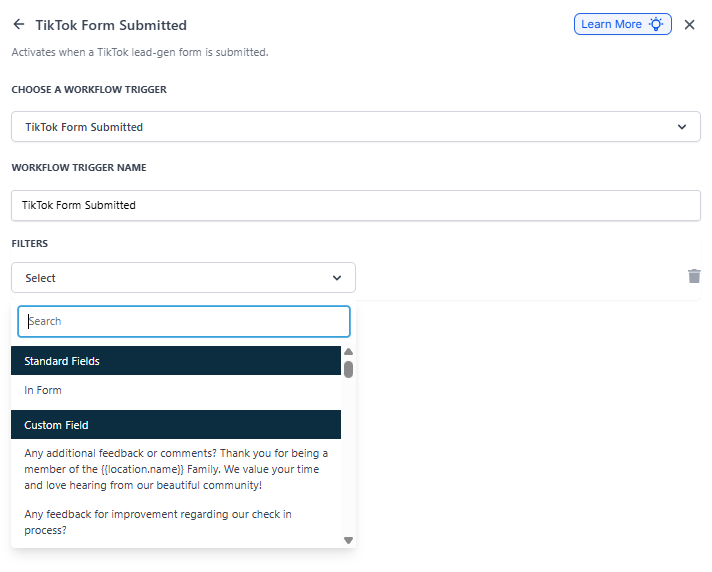
3. Set Your Filters
Use filters to specify which form submissions will start the automation. You can filter by form name to target specific campaigns.
| Filter | Description | Required |
|---|---|---|
| In Form | Selects the specific TikTok form that will trigger this automation when submitted | Yes |
Example: TikTok Tour Request Follow-Up
You want to automatically follow up with parents who submit a tour request form on TikTok.
Trigger Setup:
- Trigger Name: "TikTok Tour Request"
- Filter: In Form → "TikTok Tour Request Form"
Automation Steps:
- Trigger: TikTok Form Submitted (configured as above)
- Action: Send Text Message — Thank the parent and confirm you'll be in touch soon
- Action: Create Enrollment Opportunity — Add them to your tour pipeline
- Action: Assign Staff Member — Route to your enrollment coordinator
- Action: Add Tag — Mark as "TikTok Lead" to track your marketing sources
💡 Pro Tip: TikTok lead ads work best when you respond quickly. Set up immediate text message follow-up to engage parents while your center is top of mind.
Related Help Articles
- How to Integrate TikTok Lead Ads
- TikTok DMs & Comment Automations
- A List of Automation Triggers
- Automation Trigger - Form Submitted