
Harness the power of cutting-edge AI directly inside your automations. GPT-5 in Automations lets you embed OpenAI's newest language models—GPT-5, GPT-5 Mini, GPT-5.1, and GPT-5 Nano—into Enrollio steps for smarter, faster, and cost-efficient task execution.
This guide explains what the feature is, why it matters for your childcare center, its costs, and the exact steps to get started.
What is GPT-5 in Automations?
GPT-5 in Automations is Enrollio's latest integration of OpenAI's GPT-5 family, enabling any automation to generate or transform text with unprecedented accuracy and speed. By selecting the GPT action and choosing a GPT-5 variant, you unlock longer context windows, richer reasoning, and lower latency compared to earlier models.
Use it to draft personalized tour follow-ups, answer parent questions, summarize enrollment forms, or create custom email campaigns—all automatically.
Key Benefits of GPT-5 in Automations
Intelligent automation gets real-time, enterprise-grade language understanding:
- Speed: Accelerated processing for near real-time execution, reducing wait times for families.
- Reliability: Consistent, high-quality outputs thanks to GPT-5's refined reasoning abilities.
- Flexibility: Three model tiers let you balance performance and budget without rewriting automations.
- Simplicity: Native, click-to-configure action keeps integration and maintenance effortless.
GPT-5 Models, Pricing, and Token Math
Choose the tier that matches your volume and performance needs—pay only for the tokens you consume.
| Model | Best For | Max Context Window | Relative Latency | Input Cost per 1M Tokens | Output Cost per 1M Tokens |
|---|---|---|---|---|---|
| GPT-5 | Long-form reasoning, document analysis, high-stakes copy | 256k | ◼︎◼︎◼︎◼︎ (slower) | $1.25 | $10.00 |
| GPT-5 Mini (default) | General email drafting, text replies, marketing copy | 128k | ◼︎◼︎◼︎ (balanced) | $0.25 | $2.00 |
| GPT-5 Nano | High-volume classification, short replies, light summarization | 64k | ◼︎◼︎ (fastest) | $0.05 | $0.40 |
| GPT-5.1 | Better instruction following with a warmer, more conversational personality | 128k | ◼︎◼︎◼︎ (balanced) | $1.25 | $10.00 |
Important: Pricing mirrors OpenAI's published rates and is billed via your Enrollio AI wallet.
Token Math
Mastering token math lets you forecast AI costs accurately and avoid billing surprises. Enrollio bills GPT-5 usage exactly as OpenAI does, by counting input tokens (your prompt + context) and output tokens (the model's response).
One token is roughly four characters of English text. Charges are prorated to the nearest thousandth of a million tokens (0.001 M).
Example: A 400-word email (~2,000 characters ≈ 500 tokens) sent to GPT-5 Mini costs:
- Input: 500 tokens × $0.25 / 1M = $0.000125
- Output: 500 tokens × $2.00 / 1M = $0.001
- Total: $0.001125 for that action
How To Set Up GPT-5 in Automations
Proper setup ensures the right GPT-5 model is applied, balances speed and cost, and keeps your automations production-ready. Here's how to configure it in a few clicks.
Step 1: Select the GPT Action
- Open your automation in Enrollio
- Click the "+" icon where you want the AI step
- Search for "GPT powered by OpenAI"
- Select the GPT action
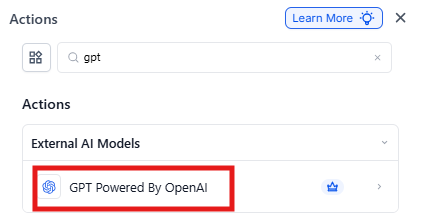
Step 2: Choose Your GPT-5 Model
- In the Model dropdown, leave the default GPT-5 Mini or choose GPT-5 / GPT-5 Nano / GPT-5.1 to match your use case
- Compose your prompt or map inbound data fields (see AI Prompting 101 for best practices)
- Save the step and publish the automation
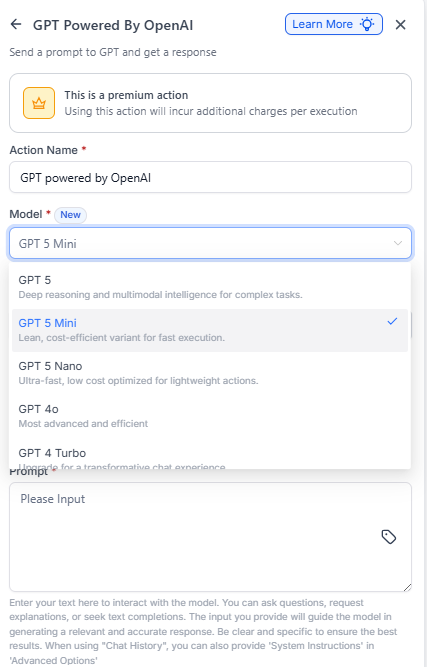
Your automation now runs with GPT-5 intelligence.
Best-Practice Prompt Tips for GPT-5 Models
Pro Tip: Well-crafted prompts make the difference between generic and excellent AI responses. Use these guidelines to get the most from GPT-5 in your childcare automations.
- Provide Role & Format: Begin system prompts with the model's role and the exact output schema. Example: "You are a friendly childcare enrollment coordinator. Draft a warm email in 2-3 paragraphs."
- Use Delimiters for Long Inputs: Wrap large documents in triple back-ticks (```) to preserve formatting
- Chunk When Possible: For Nano, split multi-page content into smaller calls to keep cost ultra-low
- Include Examples: Few-shot examples still improve consistency, especially with Mini or Nano
Frequently Asked Questions
Which GPT-5 model is most cost-effective for large-volume tasks?
GPT-5 Nano offers the lowest per-token rate, making it ideal for high-volume or background tasks where speed is less critical. Perfect for tour reminder confirmations or waitlist updates.
Can I change the model later without rebuilding the automation?
Yes. Edit the GPT action, select a different model, and save—no other steps need adjustment.
How are input and output tokens calculated?
Input tokens include the prompt and context. Output tokens are the model's response. Both are metered and priced separately.
Are there usage limits on GPT-5 requests?
Enrollio enforces the same rate limits as OpenAI. Heavy usage may queue requests during peak traffic.
Does GPT-5 support longer context windows than GPT-4 Turbo?
Yes. GPT-5 supports up to 256k tokens of context, allowing richer conversations and multi-step reasoning. This means you can include entire enrollment forms, tour notes, and family history in a single prompt.