
What is AI Memory?
AI Memory allows your automations to remember past conversations and interactions. This means your AI responses become more personalized and relevant over time — especially helpful when following up with prospective families or managing ongoing parent communications.
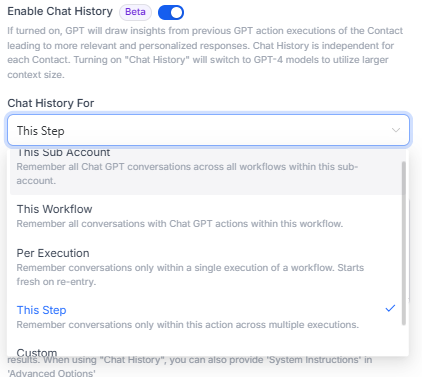
Types of AI Memory
You can choose how broadly your AI remembers conversations:
Client Account Memory
Remembers all AI conversations across every automation in your Client Account. Best for maintaining consistent context about your center's policies, programs, and communication style.
This Automation
Remembers conversations only within this specific automation. Useful for multi-step enrollment processes where earlier responses inform later ones.
Per Execution
Remembers conversations only during a single automation run. Great for one-time interactions like tour scheduling or initial inquiries.
This Step
Remembers conversations for this specific AI action across multiple automation runs. Helpful when the same AI step handles different families over time.
Custom Memory Key
Create your own memory identifier that works across multiple automations. Perfect for tracking a family's journey from inquiry through enrollment.
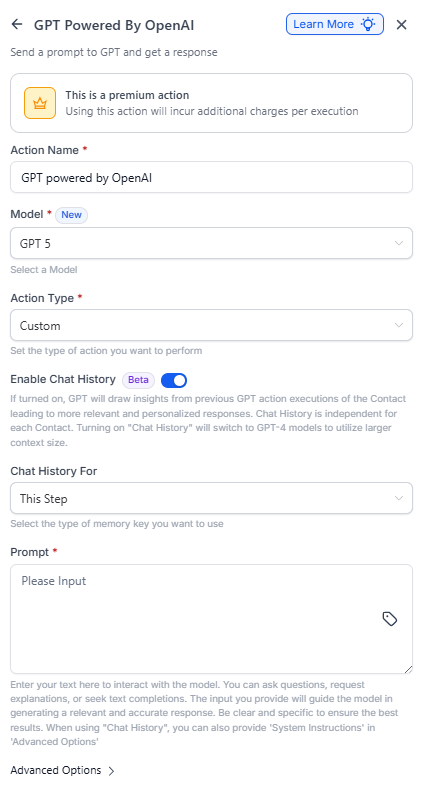
How to Enable AI Memory
- Open your automation in the Automation Builder
- Add or select an "AI Powered by OpenAI" action
- Switch on "Enable Memory"
- Choose your memory type from the dropdown
- Add system instructions (optional but recommended)
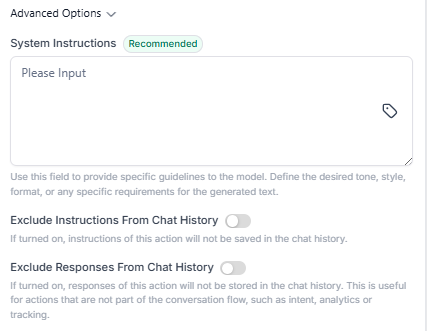
Advanced Memory Options
System Instructions
Add instructions to guide how your AI responds. For example: "You are helping parents enroll their child at ABC Childcare. Always mention our flexible scheduling options and state-licensed curriculum."
These instructions apply to all AI actions using this memory.
Exclude Instructions from Memory
Turn this on when you want your system instructions to guide responses without being stored in the conversation history. Keeps your memory focused on actual family interactions.
Exclude Responses from Memory
Enable this when the AI response is analytical (like sentiment scoring) rather than conversational. For example, if you're using AI to categorize inquiry types, you don't need those classifications in your memory.
Important Notes
- When you enable AI Memory, GPT-4 models are automatically selected for better performance
- Memory only works when using custom prompts (not pre-built templates)
- Each parent/family contact has independent memory — conversations stay organized per family
- Memory persists until you manually clear it or change the memory type
Example Use Case: Tour Follow-Up
Let's say you're following up with families who toured your center:
- Create an automation triggered when a family completes a tour
- Add an AI action with "This Automation" memory enabled
- The AI asks about their experience and answers questions
- A week later, the same automation sends a follow-up
- The AI remembers their previous concerns and addresses them specifically
Result: Parents feel heard and get relevant, personalized responses without you manually tracking every conversation.