
You can now select multiple options when building automation triggers with forms, surveys, and text-matching conditions. This makes it easier to create flexible automations without duplicating triggers.
What This Means
Previously, you could only select one option at a time for form submissions, survey responses, or phrase matching. If you wanted to trigger an automation based on multiple choices, you had to create separate triggers for each one.
Now, you can select multiple options in a single trigger. The automation will run if any of your selected options match — this works as an "or" condition.
Where You Can Use Multi-Select
Forms & Surveys
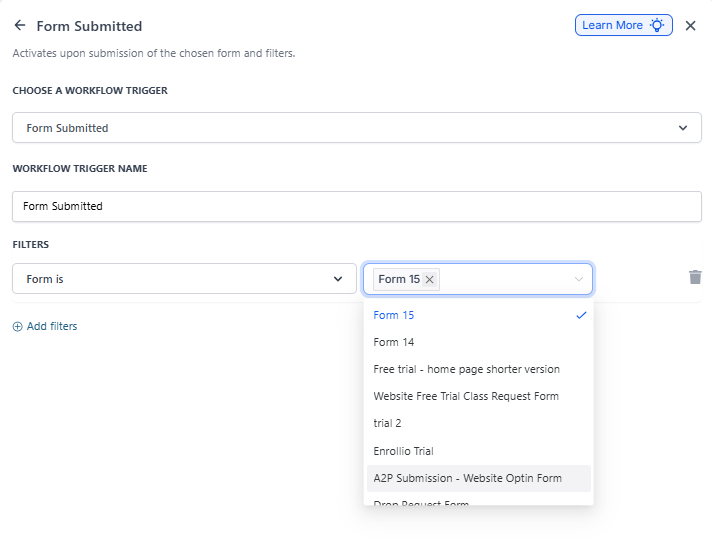
When setting up automation triggers based on form or survey submissions, you can now select multiple form options or survey responses from the dropdown.
Example: Create one trigger that fires when a parent selects "Infant Care," "Toddler Program," or "Preschool" on your enrollment interest form — instead of creating three separate triggers.
Contains Phrase & Exact Match
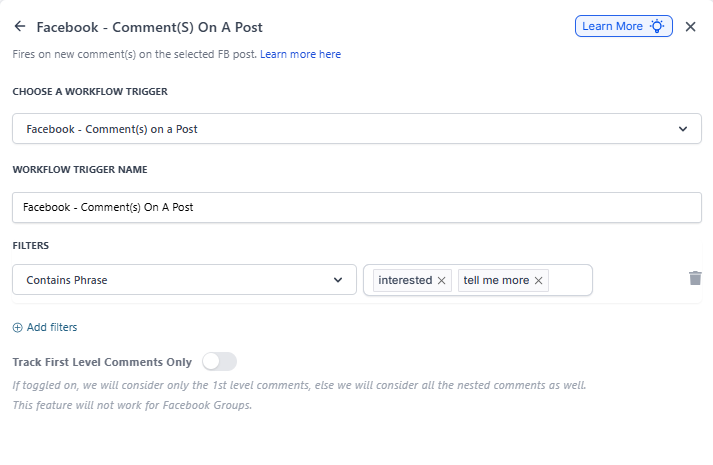
When using text-matching conditions (like Facebook or Instagram comment triggers), you can add multiple phrases or exact matches to watch for.
Example: Set up one Facebook comment trigger that responds when someone comments "interested," "tell me more," "info please," "yes," or "send details" — all in a single trigger.
To add multiple phrases, type each phrase and press Enter or Return after each one.
How to Use Multi-Select
For Forms & Surveys:
- Open your automation and add or edit a trigger
- Select your form or survey from the dropdown
- Click the filter field to open the options
- Click each option you want to include — they'll all be added to the trigger
- The automation will run when any of the selected options are submitted
For Contains Phrase & Exact Match:
- Open your automation and add or edit a trigger (like Facebook or Instagram comments)
- In the Contains Phrase or Exact Match field, type your first phrase
- Press Enter or Return to add it
- Type your next phrase and press Enter again
- Repeat for all phrases you want to watch for
- The automation will trigger if any of your phrases appear in the comment
Benefits
- Simpler automation setup — one trigger instead of many duplicates
- Easier to maintain — update one trigger instead of tracking down multiples
- More flexible responses — capture all the ways parents might phrase their interest