
You can now create and edit email templates right inside your automation actions — no need to jump between tabs or windows.
Why This Matters
When you're building automations to nurture prospective families or keep current parents informed, you can now handle everything in one place. Edit your email content, adjust your design, and keep your automation flowing without breaking your focus.
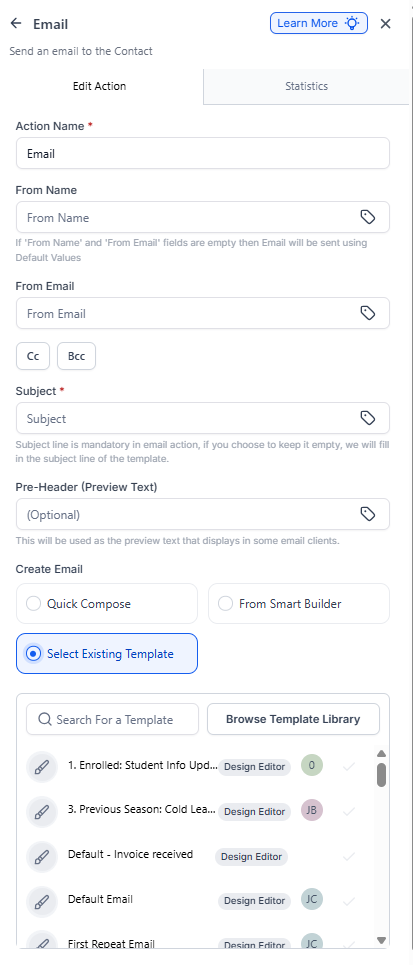
Key Benefits
Everything in One View
View and edit your email templates directly in the automation builder. No more switching between the Templates section and Automations — it's all right where you need it.
Faster Setup
Build your parent communication automations faster. Whether you're sending tour confirmations, waitlist updates, or enrollment reminders, you can create and refine your emails without losing your place.
How It Works
- Open any automation and add or click on a Send Email action
- Click Edit Template to open the email builder
- Make your changes to the email content and design
- Save and continue building your automation
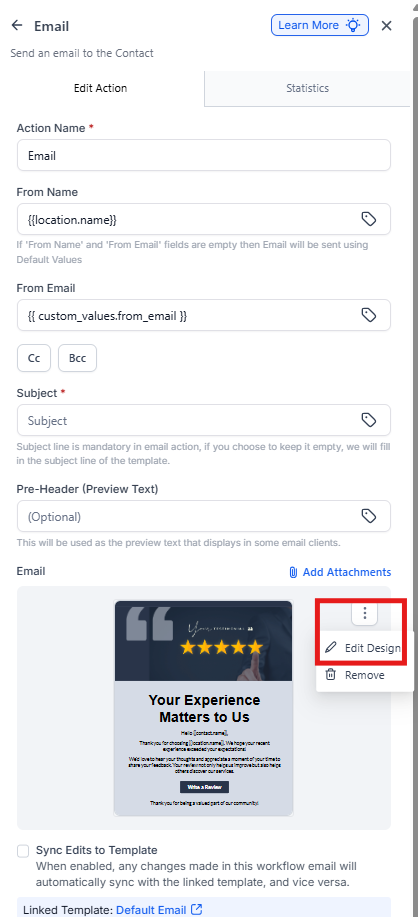
Pro Tip: You can still access all your saved email templates from the main Templates section if you need to make updates across multiple automations at once.
Common Use Cases
- Tour confirmations: Edit confirmation emails right in your tour booking automation
- Waitlist updates: Adjust messaging in your waitlist notification sequence
- Enrollment follow-ups: Fine-tune your enrollment reminder emails without leaving the automation