
Overview
The Create Enrollment Opportunity action automatically generates a new enrollment opportunity in your enrollment pipeline when specific conditions are met. This helps you track prospective families from their first inquiry through to enrollment.
You can customize the opportunity name, source, pipeline stage, and value. You also control whether duplicate opportunities can be created for the same family—useful when a parent might inquire about multiple programs or children.
Action Name
Create Enrollment Opportunity
What This Action Does
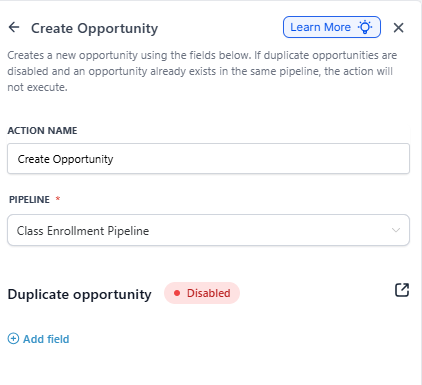
When triggered, this action creates a new enrollment opportunity record in your selected pipeline. You configure details like pipeline stage, opportunity name, and source to match your enrollment process.
If you disable duplicates and a family already has an existing opportunity, no new one will be created. This prevents clutter when the same parent submits multiple forms.
Configuration Settings
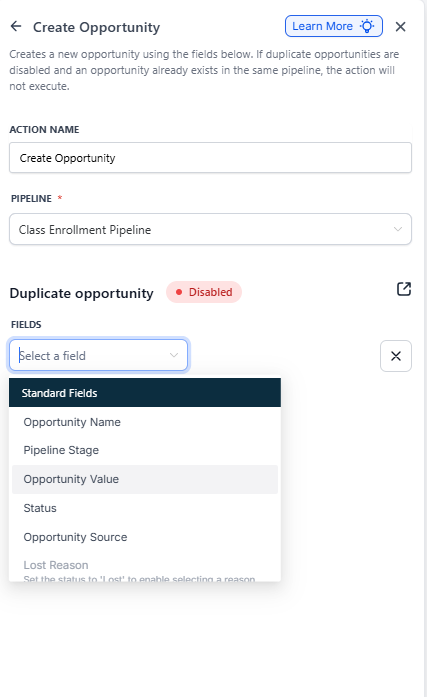
| Setting | Description | Required |
|---|---|---|
| Action Name | A unique label for this step in your automation | Yes |
| Pipeline | Which enrollment pipeline to use (e.g., "Infant Enrollment," "Toddler Enrollment") | Yes |
| Pipeline Stage | Where to place the new opportunity (e.g., "New Inquiry," "Tour Scheduled"). Defaults to the first stage if left blank. | No |
| Opportunity Name | Name for this opportunity. Defaults to the parent's name if blank. Use custom fields like {{contact.first_name}} to personalize. | No |
| Opportunity Source | Where the inquiry came from (e.g., "Website," "Referral," "Facebook"). Remains empty if not specified. | No |
| Status | Initial status of the opportunity (e.g., "Open," "New," "Pending"). Defaults to "Open" if blank. | No |
| Duplicate Opportunity | Enable to allow multiple opportunities for the same family. Disable to prevent duplicates based on family ID. | No |
| Opportunity Value | Estimated enrollment value (e.g., annual tuition). Defaults to 0 if blank. | No |
| Ownership Settings | The opportunity owner may automatically become the family's assigned staff member, depending on your pipeline settings. | No |
| Custom Fields | Any additional fields you want to populate (e.g., program type, child age, start date preferences) | No |
Important Considerations
Missing Parent Information
If a family record doesn't have a first or last name, Enrollio will use their email address for the Opportunity Name field.
No Family Record
An opportunity cannot be created without an associated family record. If your automation trigger doesn't include family data, this action will fail.
How Duplicate Checking Works
Duplicate logic is based on the family ID, not the opportunity name. If duplicates are disabled and the same family triggers this action again, no new opportunity is created—even if the opportunity name is different.
Example: Auto-Create Opportunities from Tour Requests
Scenario: You want to create an enrollment opportunity whenever a parent requests a tour through your website.
Trigger: Parent submits "Request a Tour" form
Action Configuration:
- Action Name: "Create Tour Opportunity"
- Pipeline: "Enrollment Pipeline"
- Pipeline Stage: "Tour Requested"
- Opportunity Name: {{contact.first_name}} - Tour Request
- Opportunity Source: "Website"
- Status: "Open"
- Opportunity Value: 12000 (annual tuition estimate)
- Duplicate Opportunity: Enabled (parents can request tours for multiple children)
Result: When a parent submits the tour request form, a new opportunity is created in the "Enrollment Pipeline" at the "Tour Requested" stage. If the same parent submits another tour request and duplicates are enabled, a second opportunity is created. If duplicates are disabled, only the first opportunity would be created.