
Overview
The Modify Parent Engagement Score action helps you track how interested prospective families are in your childcare center. Every time a parent opens an email, clicks a link, or visits your enrollment page, you can automatically adjust their engagement score to reflect their level of interest.
This makes it easy to identify the families most likely to enroll and prioritize your follow-ups accordingly.
What This Action Does
The Modify Parent Engagement Score action lets you increase or decrease a parent's engagement score based on their behavior. Their score updates automatically when they:
- Open your emails
- Click links in your messages
- Visit your enrollment pages
- Submit forms or complete tours
Higher engagement scores help you spot the families actively considering enrollment, so you can reach out at the right time with personalized follow-up.
How to Set It Up
Step 1: Create or Open an Automation
- Go to Automations in your Enrollio dashboard
- Click Create Automation to start fresh, or select an existing automation to edit
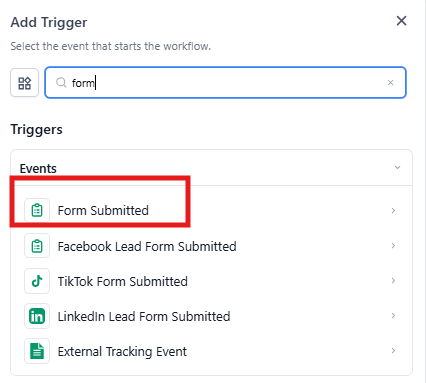
Step 2: Add a Trigger
- Choose what will start this automation. Common triggers include:
- Email Opened — when a parent opens your message
- Link Clicked — when they click a link in your email
- Form Submitted — when they complete a tour request or enrollment form
- Configure your trigger settings and save
Step 3: Add the Modify Parent Engagement Score Action
- Click the + button to add an action
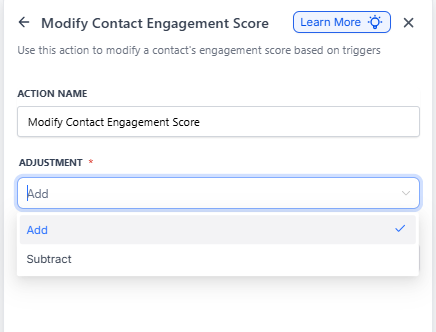
- Select Modify Parent Engagement Score from the action list
- Choose whether to Add or Subtract points
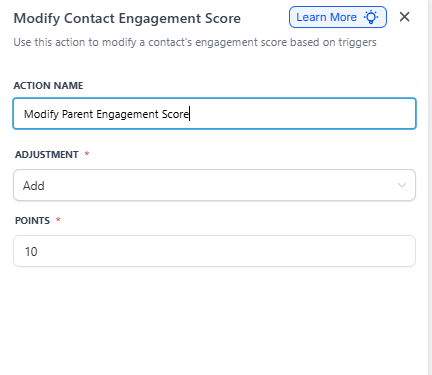
- Enter the number of points (for example, +10 for email opens or +25 for tour bookings)
- Save your action
Example: Tracking Email Engagement
Scenario: You want to identify which prospective families are most interested in your childcare center based on how they interact with your emails.
Setup:
- Trigger: Email Event — Email Opened
- Action: Modify Parent Engagement Score — Add 10 points when a parent opens your email
- Second Trigger: Link Clicked — When they click a link in the email
- Second Action: Modify Parent Engagement Score — Add 25 more points for clicking
Result:
Parents who open your emails and click through to learn more automatically get higher engagement scores. You can then filter your parent list by engagement score to:
- Send personalized follow-ups to highly engaged families
- Offer priority tour slots to parents showing strong interest
- Focus your team's outreach on the warmest leads