
Overview
The Instagram DM action lets you automatically send direct messages to families through Instagram. This is perfect for following up with parents who've shown interest in your childcare center through Instagram ads or organic engagement.
Important: Instagram requires that families message your connected Instagram page first. You can only send DMs to families who've messaged you within the last 24 hours. This ensures compliance with Instagram's messaging policies.
When to Use Instagram DMs
Instagram DM automations work great for:
- Following up on ad inquiries within 24 hours
- Sending tour reminders to families who engaged via Instagram
- Sharing enrollment updates with active Instagram followers
- Responding to families who comment on your posts
Setting Up Your Instagram DM Action
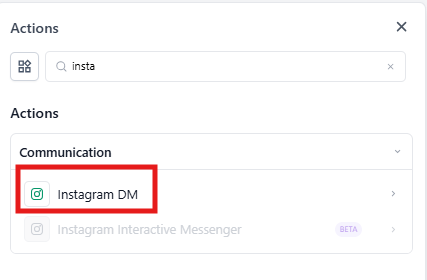
Step 1: Add the Action to Your Automation
In your automation builder, drag the Instagram DM action to your desired step. This action should come after a trigger that involves Instagram engagement (like an ad lead form submission or comment).
Step 2: Configure Your Message
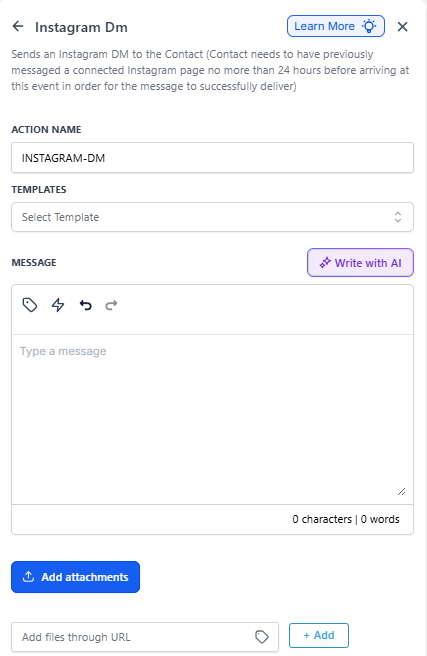
| Field | Description | Required |
|---|---|---|
| Action Name | Give this action a clear name so you can identify it in your automation (e.g., "Welcome Instagram Lead") | Yes |
| Templates | Choose a pre-written message template if you've created one. Templates help keep your messaging consistent. | No |
| Message | Write the message you want to send. Use custom fields to personalize it with the parent's name or specific details. | Yes |
| Add Attachment | Include images, PDFs, or other files — like your program guide or tuition sheet. | No |
| Add files through URL | If your files are hosted online, you can link to them directly instead of uploading. | No |
Step 3: Personalize Your Message
Click inside the message field to add custom values like {{contact.first_name}} or {{contact.child_name}}. This makes each message feel personal rather than automated.
Step 4: Add Attachments (Optional)
If you want to send additional resources:
- Click Add attachment
- Upload your file (like a center brochure or virtual tour link)
- Or use Add files through URL if your content is hosted online
Example Automation
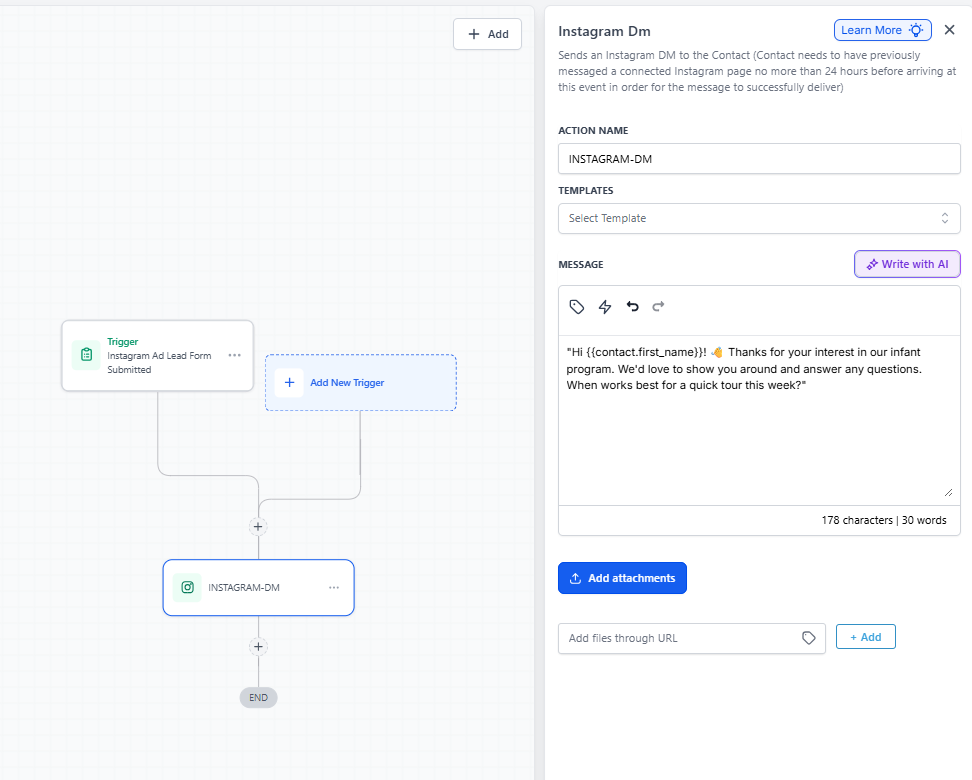
Here's how a childcare center might use Instagram DMs to follow up on ad inquiries:
Trigger: Instagram Ad Lead Form Submitted
Condition: Lead form asks about infant care program
Action: Send Instagram DM
Message:
"Hi {{contact.first_name}}! 👋 Thanks for your interest in our infant program. We'd love to show you around and answer any questions. When works best for a quick tour this week?"
Attachment: PDF of your infant program overview and pricing
Pro Tips
✨ Respond quickly: Instagram leads often reach out to multiple centers. Setting up instant DM replies helps you be first in line.
📱 Keep it conversational: Instagram is casual. Write like you're texting a friend, not sending a formal email.
🎯 Include a clear next step: Always end with a question or call-to-action like "Would you like to schedule a tour?"
⏰ Mind the 24-hour window: Make sure your automation triggers within 24 hours of the family's last message to you.
Troubleshooting
Messages not sending? Check that:
- Your Instagram Business account is properly connected in Settings
- The family messaged your page within the last 24 hours
- You have the correct permissions on your Instagram account
Instagram DM automations help you stay responsive on a platform where many parents are already spending time, making it easier to connect and convert interested families into enrolled students.