
Overview
The End Call (IVR) action lets your phone system automatically disconnect a call. You can choose to play a final message before the call ends — perfect for thanking parents for calling or confirming next steps.
This action is useful when you want to wrap up an automated phone interaction with a professional closing message.
How It Works
When this action runs in your automation, it disconnects the call immediately. If you enable voice instructions, Enrollio will play your custom message first, then end the call.
Setting Up the Action
Here's how to configure the End Call action in your automation:
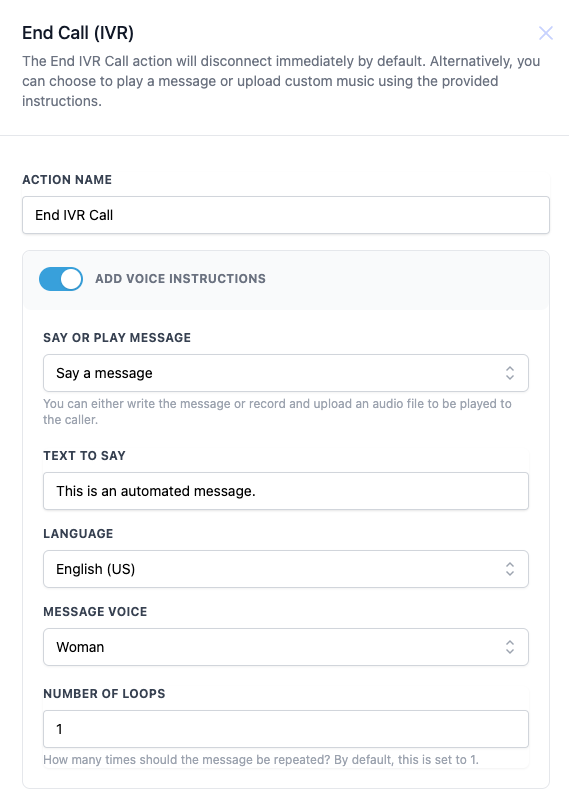
- Action Name: Give this action a descriptive name so you can identify it in your automation (e.g., "End Tour Scheduling Call").
- Add Voice Instructions: Toggle this on if you want to play a final message before disconnecting. Leave it off to end the call immediately.
- Say or Play Message: Choose whether to use text-to-speech ("Say a message") or upload your own audio file ("Play audio file").
- Text to Say: If you selected "Say a message," enter the text you want spoken to the caller.
- Language: Select the language for your text-to-speech message.
- Message Voice: Choose between a male or female voice.
- Number of Loops: Set how many times the message should repeat (default is 1).
Configuration Options
| Field | Description | Required |
|---|---|---|
| Action Name | Name for this action in your automation | Yes |
| Add Voice Instructions | Toggle to enable or disable a final message before ending the call | No |
| Say or Play Message | Choose between text-to-speech or uploaded audio | No |
| Text to Say | The message that will be spoken to the caller | No |
| Language | Language for the text-to-speech voice | No |
| Message Voice | Male or female voice option | No |
| Number of Loops | How many times to repeat the message (default: 1) | No |
Example: Ending a Tour Inquiry Call
Let's say a parent calls your center and completes your automated tour scheduling system. You want to thank them and confirm the call is ending.
Configuration:
- Action Name: End Tour Scheduling Call
- Add Voice Instructions: Enabled
- Say or Play Message: Say a message
- Text to Say: "Thank you for calling [Your Center Name]. We've scheduled your tour and you'll receive a confirmation text shortly. Have a great day!"
- Language: English (US)
- Message Voice: Woman
- Number of Loops: 1
When this action runs, Enrollio plays your message once, then automatically disconnects the call.
💡 Pro Tips
- Keep your closing message brief — parents appreciate quick, professional endings.
- Use the text-to-speech option for flexibility, but upload a custom audio file for a more personal touch.
- If you don't need a closing message, just disable "Add Voice Instructions" and the call will end immediately.
- Always confirm next steps in your message ("You'll receive a confirmation text") so parents know what to expect.
Important Notes
- If you disable "Add Voice Instructions," the call ends immediately with no message.
- This action should typically be the last step in your phone automation.
- Make sure your closing message aligns with your center's brand and tone.