
Overview
The New Enrollment Opportunity Created trigger lets you automate actions the moment a family enters your enrollment pipeline. Use it to notify staff, assign follow-up tasks, or send welcome messages—all automatically.
This is perfect for ensuring no prospective family falls through the cracks during the critical enrollment process.
How It Works
This trigger activates when a new enrollment opportunity is created in your pipeline. You can filter by specific criteria like assigned staff member, pipeline stage, expected tuition value, or custom tags.
Available Filters
| Filter | Description | Required |
|---|---|---|
| Assigned To | The staff member assigned to this opportunity | No |
| Has Tag | Filter by specific tags (like "Infant Care" or "Tour Scheduled") | No |
| In Pipeline | Select which enrollment pipeline to monitor | No |
| Lead Value | The estimated monthly or annual tuition value | No |
| Lost Reason | Why an opportunity was marked as lost | No |
| Status | Current status (New, Open, etc.) | No |
Filter Operators
| Operator | What It Does | |
|---|---|---|
| Equals to | Matches exactly | |
| Greater than | Value is higher than specified | |
| Less than | Value is lower than specified | |
| Contains | Includes the specified text | |
| Is Empty | Field has no value | |
| Is Not Empty | Field has a value |
How to Set It Up
- Open the Automations section and create a new automation
- Click Add Trigger and select Enrollment Opportunity Created
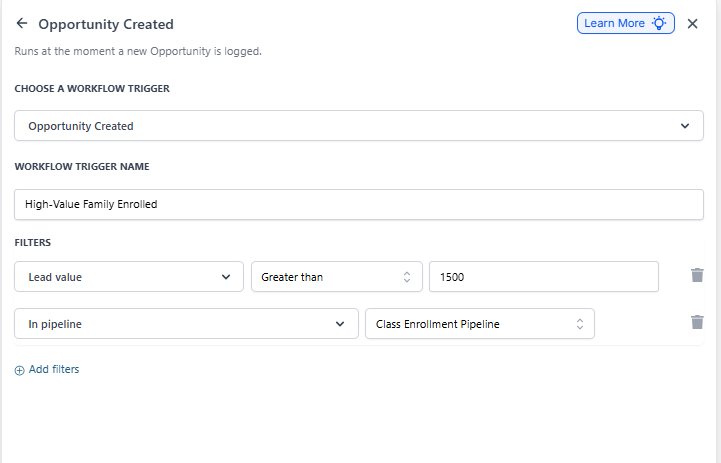
- Give your trigger a clear name like "High-Value Family Enrolled"
- Add filters to target specific opportunities:
- Assigned To: Filter by which staff member owns the opportunity
- In Pipeline: Choose which enrollment pipeline to monitor
- Lead Value: Set criteria based on expected tuition (e.g., greater than $1,500/month)
- Has Tag: Target families with specific needs or programs
- Click Add filters to include multiple criteria
- Add your automation actions (send text, create task, notify staff, etc.)
Real-World Example
Scenario: You want your director notified immediately when a high-value family enters your infant care pipeline.
Setup:
- Trigger: Enrollment Opportunity Created
-
Filters:
- In Pipeline = "Infant Care"
- Lead Value greater than $2,000
- Action: Send text message to director with family details
This ensures your leadership team can personally reach out to high-value families during the critical first hours of their enrollment journey.
Common Use Cases
- Send a personalized welcome text when a family starts the enrollment process
- Notify your enrollment coordinator when opportunities exceed a certain tuition value
- Automatically create a follow-up task for 24 hours after opportunity creation
- Trigger different email sequences based on the program type (infant vs. preschool)
- Alert staff when opportunities are created but not assigned to anyone