
Overview
The Note Changed trigger starts an automation whenever someone edits an existing note on a family's record. Use this to keep your team informed of important updates and maintain accurate communication records.
What This Trigger Does
When you or a team member modifies a note on a parent or family profile, this trigger fires the automation. You can use it to notify staff, update tasks, or tag families based on the new information in the note.
How to Set It Up
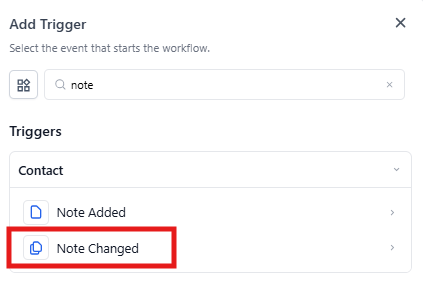
When creating your automation, select "Note Changed" as your trigger. Then add filters to control exactly when the automation runs.
Configuration Options
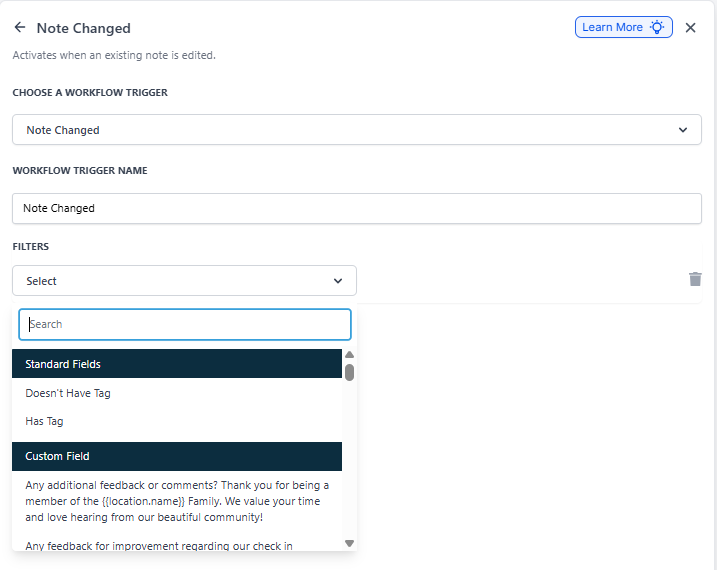
| Field | Description | Required |
|---|---|---|
| Automation Trigger Name | Give your trigger a descriptive name so you can identify it later | Yes |
| Doesn't Have Tag | Only trigger if the family doesn't have a specific tag | No |
| Has Tag | Only trigger if the family has a specific tag | No |
Example: Track Changes to VIP Family Notes
Let's say you want to stay on top of any updates to notes for your most important families. Here's how you'd set it up:
Trigger Settings:
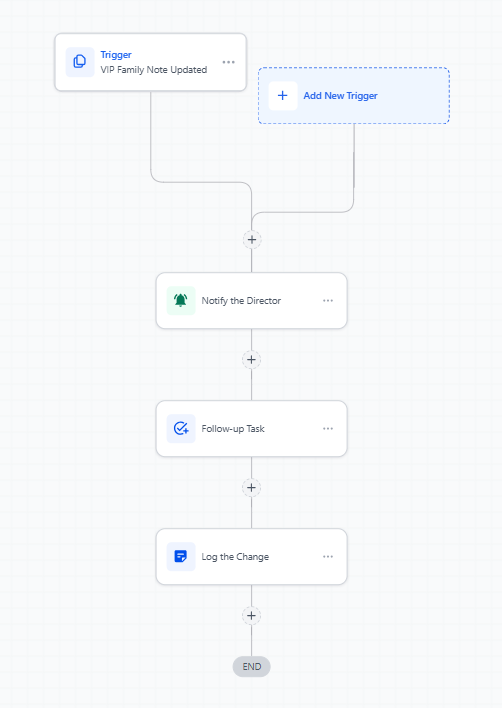
- Automation Trigger Name: "VIP Family Note Updated"
- Has Tag: "VIP Family"
Actions You Might Add:
- Notify the Director: Send an internal notification to the center director when a note changes on a VIP family's profile
- Create a Follow-up Task: Automatically create a task for the assigned enrollment coordinator to review the changes and take appropriate action
- Log the Change: Add an activity record showing when the note was modified and by whom
Pro Tip: Combine this trigger with tag filters to focus only on families in active enrollment processes or those flagged for special attention. This keeps your team from getting overwhelmed by every note change.
Common Use Cases
- Alert enrollment staff when notes are updated on families in the enrollment pipeline
- Track changes to behavioral notes or incident reports
- Notify directors when payment arrangement notes are modified
- Create audit trails for compliance-sensitive information