
This article explains how two important settings work together when your automation makes phone calls to parents: the automation's "Stop on Response" setting and the "Disable Voicemail Detect" setting within the Call action.
These settings let you control what happens when an automated call reaches a parent. You can choose whether the automation should carefully distinguish between a real person and voicemail (more accurate), or connect calls faster (less accurate).
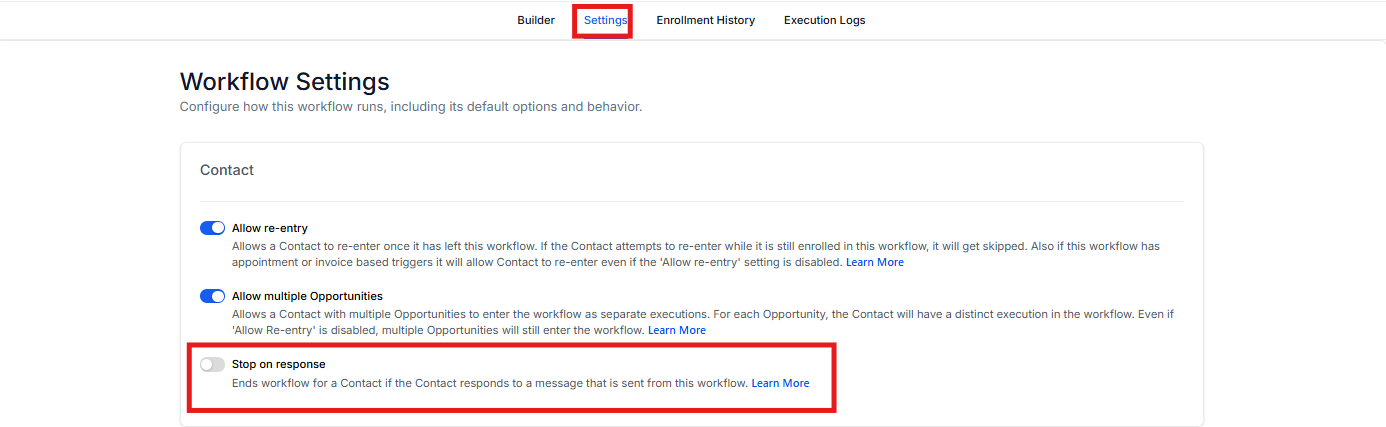
Stop on Response
This is a general setting for your entire automation. When enabled, it automatically removes a parent from the automation if they respond to any communication sent from it — including text messages, emails, or calls.
This prevents you from sending more automated messages to a parent who's already engaged with you.
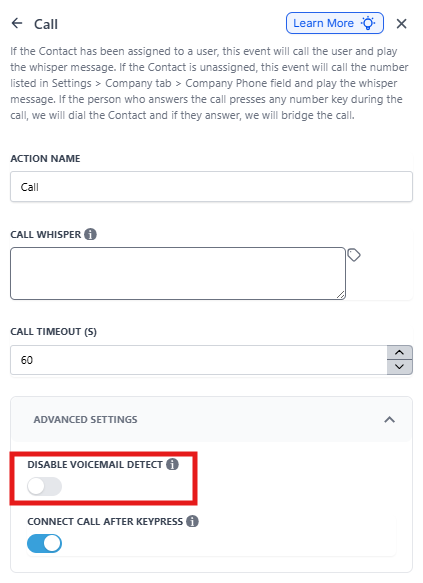
Disable Voicemail Detect
This is an advanced setting found specifically within the "Call" action. It controls whether Enrollio attempts to identify if a call was answered by a person or an answering machine.
How These Settings Work Together
Understanding how to configure these settings depends on your goal. Here's what happens with each combination:
| Stop On Response | Disable Voicemail Detect | What Happens |
|---|---|---|
| ON | ON | The automation will stop if the parent's voicemail answers. Set the call timeout to less than 20 seconds to ensure the call doesn't reach voicemail. |
| ON | OFF | The automation will detect voicemail, so calls that go to voicemail won't activate Stop On Response. The parent continues in the automation. |
| OFF | OFF | The automation continues regardless of parent responses or voicemail. This will be slightly slower since voicemail detection is enabled by default. |
| OFF | ON | The automation continues regardless of parent responses or voicemail. This will be slightly faster since voicemail detect is disabled. |
Frequently Asked Questions
Why is my automation stopping after a call even if the parent didn't answer?
This typically happens when you have "Stop on Response" enabled for the automation and "Disable Voicemail Detect" enabled on the Call action. If the call goes to voicemail, Enrollio sees it as a response and stops the automation.
To prevent this, set the "Call Timeout" on that action to 20 seconds or less.
What causes the delay when voicemail detection is enabled?
When voicemail detection is on (the default setting), the system pauses for a few seconds after the call is answered to analyze the audio. It's listening for indicators of a live person versus a pre-recorded voicemail greeting.
This analysis causes the short delay before the call is fully connected.
What is the recommended 'Call Timeout' to avoid triggering voicemail?
A timeout of 20 seconds is generally recommended. Most phone services and mobile carriers will ring for more than 20 seconds before forwarding the call to a voicemail service.
Does 'Stop on Response' apply to manual calls I make from the Conversations tab?
No. The "Stop on Response" setting only applies to automated actions sent from within that specific automation. Manual communications or communications from other automations won't affect it.