
Using GPT-4 AI in Enrollio Automations
This article explains how to use GPT-powered AI models, including the latest GPT-4 Turbo, inside Enrollio automations. Learn how to set up AI steps, configure smart prompts, and automate powerful actions like parent follow-ups, conversation summaries, and personalized messaging.
Table of Contents
- GPT-4 Turbo: Smarter AI with Enrollio
- What's New
- Pricing of GPT-4
- Use Cases and Example Prompts
- GPT Models Compared
- Setting Up GPT-Generated Output
- Frequently Asked Questions
GPT-4 Turbo: Smarter AI with Enrollio
With the rise of conversational AI, childcare businesses need tools that are smart, scalable, and deeply integrated. Enrollio brings this power to your automation engine through GPT-powered AI automation steps.
From writing personalized parent follow-ups and summarizing tour conversations to generating dynamic email content and enrollment reminders, you can make your automations more intelligent, contextual, and human-like with minimal setup.
Whether you're managing a single center or multiple locations, this guide will help you unlock powerful new capabilities using AI in your existing Enrollio automations.
What's New
GPT-4 Turbo: Now available in AI automation steps with faster response times and lower cost-per-call compared to previous GPT-4 models.
Model Switcher UI: Select between GPT-3.5, GPT-4, or GPT-4 Turbo directly in your automation step.
Improved Prompt Handling: Enhanced merge field support and better handling of complex instructions for childcare-specific workflows.
System Prompt (optional): Add tone or behavior guidance to shape the AI's personality and output style—perfect for maintaining your center's voice.
Pricing of GPT-4
Enrollio's GPT Action is billed at zero markup, meaning you pay exactly what OpenAI charges with no added fees. Pricing is token-based, calculated from the number of input tokens (your prompts) and output tokens (AI responses), and varies depending on the model you select.
This ensures full transparency and cost efficiency, replacing the old flat execution fee model with one that scales directly with your usage.
Important: Pricing has shifted from a fixed execution fee to a token-based, zero-markup model. Your costs now depend on:
- The input tokens used in your prompts
- The output tokens generated in the response
- The AI model you choose
This means you pay OpenAI's exact rates—nothing more, nothing less.
External AI Models - Token-Based Pricing
GPT-4o (per million tokens)
- Input: $2.50
- Output: $10.00
GPT-4o Mini (per million tokens)
- Input: $0.15
- Output: $0.60
What $10 Gets You
With just $10 in usage, GPT-4o can process around 3 million input words or generate about 750,000 output words, while GPT-4o Mini offers far greater volume—handling roughly 50 million input words or producing about 12.5 million output words.
This makes it easy to balance cost and performance, choosing the model that best matches your automation needs.
GPT-4o:
- Process approximately 3 million input words OR
- Generate approximately 750,000 output words
GPT-4o Mini:
- Process approximately 50 million input words OR
- Generate approximately 12.5 million output words
Use Cases and Example Prompts
| Use Case | Example Prompt |
|---|---|
| Parent Follow-Up | "Draft a friendly message to {{contact.name}} thanking them for their interest in enrolling at our center." |
| Tour Conversation Summary | "Summarize this tour conversation in 2-3 bullet points." |
| Email Draft | "Write a persuasive email promoting our {{contact.custom_value.program}} to a prospective family." |
| Waitlist Follow-Up | "Create a personalized update for {{contact.name}} about their position on our waitlist." |
| Enrollment Reminder | "Write a friendly reminder to {{contact.name}} about completing their enrollment paperwork." |
GPT Models Compared
| Feature | GPT-3.5 Turbo | GPT-4 Turbo | GPT-4o | GPT-4o Mini |
|---|---|---|---|---|
| Quality | Good responses | More advanced and powerful | Optimized for specific tasks | Lightweight version of GPT-4o |
| Accuracy | Not as consistent | Consistent and accurate responses | Consistent with slight trade-offs | Efficient but less comprehensive |
| Complex Queries | May struggle to connect the dots | Can handle highly complex queries | Handles most queries effectively | Best for less complex queries |
| Speed | Moderate | A bit slower than GPT-4o Mini | Fastest in response time | Faster responses |
| Context Understanding | Good | Superior contextual understanding | Good contextual understanding | Adequate for basic needs |
| Pricing | $0.015 per execution (legacy) | Token-based | Token-based | Token-based |
Setting Up GPT-Generated Output
After selecting and configuring your desired AI model, add a "GPT powered by OpenAI" action to your automation to generate dynamic output aligned with your configured prompts.
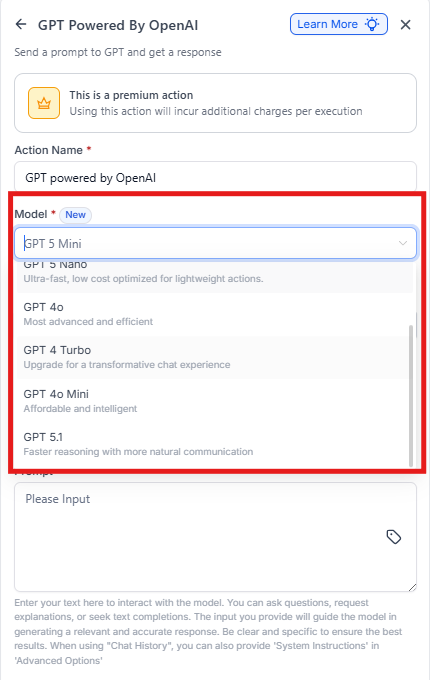
Step 1: Select the Action Type
Pick from predefined options:
- Analyze Text Sentiment
- Summarize Text
- Translate
- Custom (for your own prompt)
If using Custom, enter your own prompt. For example: "Write a follow-up email based on this message: {{contact.message}}."
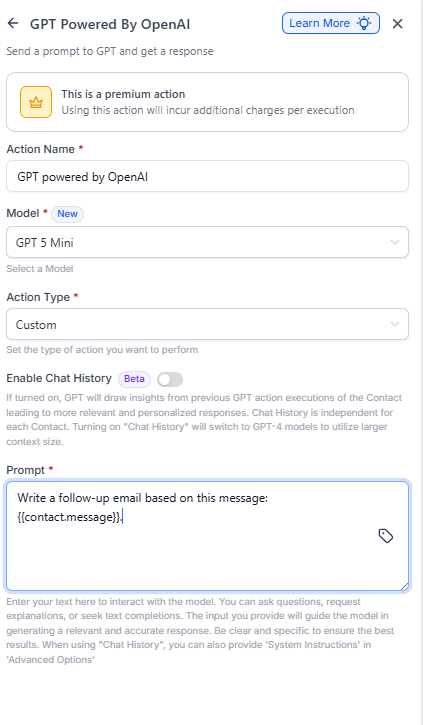
Step 2: Use Dynamic Variables (Optional)
Insert dynamic fields like {{contact.first_name}}, {{contact.child_name}}, or {{event.notes}} into your prompt to personalize the output for each family.
Step 3: Test or Run the Automation
Once the action is added, you can test the automation using a sample parent record to see the GPT output in action. The AI output can be used in subsequent automation steps (e.g., send as an email or text message).
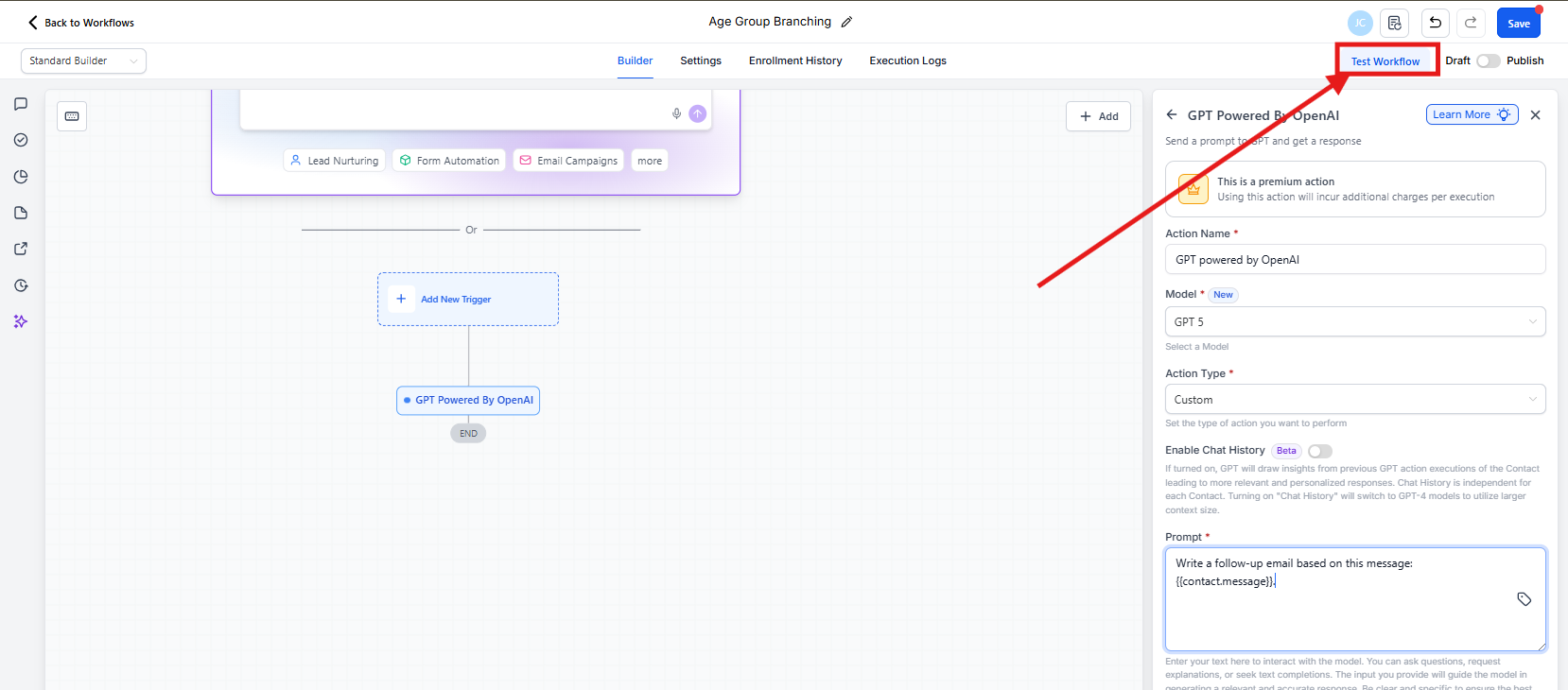
Where Does the Output Go?
The AI-generated content can be:
- Stored in Custom Fields for later reference
- Used directly in Email or SMS steps to communicate with families
- Logged internally or sent to your team via webhook
Frequently Asked Questions
What is GPT-4 Turbo, and how is it different from GPT-4 or GPT-3.5?
GPT-4 Turbo is a faster, more cost-efficient variant of GPT-4 with improved performance for high-volume use cases. Compared to GPT-3.5, it offers better contextual understanding, more accurate content generation, and supports larger prompts—perfect for complex parent communications and enrollment scenarios.
Is GPT-4 Turbo available in all Enrollio plans?
GPT-4 Turbo is part of Enrollio's premium Content AI features. Access may vary based on your subscription plan and usage settings. Check your plan or contact support for upgrade options.
Does using GPT-4 Turbo in automations cost extra?
Yes. GPT-4 Turbo is a premium automation action, and usage is billed based on the number of tokens processed per execution. You can monitor usage and costs in the AI Billing Settings of your account.
Can I switch between GPT-3.5 and GPT-4 Turbo within the same automation?
Yes. Each AI step allows you to select the model independently. You can mix and match GPT-3.5, GPT-4, and GPT-4 Turbo within a single automation based on the complexity or budget of each step.
For example, use GPT-4 Turbo for complex parent communications and GPT-3.5 for simple task summaries.
How many words are in 1 million tokens?
This is an estimation—actual results may vary:
1,000,000 tokens × 0.75 words/token = 750,000 words
Related Articles
- Automation Action - GPT Powered by OpenAI
- How to Enable and Rebill AI Features
- GPT-5 in Enrollio Automations
- How to Enable and Rebill External AI Models