
Automation Action - AI Summarize
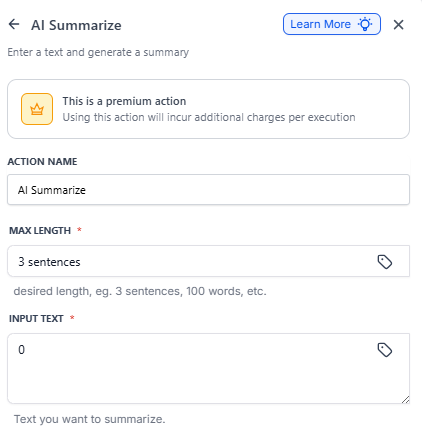
The AI Summarize action uses AI to automatically condense long content into concise summaries. Specify your desired summary length and input text, and Enrollio will generate a shortened version while preserving the key information you need.
Perfect for creating parent-friendly text messages from detailed tour notes, condensing enrollment forms, or summarizing parent feedback.
How It Works
The action processes your input text through AI to:
- Identify key points and main ideas
- Remove redundant information
- Restructure content to fit your specified length
- Maintain context and readability
Setup Instructions
Step 1: Add the Action
In your automation builder, search for "AI Summarize" in the actions menu and add it to your automation.
Step 2: Configure Settings
Action Name: Give your action a descriptive name (e.g., "Summarize Tour Notes" or "Condense Parent Inquiry")
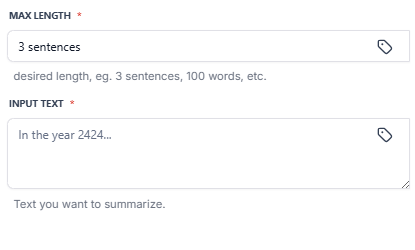
Max Length Input: Specify your desired summary length using one of these formats:
- Number of words (e.g., "50 words")
- Number of characters (e.g., "280 characters")
- Number of sentences (e.g., "3 sentences")
- Number of paragraphs (e.g., "1 paragraph")
Input Text: Provide the text to summarize. You can use:
- Static Value: Enter text directly
- Dynamic Variable: Use the custom value picker to pull in form responses, notes, messages, or other fields
Save: Click save to complete the setup.
Using the Output
After configuration, the summarized text becomes available as a custom variable you can use in subsequent automation actions.
Use the summarized output to:
- Send summaries via text message or email
- Store condensed notes in custom fields
- Display in notifications to staff
- Pass to other automation actions
Example Use Cases
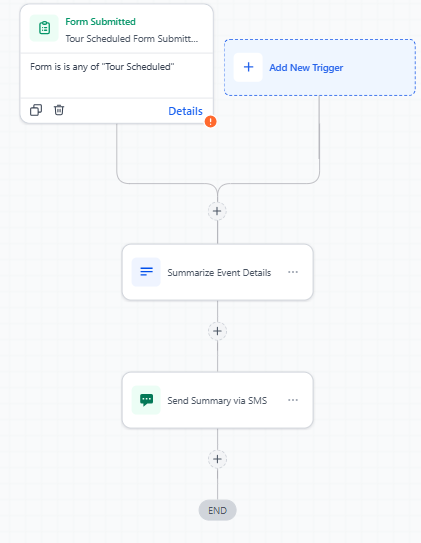
Text-Friendly Tour Notes
Trigger: Tour Scheduled
Input: Detailed tour notes from booking form
Max Length: 160 characters
Action: Send confirmation text to parent with summary
Enrollment Pipeline Stage Change Summary
Trigger: Enrollment Opportunity Stage Changed
Input: All enrollment opportunity notes and activities
Max Length: 1 paragraph
Action: Email summary to enrollment coordinator
Parent Feedback Summary
Trigger: Review Received (Google/Facebook)
Input: Full parent review text
Max Length: 50 words
Action: Post to team Slack channel or internal notifications
Meeting Notes Condensation
Input: Full parent meeting transcript or notes
Max Length: 1 paragraph
Output: Executive summary for director review
Pricing
Cost: 1 cent ($0.01) per execution
Part of Premium Actions suite
Frequently Asked Questions
Q: Can I summarize multiple messages or concatenated text?
A: Yes, you can combine multiple text sources using custom values before summarizing. For example, combine inquiry form responses and follow-up notes into one summary.
Q: Can I chain multiple summarize actions?
A: Yes, you can progressively summarize content—first to 500 words, then to 100 words in a second action. This works well for extremely long input text.
Q: How accurate are the summaries?
A: The AI maintains high accuracy for key information while removing redundant details. Always test with sample data first, especially for parent-facing communications.
Q: Is there a way to exclude certain information from summaries?
A: Currently, the AI decides what's important based on context. For specific exclusions, consider preprocessing the text with other automation actions first, or use filters to remove sensitive information before summarizing.