Text keyword campaigns are perfect when you want to promote your childcare center through offline channels like billboards, postcards, or flyers. Parents can simply text a keyword to your center's number to request information, claim an offer, or join your waitlist.
For example, a billboard might say: "Text ENROLL to (555) 123-4567 to schedule a tour!"
Setting Up Your Text Keyword Campaign
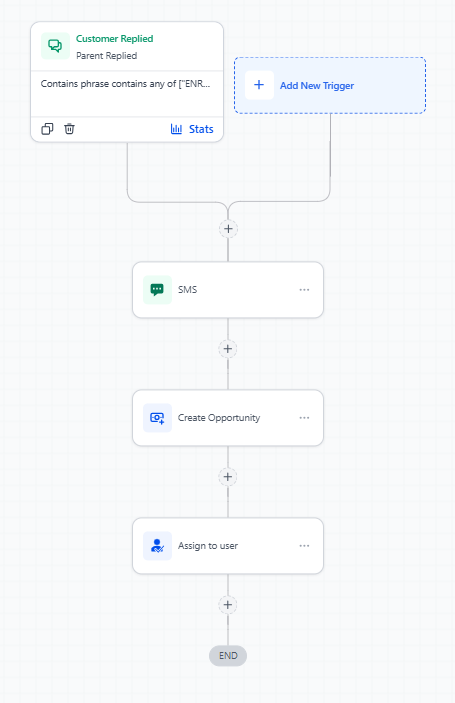
The foundation of a text keyword campaign is the "Parent Replied" automation trigger. Here's how to build one:
- Navigate to Automations in your Enrollio dashboard
- Click Create Automation
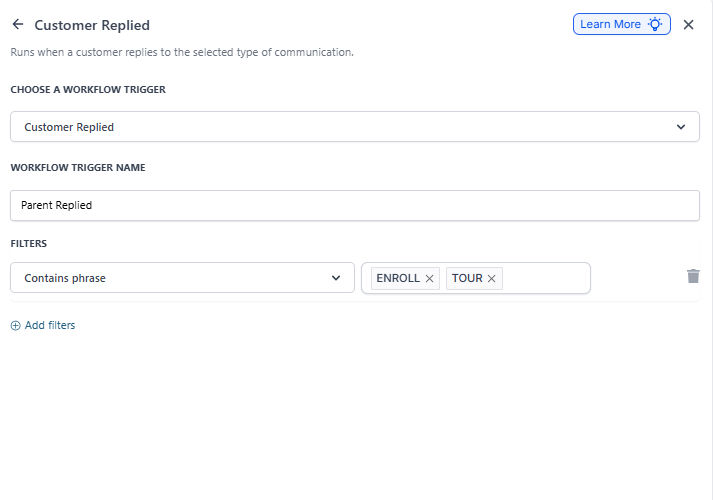
- Select Parent Replied as your trigger
- Configure the trigger to listen for your specific keyword (like "ENROLL" or "TOUR")
- Add your response actions — send a confirmation text, assign to staff, create an enrollment opportunity, etc.
Best Practices for Text Keywords
Keep keywords simple. Choose words that are easy to spell and remember. "TOUR" works better than "TOURREQUEST".
Respond immediately. Set up an instant text confirmation so parents know their request was received. Follow up within minutes to schedule their tour or answer questions.
Track your sources. Use different keywords for different marketing channels — "BILLBOARD" vs "POSTCARD" — so you can see which campaigns drive the most interest.
What Happens Next
Once a parent texts your keyword:
- They're automatically added to Enrollio as a prospective family
- Your automation sends them a welcome message
- The family is tagged with your campaign keyword for tracking
- Your team is notified to follow up
You can build on this foundation by adding nurture sequences, appointment scheduling, or waitlist management — all automated based on that first text message.