
Overview
The Manual Call action creates a task for your team to call a parent or prospective family. This is useful when you want a personal touch — like following up after a tour, checking in on a new enrollment, or reaching out to a waitlisted family.
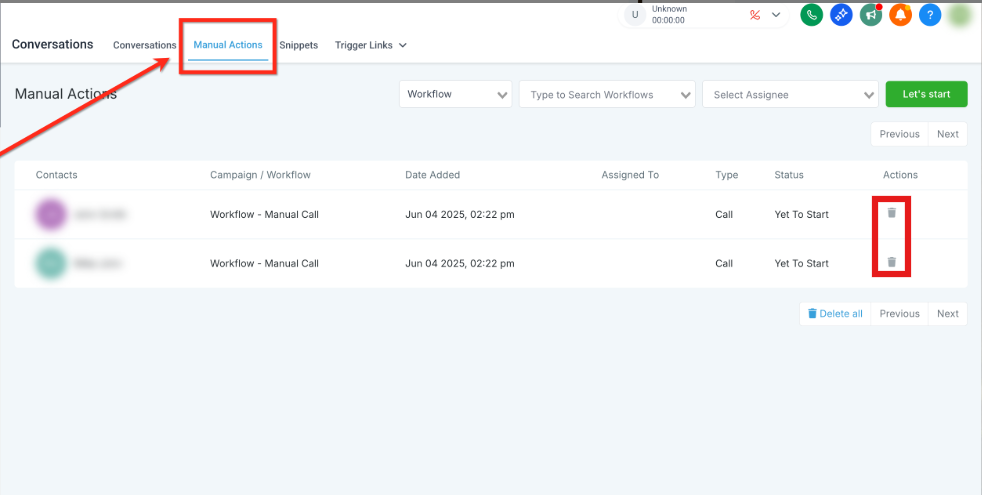
The task appears in Conversations Manual Actions, where your team can see who needs to be called and mark it complete when done.
How It Works
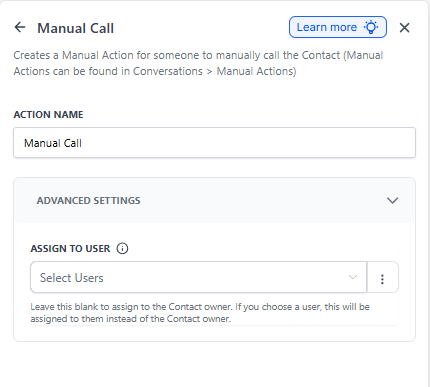
Action Name: Manual Call
What it does: Creates a call task in your Manual Actions queue. The task requires someone on your team to actually make the call — it won't happen automatically.
Once the task is deleted from the Manual Actions tab, the parent moves to the next step in your automation.
Setting Up a Manual Call Action
- Choose the action: In your automation builder, select "Manual Call" from the available actions.
- Name your action: Give it a clear name like "Tour Follow-Up Call" or "Check in on New Family."
- Assign to a specific person (optional): By default, the task goes to whoever owns this parent record. But you can assign it to a specific team member in Advanced Settings using the "Assign To" field.
- Save your automation.
Completing the Task
- Go to Conversations Manual Actions.
- Find your call task in the list.
- Make the call to the parent.
- Delete the task when you're done — this tells Enrollio to move the parent to the next step.
Assigning Tasks
You have flexibility in who handles the call:
- Default: Task goes to the parent's assigned owner
- Specific person: Use "Assign To" in Advanced Settings to choose a team member
- If that person doesn't have access: Task falls back to the parent's owner
- If neither is available: Task is marked "Unassigned" so nothing slips through
Tracking Your Calls
Check your automation execution logs to see when manual call tasks are created. You'll see an entry that says "Manual Call added to the manual queue" — helpful for keeping tabs on your follow-up process.
Example: Tour Follow-Up Process
Scenario: You want your enrollment coordinator to personally call every family within 24 hours of their tour.
Automation setup:
- Trigger: Tour Completed (or tag added: "Tour Complete")
- Wait: 1 day
-
Action: Manual Call
- Name: "Tour Follow-Up Call"
- Assign To: Sarah (Enrollment Coordinator)
Result: Sarah gets a task to call the family the day after their tour. Once she completes the call and deletes the task, the family continues through your enrollment automation.
Frequently Asked Questions
Do I have to delete the task manually?
Yes. Deleting the task from Manual Actions is how you tell Enrollio "I completed this call" and allow the automation to continue. Just making the call isn't enough.
Can I assign the call to someone besides the parent's owner?
Absolutely. Use the "Assign To" field in Advanced Settings to pick a specific team member. If they don't have access to this parent record, it falls back to the owner.
What if nobody is assigned?
If the selected person doesn't have access and there's no owner, the task shows as "Unassigned" in Manual Actions so you can reassign it to someone on your team.
Can I see who made the call?
The task shows who it's assigned to, and when you delete it, that person is logged as completing the action. You can also track calls made from the parent's conversation history.