
Overview
The Voicemail Drop action lets you send a pre-recorded voicemail message directly to a parent's phone without ringing. This is perfect for appointment reminders, tour follow-ups, or enrollment updates — delivered efficiently without requiring a live call.
How It Works
When this action triggers in your automation, Enrollio plays your pre-recorded message directly into the parent's voicemail inbox. They'll receive it just like a regular voicemail, but you save time by not making individual calls.
Setting Up Voicemail Drop
Step 1: Add the Action
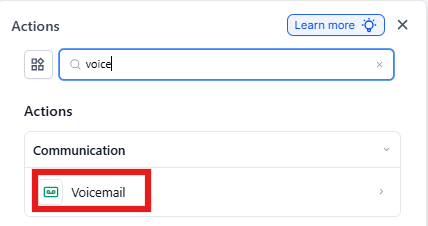
In your automation builder, add a new action and select Voicemail from the communication actions.
Step 2: Name Your Action
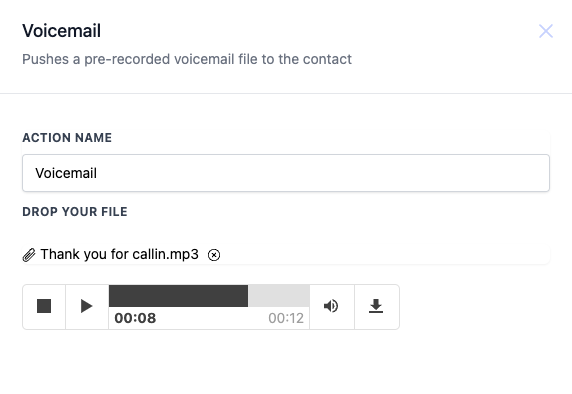
Give your action a clear name that describes its purpose, like "Tour No-Show Follow-Up" or "Enrollment Reminder." This helps you stay organized when managing multiple automations.
Step 3: Upload Your Voicemail File
Click Upload file and choose your pre-recorded message. Your file should be in MP3 or WAV format. After uploading, you can preview the message to make sure it's correct.
Step 4: Save Your Automation
Click Save to activate this step in your automation. Test it with your own number first to ensure the message sounds professional and clear.
When to Use Voicemail Drop
Voicemail drop works great for situations where you want to ensure parents receive important information without waiting for them to answer:
- Tour no-shows: Send a friendly message encouraging them to reschedule
- Enrollment deadlines: Remind families about upcoming registration dates
- Waitlist updates: Let parents know a spot has opened up
- Event reminders: Confirm attendance for open houses or orientation sessions
- Follow-up sequences: Reach families who haven't responded to emails or texts
Example Automation
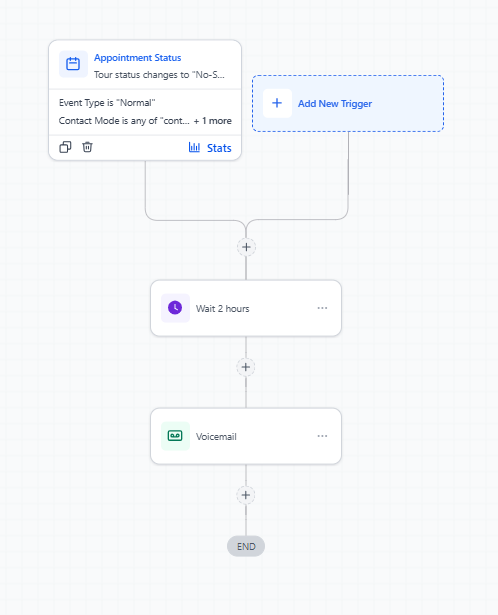
Here's how you might set up an automation for tour no-shows:
Trigger: Tour status changes to "No-Show"
Action: Voicemail Drop
Message: "Hi, this is Sarah from Little Learners Academy. We noticed you weren't able to make your tour today. We'd love to reschedule at a time that works better for you. Give us a call at 555-1234 or visit our website to book another time. We look forward to showing you around!"
Best Practices
- Sound professional: Record in a quiet space with clear audio quality
- Identify yourself: Always state your name and your childcare center's name
- Be specific: Clearly explain why you're calling and what action you want them to take
- Include next steps: Tell parents exactly how to respond (call, text, or visit your site)
- Test first: Send test voicemails to your own phone before activating the automation
Technical Requirements
Supported file formats: MP3, WAV
Recommended length: 15-30 seconds
Maximum file size: 5MB