
Overview
The Slack Message action lets you send notifications directly to Slack — whether to a specific user, a private channel, or a public channel. Keep your team informed about enrollment updates, new tours, or urgent tasks without leaving Enrollio.
Note: This is a premium action and will incur additional charges for each execution.
When to Use This Action
Use Slack notifications to keep your team in sync when:
- A new prospective family schedules a tour
- An enrollment opportunity moves to "Ready to Enroll"
- A waitlist family becomes available for enrollment
- A high-priority task is assigned to a staff member
- A parent submits an important form
How to Configure
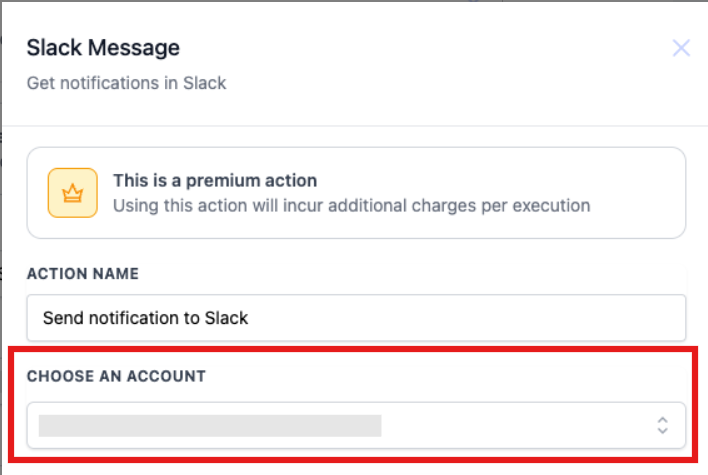
1. Choose an Account
Select the Slack workspace where you want to send notifications. This ensures your message reaches the right team.
2. Select Message Type
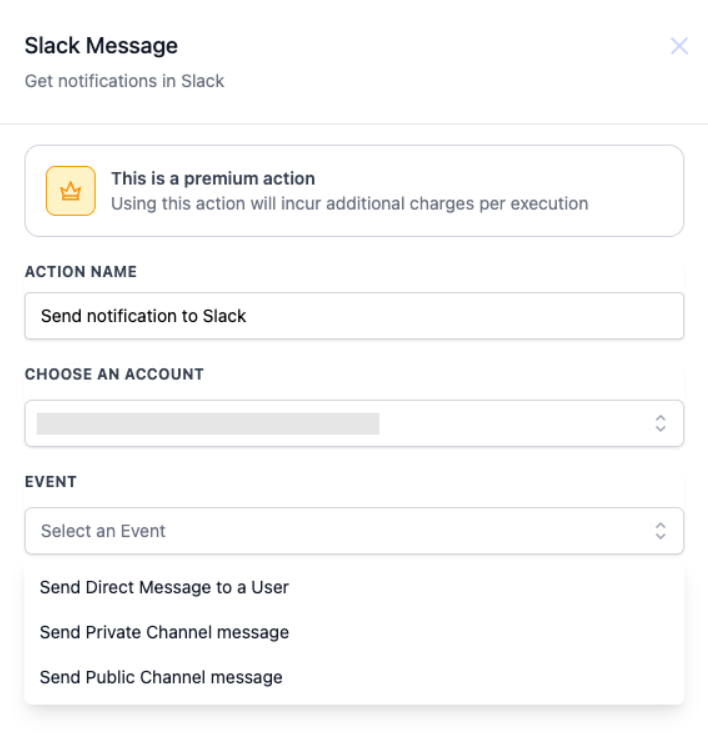
Choose where your notification should go:
- Send Direct Message to a User: Send a private message to a specific team member
- Send Private Channel Message: Post to a private channel only certain staff can see
- Send Public Channel Message: Broadcast to a public channel everyone in your workspace can access
3. Compose Your Message
Write the notification text you want to send. You can use custom fields to include family names, enrollment details, or other dynamic information.
Configuration Fields
| Field | Description | Required |
|---|---|---|
| Choose an Account | The Slack workspace where notifications will be sent | Yes |
| Event | Type of message: direct message, private channel, or public channel | Yes |
Example: New High-Priority Family Alert
Let's say you want to notify your enrollment team whenever a prospective family is tagged as "High Priority."
Automation Setup:
- Trigger: Tag Added
- Filter: Tag = "High Priority"
- Action: Slack Message
Action Configuration:
- Choose an Account: Your Slack Workspace
- Event: Send Private Channel Message
- Channel: #enrollment-team
- Message: "🔥 New high-priority family added: {{contact.name}}. Please follow up within 24 hours."
Suggested Automation Triggers
This action works great with:
- Appointment Scheduled: Alert your team when a family books a tour
- Opportunity Stage Changed: Notify when a family moves through your enrollment pipeline
- Form Submitted: Send alerts when parents complete enrollment paperwork
- Task Added: Remind staff about new assignments
- Tag Added: Flag urgent or VIP families for immediate attention
Pricing Note
Each Slack message sent through an automation counts as a premium action execution. Review your usage regularly in your billing dashboard to manage costs effectively.