
TikTok DMs & Comment Automations
Bring TikTok DMs and comments straight into Enrollio—and let automations handle the replies. Turn your TikTok engagement into enrollment conversations without lifting a finger.
The TikTok DM & Comment Automations integration routes every private message and public comment directly to your Conversations Inbox, where automations can nurture prospective families, answer questions, and book tours automatically.
What are TikTok DM & Comment Automations?
TikTok DM & Comment Automations connects your TikTok account to Enrollio so that:
- Direct Messages (DMs) and post comments appear inside your Conversations Inbox in real time
- Automations can be triggered by incoming messages to send interactive replies, assign leads to staff, create tasks, or start follow-up sequences
- Every conversation is stored on the family record, giving you complete history across all channels
Why Use TikTok Automations?
Unified Inbox: Manage TikTok conversations alongside SMS, email, WhatsApp, and more—all in one place. No tab switching between platforms.
Faster Response Times: Use automations to send instant, 24/7 answers that keep prospective families engaged, even after hours.
Automation-Driven Efficiency: Auto-reply to comments, route prospective families to the right staff member, and hand off conversations without manual effort.
Conversion Focus: Turn TikTok engagement into tracked family records and enrollment opportunities you can measure and report on.
Scale for Teams: Perfect for multi-location childcare brands handling high message volumes with shared inboxes and routing rules.
Connecting Your TikTok Account
Before you start automating, make sure your TikTok account is connected to Enrollio.
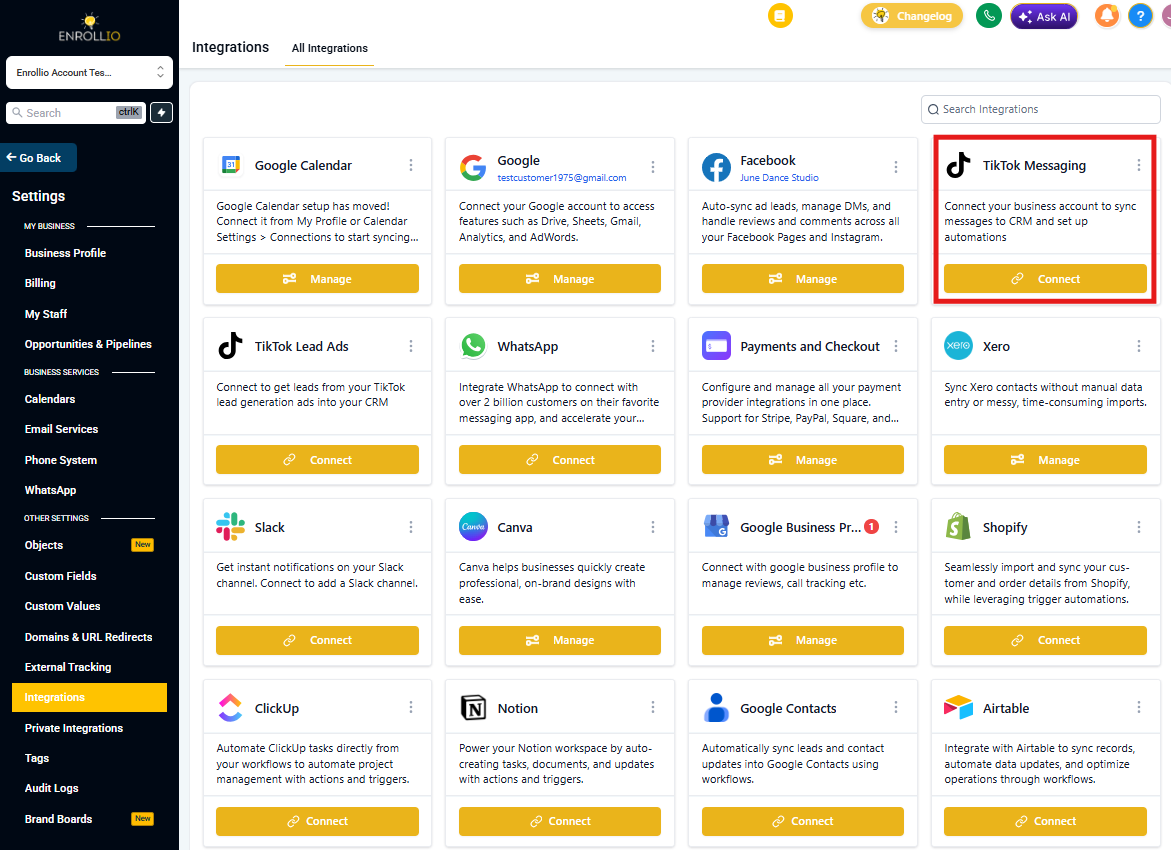
- From your Client Account dashboard, click Settings
- Navigate to Integrations
- Find and click the TikTok card
- Follow the prompts to authorize your TikTok business account
TikTok Conversations Inbox
Once connected, incoming DMs and comments sync to your inbox just like any other channel. You can:
- See profile photos, usernames, and full message history in one thread
- Reply manually with text, emojis, media, or saved snippets
- Use quick-action buttons to add notes, tags, or tasks to family records
TikTok Automation Building Blocks
TikTok automations use triggers and actions to respond automatically to engagement.
Triggers (what starts the automation)
- TikTok Comment on a Reel: Automation starts when someone comments on your TikTok post
- Customer Replied: Automation starts when someone sends you a DM (select TikTok as the reply channel)
Actions (what the automation does)
- Reply In Comments: Post a public reply under the original comment
- TikTok Interactive Messenger: Send an automated DM with your custom message
Setting Up TikTok Comment Automation
Turn your comment sections into lead magnets by automatically replying to engagement and following up with prospective families.
Step 1: Add the Comment Trigger
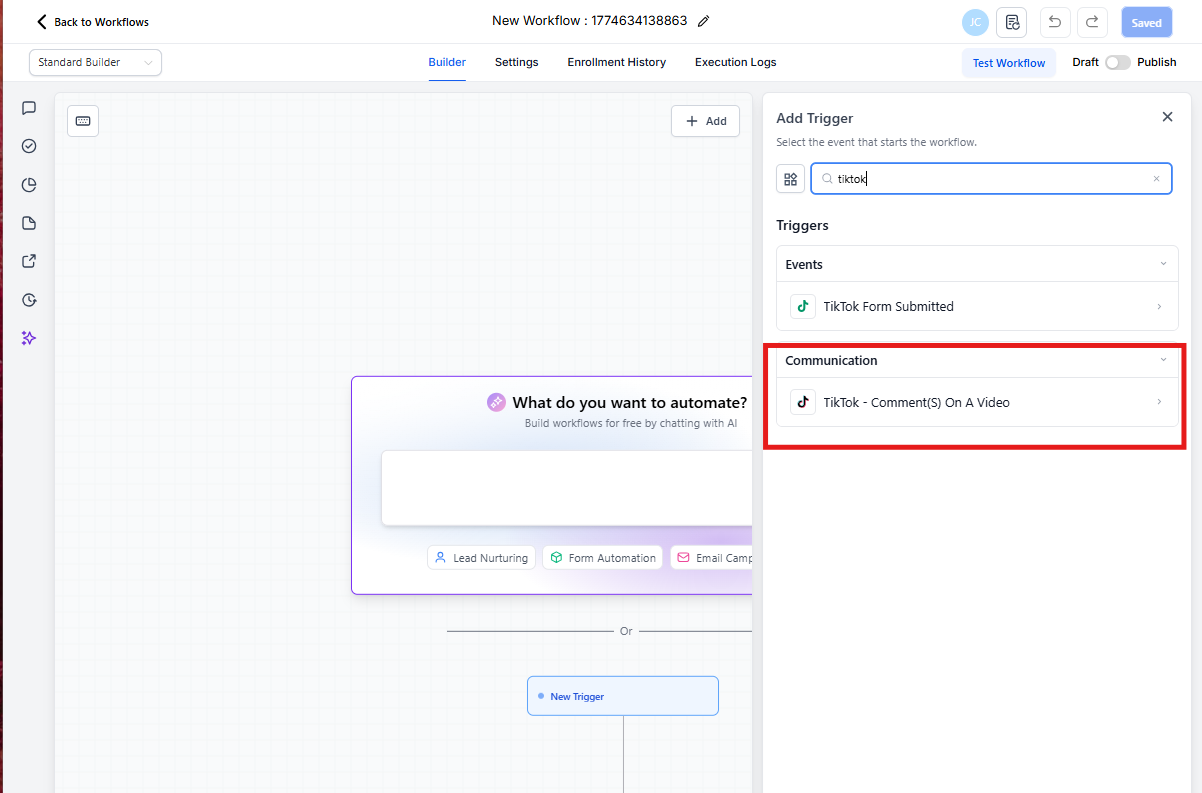
- In the Automation builder, click + Add New Trigger
- Select TikTok - Comment(s) on a Post
Step 2: Select Your TikTok Account
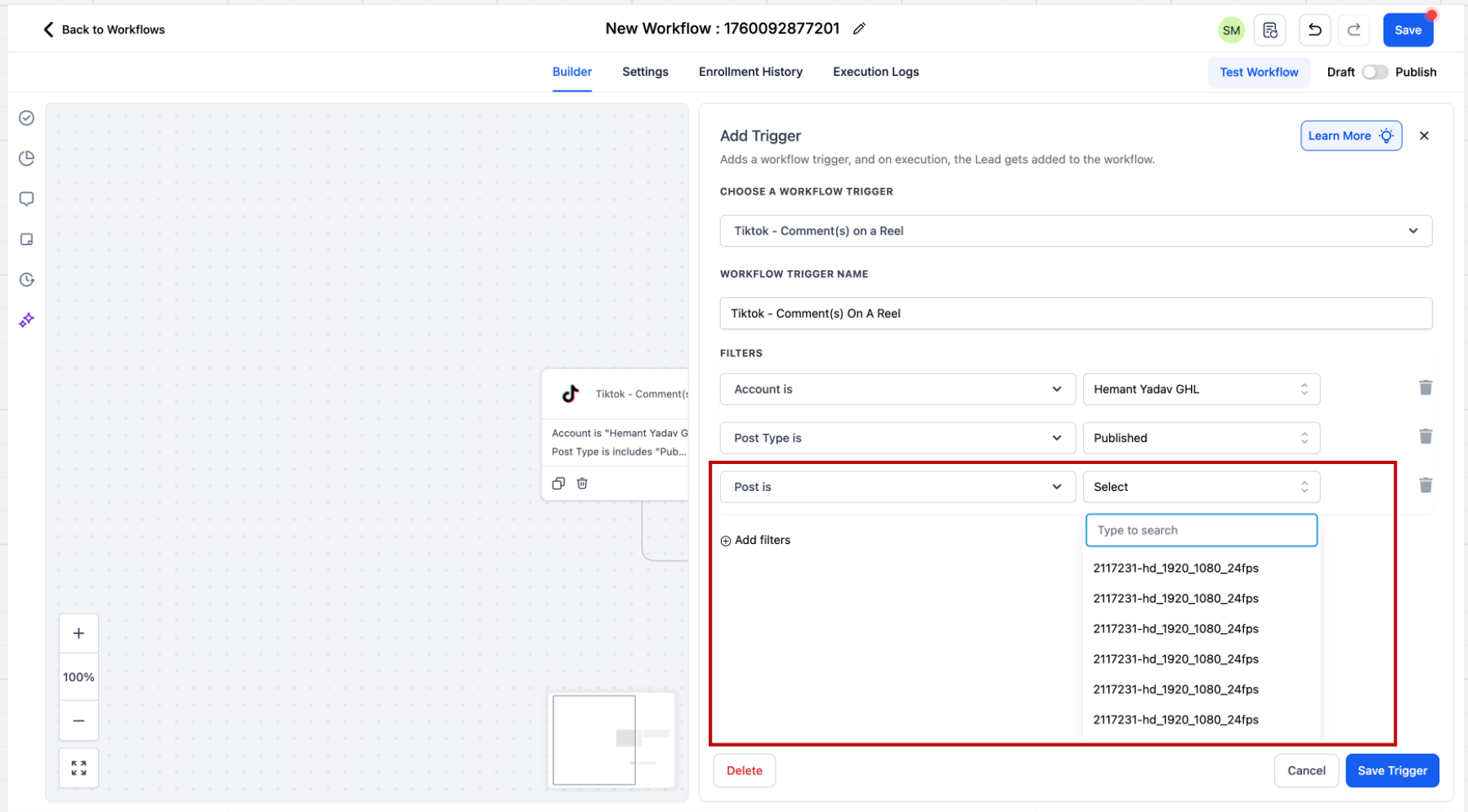
In the trigger settings sidebar, choose which TikTok account to monitor.
Pro Tip: If you don't select a specific account, the automation will run across all TikTok accounts connected to your location.
Step 3: Choose Post Type
Select whether you want to monitor:
- Published Post: Choose from a dropdown of all your existing TikTok posts
- Custom Post: Paste the URL of any specific TikTok video
Note: If you don't select a specific post, the automation will monitor all posts from your account.
Step 4: Select Your Post or Enter URL
Pick the specific post you want to track, or paste its URL if using the Custom Post option.
Step 5: Set Your Match Phrase
Tell Enrollio what you're looking for in comments. You have two options:
Exact Match: The comment must match your phrase exactly
- Example phrase: "tour"
- ✅ Will trigger: "tour"
- ❌ Won't trigger: "book a tour" or "tours"
Contains Phrase: The comment must include your exact phrase anywhere in the message
- Example phrase: "book a tour"
- ✅ Will trigger: "I want to book a tour"
- ✅ Will trigger: "Can I book a tour tomorrow?"
- ❌ Won't trigger: "I want to book tours" (phrase must match exactly)
Important: When someone comments and triggers this automation, Enrollio automatically creates a family record with their first and last name.
Step 6: Add the Reply in Comments Action
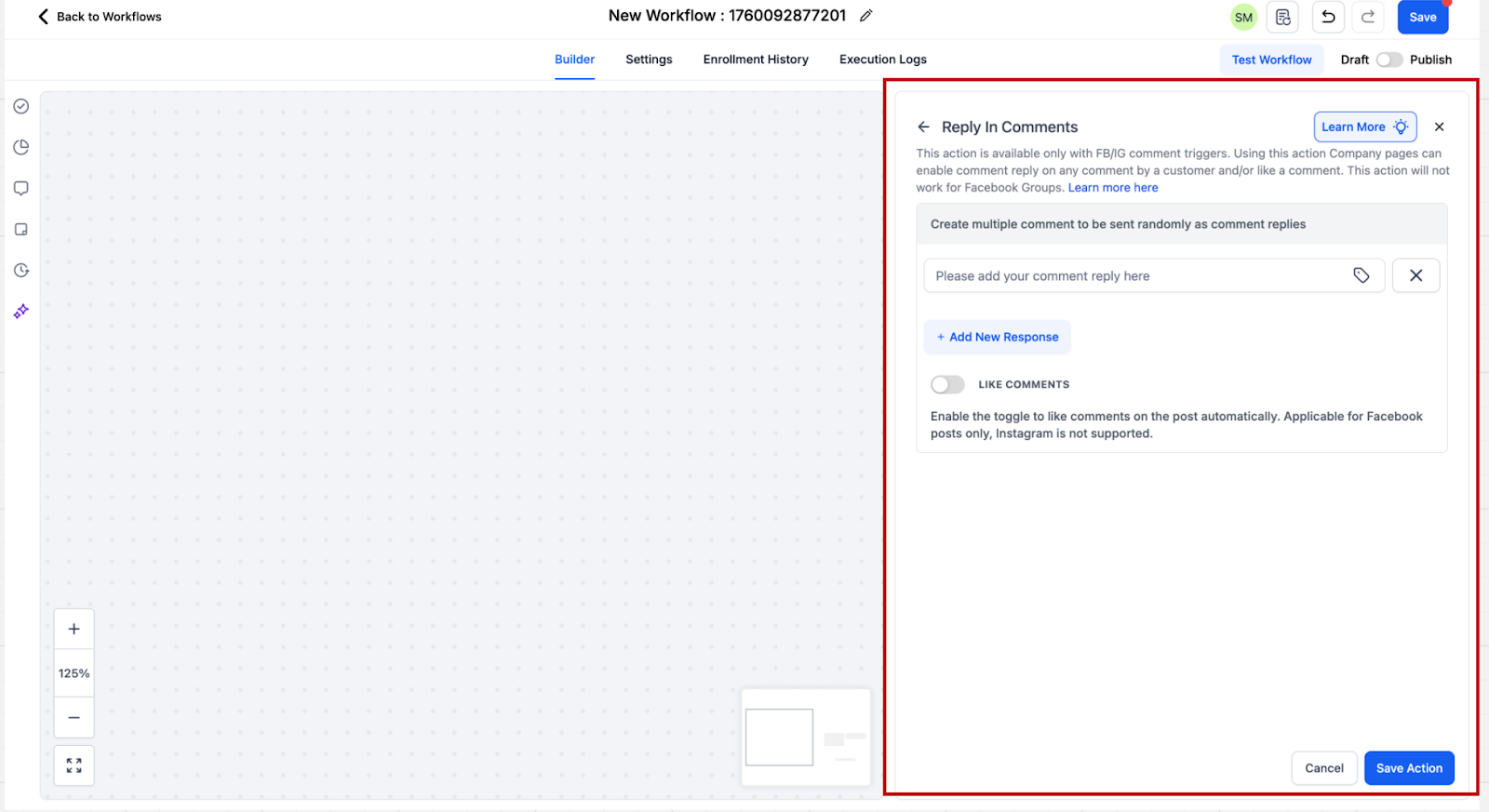
- Click + Add New Action
- Select Reply in Comments
- Write up to 10 different reply comments
Enrollio will randomly select one of your replies each time the automation runs, making your responses feel more natural and varied.
Example replies for enrollment:
- "We'd love to show you around! Check your DMs for tour times 👶"
- "Thanks for your interest! Sending you more info now 💙"
- "Perfect! I just sent you our availability—let's find a time that works!"
Setting Up TikTok DM Automation
Automate responses when prospective families send you a direct message.
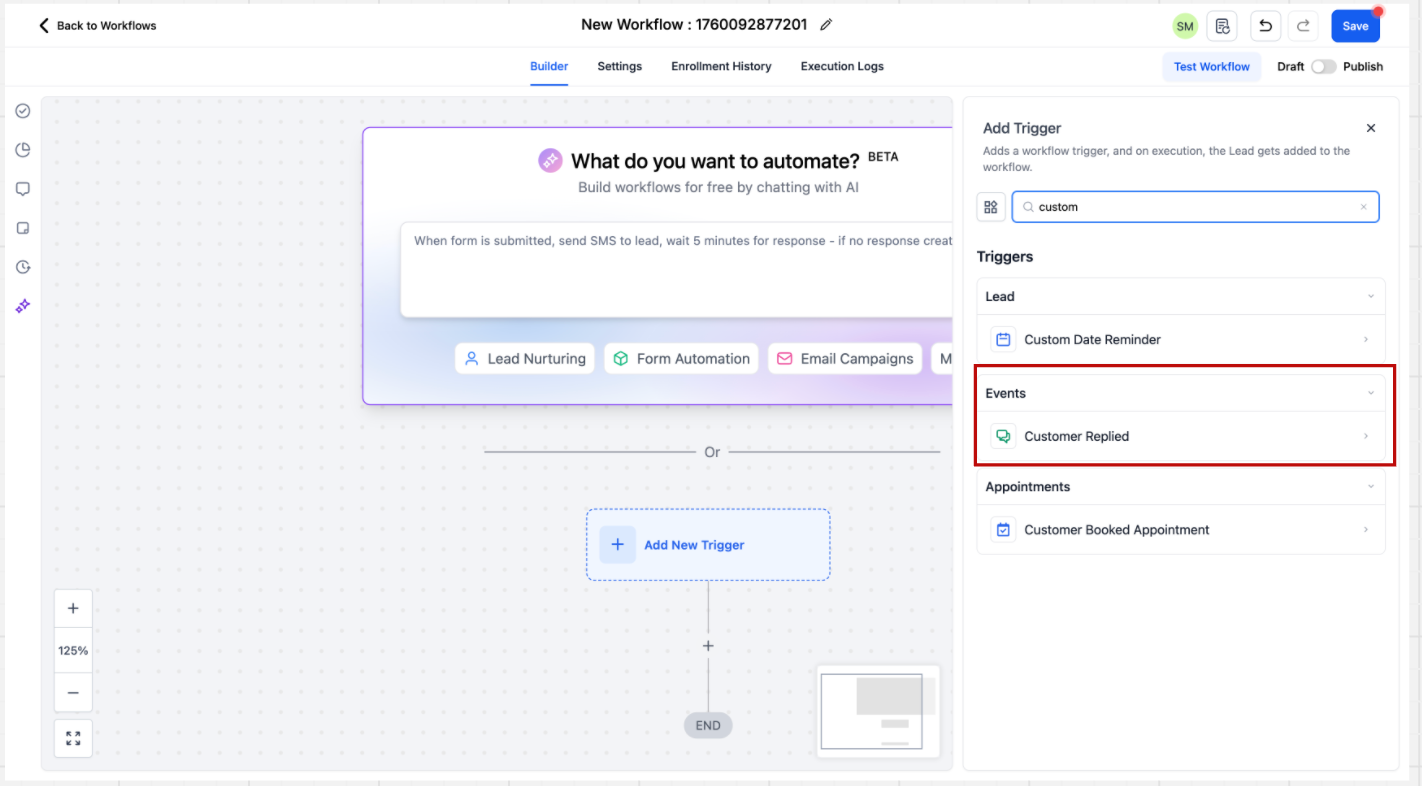
Step 1: Add the Customer Replied Trigger
- In the Automation builder, click + Add New Trigger
- Look in the Events category or search for "Customer Replied"
- Select Customer Replied
Step 2: Set Reply Channel to TikTok
In the trigger settings sidebar:
- Find the Reply Channel filter
- Select TikTok from the dropdown
This ensures the automation only fires for TikTok DMs, not other channels like SMS or email.
Step 3: Configure Message Matching (Optional)
You can set the automation to trigger only when DMs contain specific phrases:
- Contains Phrase: Message includes your phrase anywhere
- Exact Match Phrase: Message matches your phrase exactly
Leave this blank to trigger on every DM.
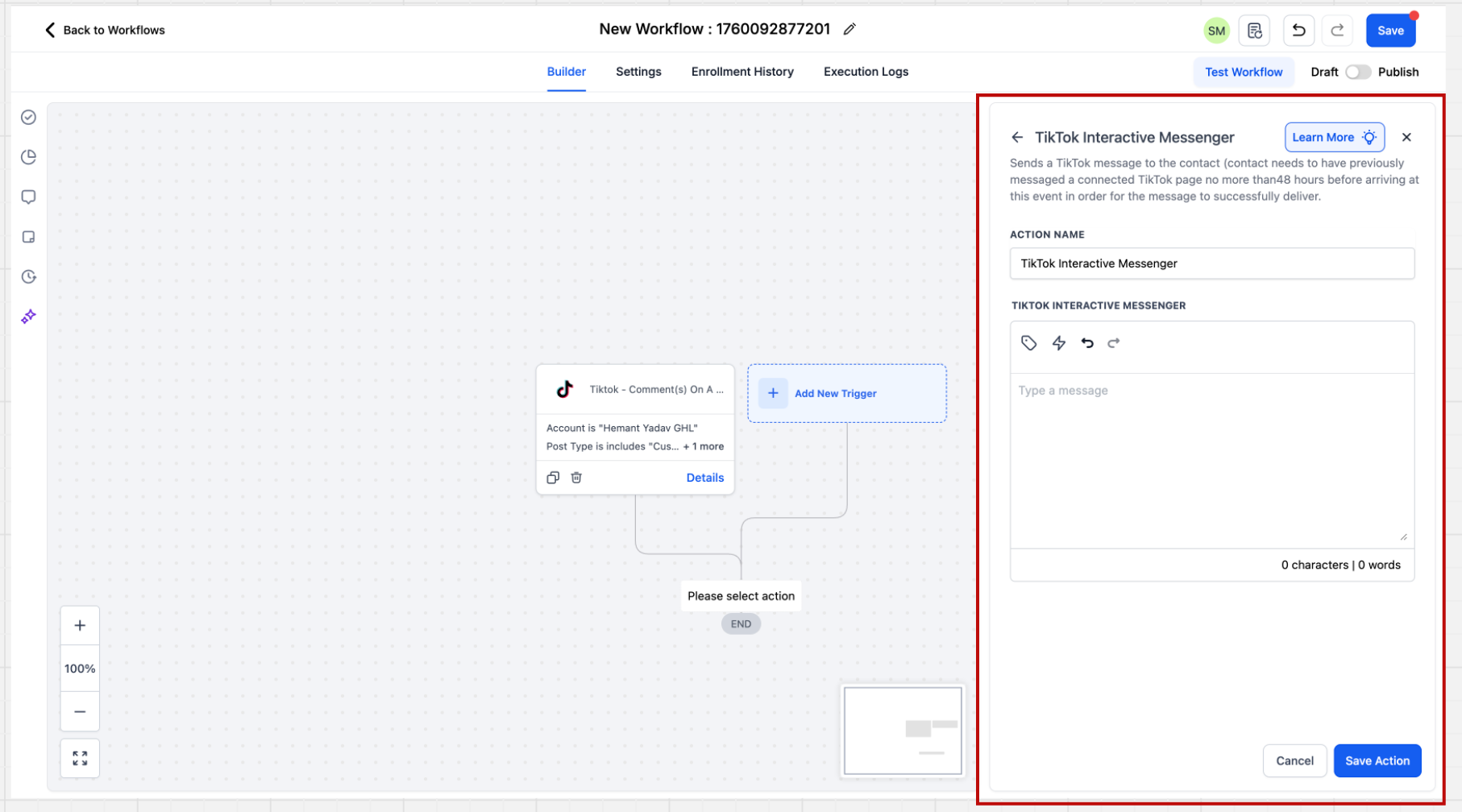
Step 4: Add the TikTok Interactive Messenger Action
- Click + Add New Action
- Select TikTok Interactive Messenger
- Write the message you want to send automatically
- Click Save
Example auto-reply:
"Hi! Thanks for reaching out. We have tours available Tuesday-Thursday at 10am and 2pm. What day works best for you?"
Current TikTok Automation Limitations
TikTok's API is still growing, so some features you may see in other channels aren't available yet:
- No reply type options: You can't currently choose "Reply as DM" vs "Reply to Comment via DM" like you can with Facebook and Instagram
- No message templates: Pre-built interactive message templates aren't supported yet
- No rich media: Attachments, buttons, and quick replies aren't available in TikTok DMs
We'll add these features as TikTok makes them available in their API.
Real-World Use Cases for Childcare Centers
Auto-respond to tour requests:
When someone comments "tour" on your TikTok video, automatically reply publicly and send them a DM with your tour calendar link.
Capture waitlist interest:
Set up a comment trigger for "waitlist" that auto-replies and adds the family to your waitlist pipeline.
Answer common questions:
Create DM automations that detect questions about pricing, hours, or age groups and send instant answers.
Follow up on engagement:
When someone comments on your staff highlight video, send them a DM introducing your team and offering a tour.
Pro Tips
💡 Use multiple reply variations
Write 5-10 different comment replies so your responses don't look automated. Enrollio will rotate through them randomly.
💡 Combine triggers with enrollment pipelines
Add an action to create an enrollment opportunity when someone engages. This moves them into your enrollment tracking automatically.
💡 Set up staff assignment rules
Route TikTok conversations to specific staff members based on your internal workflows—like sending infant inquiries to your infant room lead.
Frequently Asked Questions
Q: Do I need a TikTok Business account?
Yes, you'll need a TikTok Business or Creator account to connect to Enrollio.
Q: Can I automate responses to all my TikTok posts at once?
Yes. When setting up the comment trigger, just don't select a specific post. The automation will monitor all posts from your account.
Q: What happens if someone comments multiple times?
The automation will trigger each time they comment, unless you add filters to prevent duplicate responses.
Q: Can I send images or videos in automated DMs?
Not yet. TikTok's API doesn't currently support attachments in automated messages. We'll add this when it becomes available.
Q: Will TikTok conversations sync with family records?
Yes. Every TikTok DM and comment is stored on the family's contact record, so you have complete conversation history.
Q: Can I turn off automations for specific posts?
Yes. Either pause the automation entirely or use the post selection filter to exclude certain videos.