
Stale Enrollment Opportunity Trigger
The Stale Enrollment Opportunity trigger automatically activates when an enrollment opportunity hasn't been updated within a timeframe you specify. This helps you follow up with families who may have gone quiet during the enrollment process.
How It Works
An enrollment opportunity becomes "stale" when there's been no activity — no status changes, no notes added, no communication logged — for the number of days you set. Once it hits that threshold, Enrollio fires the trigger and runs whatever automation you've connected to it.
This is perfect for re-engaging families who started the enrollment process but haven't moved forward, ensuring no potential enrollment slips through the cracks.
Setting Up the Stale Opportunity Trigger
- Go to Automations in your Enrollio dashboard
- Click Create Automation
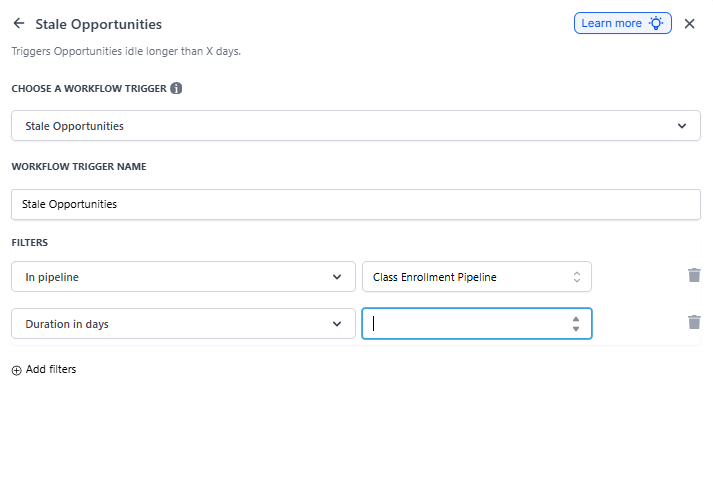
- Select Stale Enrollment Opportunity as your trigger
- Choose which enrollment pipeline you want to monitor (or select "All Pipelines")
- Set the number of days of inactivity that defines "stale" (typically 3-7 days works well)
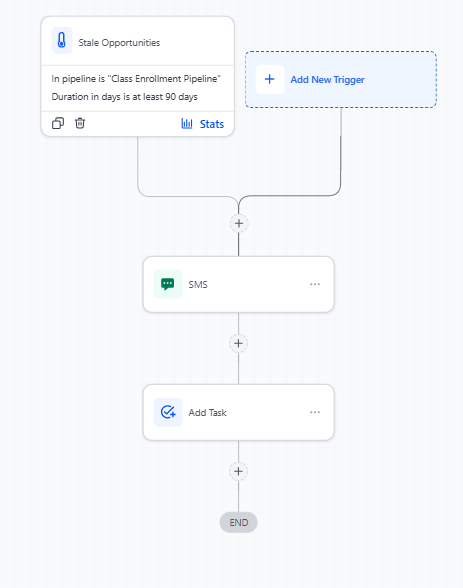
- Add your follow-up actions — send a text, create a task for your staff, or move the opportunity to a different stage
Common Use Cases
Re-engagement Outreach
When an enrollment opportunity goes stale, automatically send a friendly text or email checking in with the family. Keep the message personal and helpful — ask if they have questions or need to reschedule their tour.
Internal Alerts
Create a task for your enrollment coordinator to personally call families with stale opportunities. Sometimes a warm voice makes all the difference in moving an enrollment forward.
Pipeline Management
Automatically move stale opportunities to a "Needs Follow-Up" stage so your team can prioritize outreach. This keeps your active pipeline organized and ensures nothing gets forgotten.
What Counts as Activity
These actions reset the stale timer:
- Changing the opportunity stage
- Adding a note to the opportunity
- Logging communication (call, text, email)
- Updating opportunity details
- Scheduling or completing an appointment
The timer restarts from zero whenever any of these activities occur, so only truly inactive opportunities trigger your automation.
Best Practices
Don't wait too long. In childcare enrollment, timing matters. Set your stale threshold to 3-5 days max so families don't lose momentum or choose another center.
Personalize your outreach. When the trigger fires, reference where the family is in the process. A family who hasn't scheduled a tour needs different messaging than one who toured but hasn't enrolled.
Monitor your results. Check which stale opportunities convert after your automation runs. If your follow-up isn't working, adjust your messaging or timeframe.
Related Features
- Opportunity Created Trigger — Start automations when new enrollment opportunities are added
- Enrollment Pipeline Management — Organize your enrollment process with custom stages
- Automation Overview — Learn the basics of building automations in Enrollio