
Overview
The Remove Associated Records from Automation action works in all automation types — whether they're triggered by families, enrollments, or custom records. It automatically removes related records from another automation based on their relationship to the original record.
This is especially useful when relationships change. For example, if a family withdraws, you might want to stop sending their emergency contacts certain notifications.
This action is different from the standard Remove from Automation action, which only removes the current record. This one removes associated records based on a relationship label you define.
How It Works
This action lets you:
- Choose what type of related record to remove (families, emergency contacts, custom records, etc.)
- Pick the relationship label that connects them
- Select which automation to remove them from
Before using this action, you need to have relationships set up between your records — like family-to-family or enrollment-to-family connections — with clear labels defining those relationships.
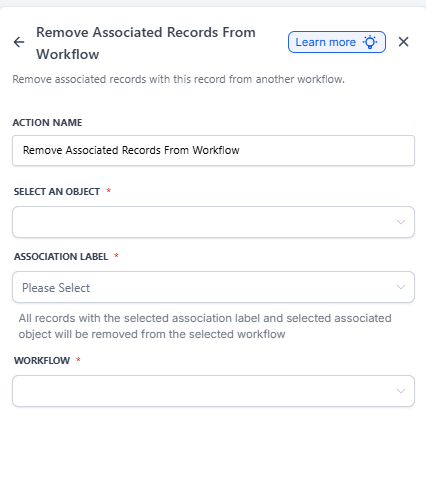
Action Settings
Select an object: Choose the type of related records you want to remove (e.g., Families, Emergency Contacts, Custom Records).
Association Label (required): Pick the relationship label that identifies which records should be removed. This tells Enrollio which connection to follow.
Automation: Select the automation you want to remove the related records from.
Real-World Examples
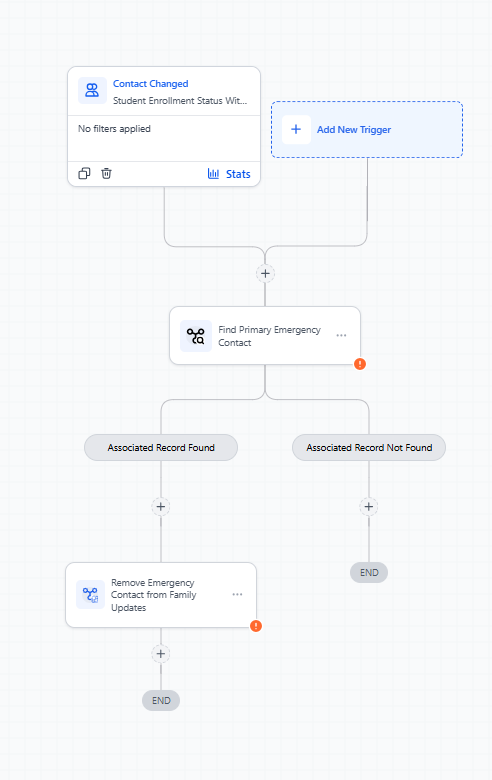
Example 1: Enrollment → Emergency Contacts
When an enrollment's status changes to Withdrawn, remove all associated Emergency Contacts (label: "Primary Emergency Contact") from the "Weekly Family Updates" automation.
Setup:
- Object → Emergency Contact
- Association Label → Primary Emergency Contact
- Automation → Weekly Family Updates
What happens:
- Enrollment status becomes Withdrawn (triggers the automation)
- Action finds Emergency Contacts linked via "Primary Emergency Contact"
- Those contacts are removed from the Weekly Family Updates automation
Example 2: Family → Family (Parent–Child Relationship)
When a student's family record is marked as Graduated, remove all Parent family records (label: "Parent-Child") from the "New Semester Reminders" automation.
Setup:
- Object → Family (Parent)
- Association Label → Parent-Child
- Automation → New Semester Reminders
What happens:
- Student family record triggers on Graduated status
- Action finds parent families linked via "Parent-Child" relationship
- Those parent families are removed from the New Semester Reminders automation
Example 3: Center Record → Families
When a center's status changes to Temporarily Closed, remove all enrolled families from the "Active Families Communication" automation.
Setup:
- Object → Family
- Automation → Active Families Communication
What happens:
- Center record updates to Temporarily Closed
- All families associated with that center are found
- Those families are removed from the Active Families Communication automation
Common Use Cases
- Stop sending tour reminders to all family members when the primary contact cancels
- Remove emergency contacts from update sequences when a child withdraws
- Unenroll sibling families from new enrollment campaigns when one family opts out
- Stop staff notifications when their assigned classroom closes