
Clean, hierarchical URL paths boost search visibility, simplify navigation, and help visitors understand where they are on your site. Enrollio supports nested (multi-path) URL paths across your enrollment sites and landing pages. This article explains what nested URL paths are, why they matter, and how to implement them.
What are Nested URL Paths?
Nested URL paths let you create hierarchical URLs using forward slashes (/) to represent your site structure. You can organize your content logically, making URLs easier for parents to understand and improving your SEO.
Examples of Nested Paths:
- /programs/preschool/enrollment
- /tours/schedule/summer-2025
- /resources/parent-handbook/getting-started
- /enroll/step1
Key Benefits of Nested URL Paths
SEO Optimization: Clean, hierarchical URLs improve site structure and search rankings by making your content easier for search engines to index and understand.
Improved Parent Experience: Visitors see intuitive, well-organized paths in the address bar, creating a more professional and navigable experience.
Flexible Organization: Create or edit pages with multiple path segments. This is ideal for structuring complex enrollment sites, program pages, resource sections, or multi-step enrollment forms.
Accurate Sitemaps: Your sitemaps will reflect the correct nested paths, enabling better indexing and discovery by search engines like Google.
Path Validation and Restrictions
Understanding system limits prevents errors and ensures clean URLs.
Reserved Paths
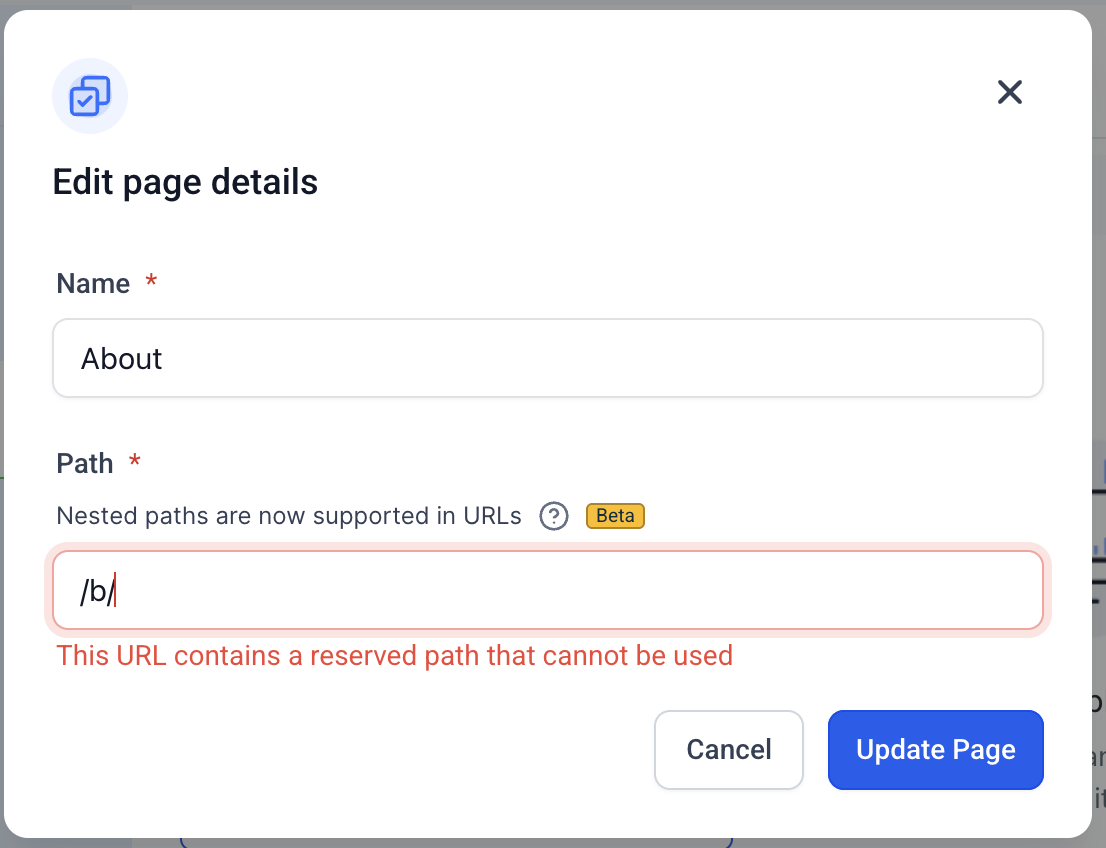
Certain paths are reserved for system functionality and cannot be used. Attempting to use them will result in an error message:
-
/b/— Reserved for blogs -
/c/— Reserved for categories -
/product/— Reserved for product pages -
/collections/— Reserved for collection pages -
/post/— Reserved for blog posts -
/category/— Reserved for category pages -
/author/— Reserved for author pages -
/tag/— Reserved for tag pages -
/store/account— Reserved for store account functionality
Maximum Depth
Nested URLs support up to 5 levels (e.g., /level1/level2/level3/level4/level5). Every segment between slashes (/) counts as one level. Your main domain and any subdomain are not included in that count.
If you exceed five levels, the builder blocks the save and shows the message: "URL path is too deep. Maximum 5 levels allowed."
How to Use Nested URL Paths
- Go to your enrollment site or landing page
- Click Edit
- Enter your desired nested URL path, using
/to create hierarchical structure - Save your changes
Best Practices
Avoid trailing slashes: Use clean paths without a trailing slash (e.g., /path/subpath instead of /path/subpath/)
Eliminate double slashes: Ensure there are no duplicate slashes in your paths (e.g., /path/subpath not /path//subpath)
No empty segments: Avoid leaving blank segments between slashes (e.g., use /category/item, not /category//item)
Use descriptive, meaningful paths: Clearly communicate the content and its hierarchy with readable, intuitive URLs (e.g., /programs/infant-care instead of /p/123)
Organize logically: Structure paths in a way that makes sense to parents and mirrors your site's navigation or content hierarchy
Optimize for SEO: Well-nested, keyword-rich paths can boost search engine rankings by signaling clear content relationships
/programs/preschool/enroll makes it instantly clear where they are and what they'll find.Frequently Asked Questions
Q: I used to see my slash converted to a hyphen. Why isn't that happening now?
Previously, entering a slash automatically converted it to a hyphen to create a flat path. With nested URLs, slashes are preserved so you can maintain a true folder hierarchy.
Q: Will changing a live URL break existing links?
Yes. Set up a 301 redirect from the old address to preserve SEO equity and avoid 404 errors.
Q: Can I use uppercase letters or spaces?
Stick to lowercase letters, numbers, and hyphens for clean, crawl-friendly URLs.
Q: Can I include hyphens or numbers inside individual segments?
Yes. Paths like /blog/2025/summer-updates or /programs/room-1 are valid.
Q: Can I mix nested and flat URLs within the same site?
Yes. You can keep some pages at a single level (e.g., /about) and others nested (e.g., /programs/preschool/curriculum) within the same enrollment site.