
What is Split Testing?
Split testing (also called A/B testing) helps you figure out which version of your enrollment page converts more families. Instead of guessing which headline or image works better, you can test both and let real data decide.
Here's how it works: You create two versions of the same page, then Enrollio automatically shows version A to some visitors and version B to others. After collecting enough data, you'll see which version gets more tour bookings, form submissions, or whatever action you're tracking.
Note: Split testing is available on all Enrollio plans.
How to Create a Split Test
Important: Before you can split test, you need to connect a custom domain to your enrollment page.
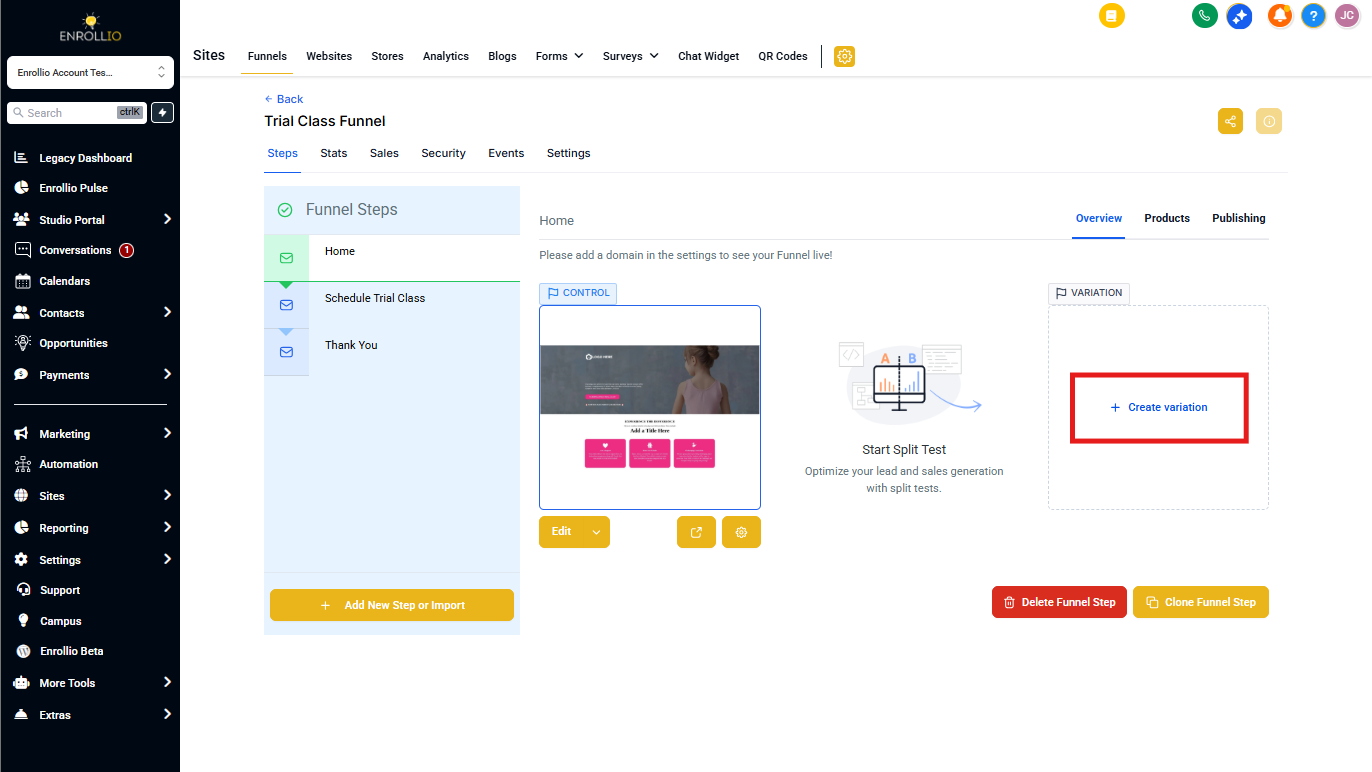
- Navigate to Sites > Enrollment Pages
- Select the enrollment page you want to test
- Choose the specific step within your page where you want to run the test
- Click Create Variation
Make Meaningful Changes
For accurate results, make noticeable differences between your control page and variation. Testing a slightly different shade of blue won't give you useful data. Instead, try:
- Different headlines ("Enroll Today" vs "Secure Your Child's Spot")
- Alternative hero images (happy kids vs your facility)
- Different call-to-action buttons ("Schedule a Tour" vs "Book Your Visit")
- Varying form lengths (quick contact form vs detailed enrollment form)
Pro tip: Don't edit your control page while the test is running. This ensures you're comparing apples to apples.
Set Your Traffic Split
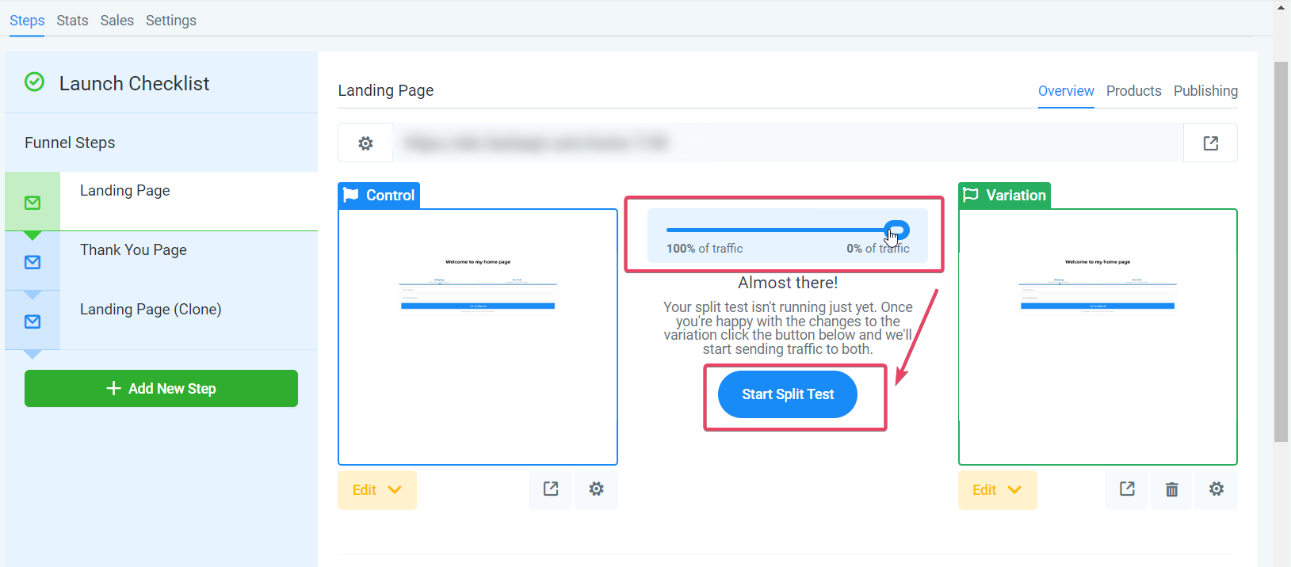
Use the slider to decide how to divide traffic between your control page and variation. A 50/50 split is standard, but you can adjust based on your needs.
Click Start Split Test, then Apply to confirm.
Understanding Your Page URLs
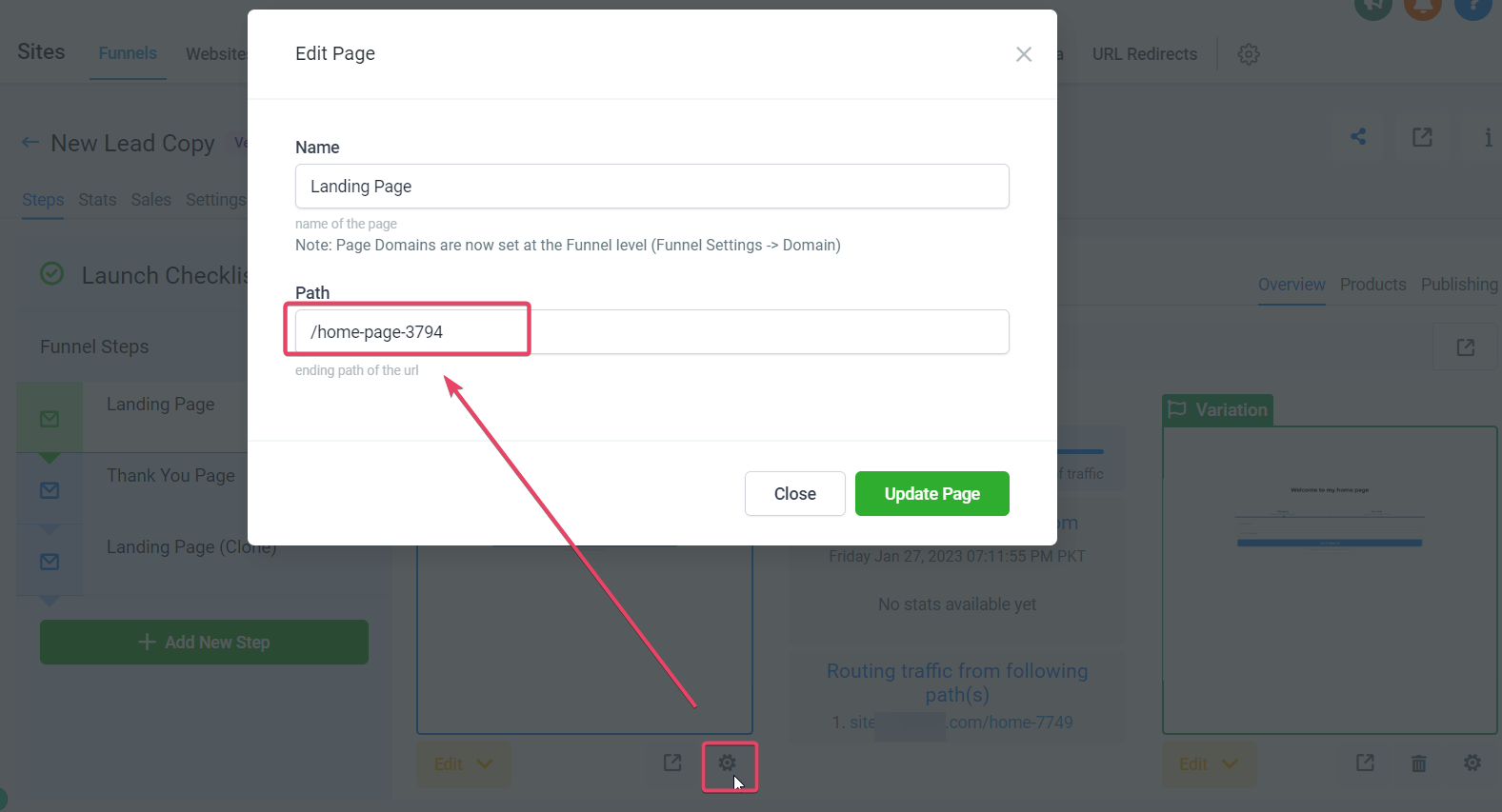
Even though all traffic comes to your main page URL, Enrollio automatically routes visitors to dedicated URLs for the control and variation based on your traffic split.
You can customize these dedicated URLs by clicking the gear icon below each version:
- Control page gear icon: Edit the control page's URL path
- Variation gear icon: Edit the variation's URL path
Testing tip: Split tests use browser cookies to keep visitors on the same version throughout their session. To view the other variation yourself, open the URL in an incognito window or different browser.
Viewing Your Split Test Results
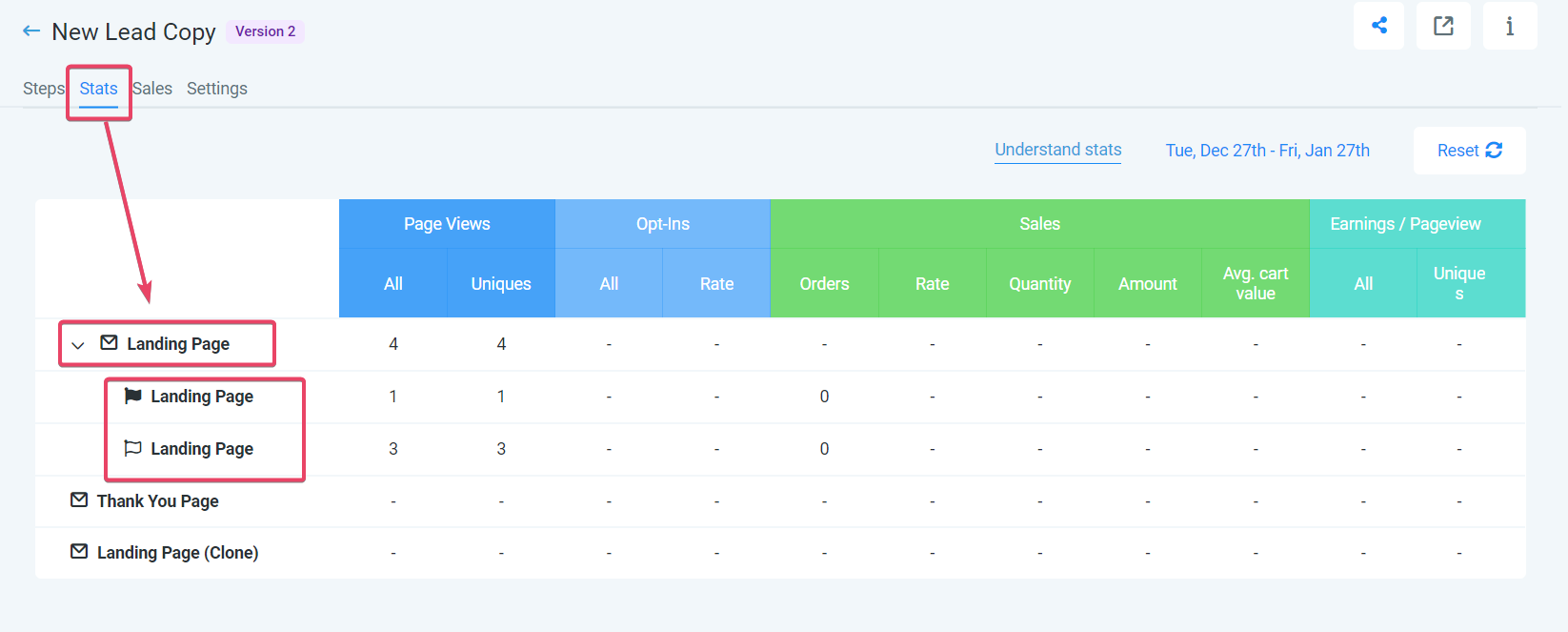
As families visit your page, results populate automatically. You'll see conversion data for both versions side by side.
To view detailed stats:
- Click the Stats tab above your page
- Click on the page running the split test
- Review the dropdown showing metrics for both control and variation
Real-World Examples for Childcare Centers
Tour Booking Page
Test different approaches to get more tour bookings:
- Headline A: "Schedule Your Personal Tour Today"
- Headline B: "See Why Families Love Our Center"
Or test your hero image: one showing happy children in a classroom vs. one showing your outdoor play area. The version with more tour bookings wins.
Waitlist Sign-Up Page
If you have a waitlist, test different ways to encourage sign-ups:
- Form A: Simple form asking just name, email, and child's age
- Form B: Detailed form including start date preferences and special needs
You might find that a shorter form gets more initial sign-ups, even if a longer form gets more qualified leads.
Enrollment Application Page
Test different page layouts to reduce drop-off during enrollment:
- Layout A: Single-page application with all fields visible
- Layout B: Multi-step application broken into sections (child info, parent info, emergency contacts)
Also test trust elements like testimonials placement, licensing badges, or photos of your staff.
Open House Registration
When promoting an open house event, test different registration approaches:
- Version A: "Join Us for Our Spring Open House"
- Version B: "Meet Our Teachers & Explore Our Classrooms"
Test different event images or button colors to see what drives more registrations.
Benefits of Split Testing
Higher Conversion Rates
Identify which page elements actually convince families to book tours or submit applications. Small improvements can mean several extra enrollments per month.
Better Parent Experience
Learn what resonates with your target families. When you implement the winning variation, you're giving parents exactly what they respond to best.
Data-Driven Decisions
Stop guessing what works. Split testing shows you exactly which headline, image, or form design performs better with real prospective families.
Fewer Abandoned Forms
By testing different page designs and form lengths, you can reduce the number of parents who start but don't finish your enrollment process.
Better Return on Marketing Spend
When your enrollment pages convert better, every dollar you spend on ads or marketing generates more enrollments. Small conversion improvements compound quickly.
Continuous Improvement
Split testing creates a culture of optimization. There's always something new to test—from seasonal messaging to different tour scheduling options.
Frequently Asked Questions
How long should I run a split test?
Run your test until you have statistically significant results—typically at least 100 visits per variation and at least one week to account for day-of-week differences in parent behavior.
Can I test more than two versions?
Currently, you can test two versions at a time (control vs. variation). After declaring a winner, you can create a new variation to test against it.
What should I test first?
Start with high-impact elements: headlines, hero images, and call-to-action buttons. These tend to show the biggest conversion differences.
Will split testing slow down my page?
No. The traffic splitting happens instantly through browser cookies, with no noticeable impact on page load speed.
What if my results are very close?
If both versions perform nearly the same, neither change was significant enough. Try a more dramatic variation or test a different element entirely.