
Understanding the Red Mark on Your Popup Button
If you see a red mark on your popup button in your enrollment page or landing page, it means the popup is currently disabled. This is a quick visual indicator that the popup won't appear to visitors.
How to Fix It
Follow these steps to enable your popup:
- Open your enrollment page or landing page in the editor
- Click on the popup button that shows the red mark
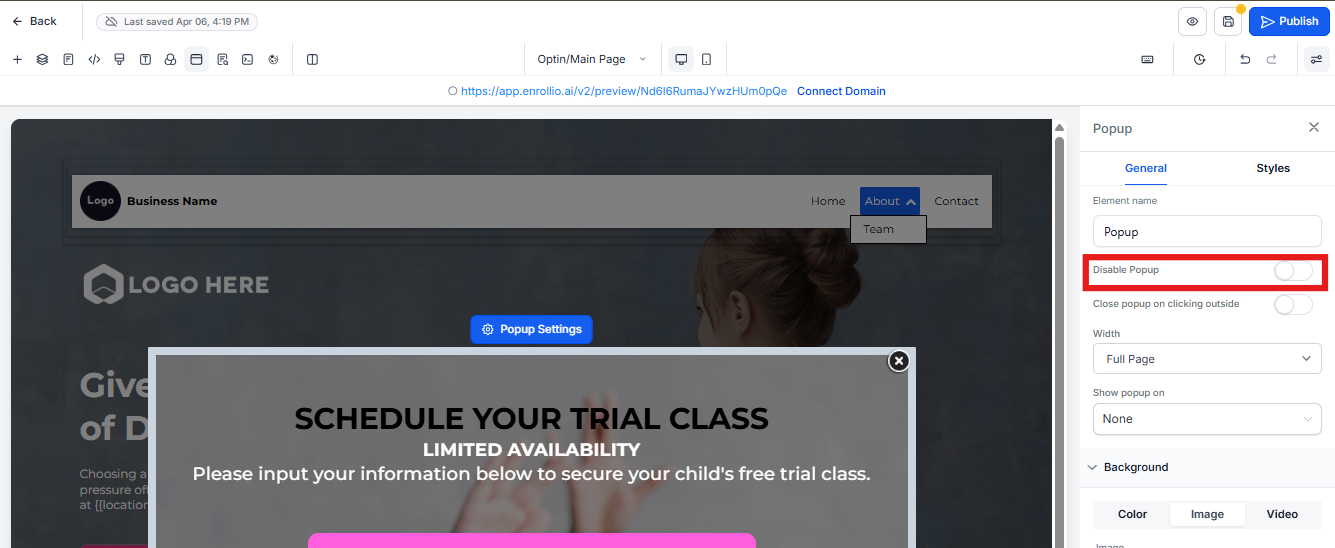
- Navigate to the popup settings panel
- Find the "Disable Popup" option and toggle it OFF
- Click Save to apply your changes
Why This Happens
The red mark appears when someone has previously disabled the popup. This might have been done intentionally during testing or by accident while editing your page.
Pro Tip: Before publishing changes to a live enrollment page, always preview your page to make sure all popups are working as expected. This helps you catch any disabled popups before families see them.
What Happens After You Enable It
Once you turn off the "Disable Popup" option and save, the red mark will disappear. Your popup will now display to visitors based on your trigger settings (like when they arrive, when they try to exit, or after a certain amount of time).