
Overview
Global Sections let you reuse the same sections across multiple pages on your enrollment site. Update a Global Section once, and those changes appear everywhere you've used it — perfect for headers, footers, or review sections that should stay consistent across your site.
The latest update adds a search field to Global Sections, so you can quickly find the section you need without scrolling through long lists.
What Are Global Sections?
Global Sections are saved sections you can drop into any page. When you edit a Global Section, the changes sync everywhere that section appears. This makes them ideal for shared elements like:
- Site headers and navigation
- Footers with contact info
- Parent testimonial galleries
- Enrollment CTAs that appear on multiple pages
You access them from the Page Builder when adding content to your enrollment pages.
How to Access Global Sections
To use a Global Section on your page:
- Open the Page Builder for any enrollment page or landing page
- Click Add Elements in the left sidebar
- Select Saved Sections
- Open Global Sections
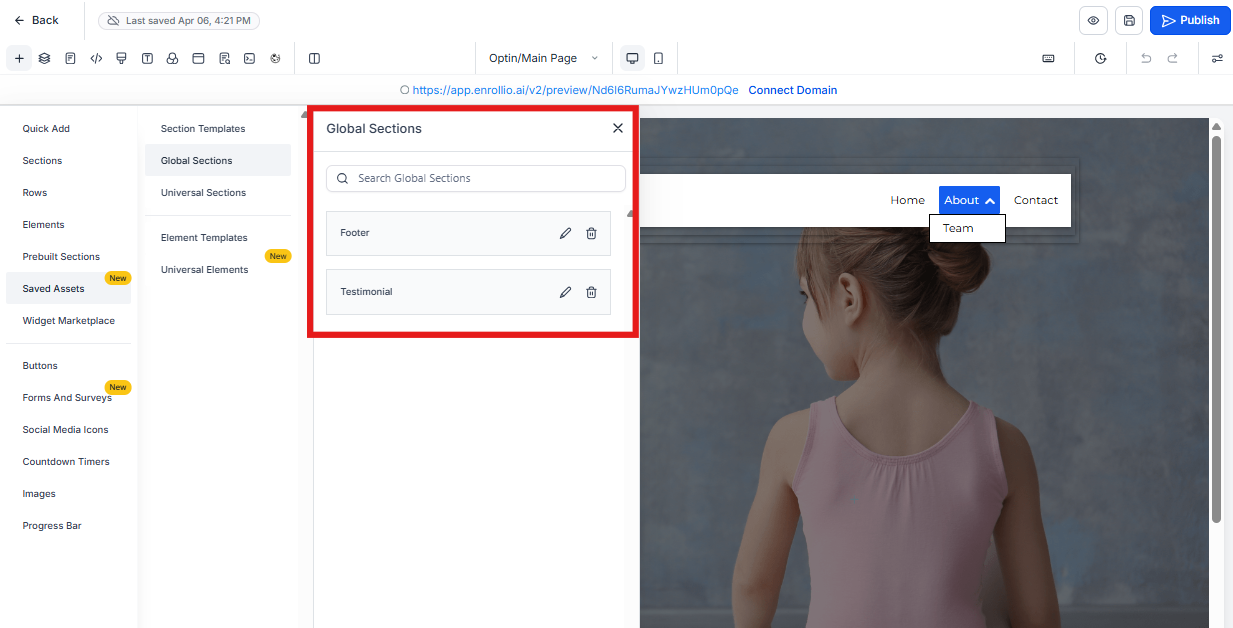
Searching Global Sections
You'll now see a search field at the top of the Global Sections panel. This helps you quickly find sections you've already created — especially useful if you've built out several enrollment pages.
How the Search Works
- Type any part of a section name
- Results update instantly as you type
- Only Global Sections are searched (Local Sections aren't included)
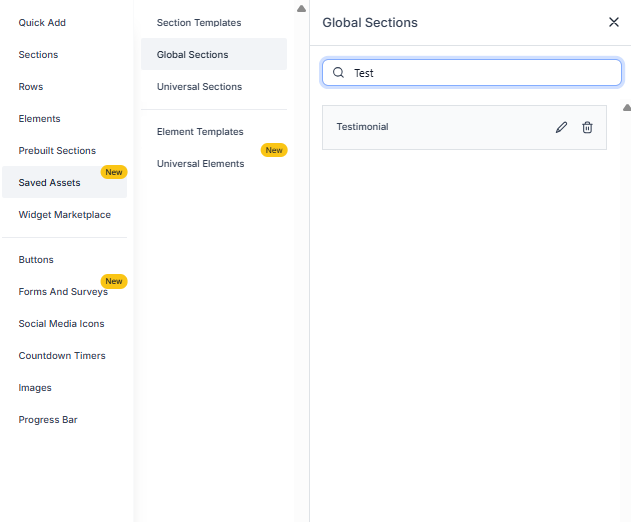
Example: Finding a Header Section
Let's say you've saved several headers as Global Sections. Type "header" in the search field, and only sections with "header" in the name will appear. No more scrolling through unrelated sections to find what you need.
Why This Matters
The Global Sections search helps you:
- Find sections faster — especially when you've built out multiple enrollment pages
- Maintain consistency — quickly locate the correct header or footer to use across pages
- Reuse components efficiently — spend less time hunting, more time building
What Hasn't Changed
This update only improves how you find Global Sections. Nothing else has changed:
- Creating and editing Global Sections works the same way
- Global Sections still sync across all pages where they're used
- Permissions and access remain unchanged
- Local Sections and Element Templates are unaffected
Frequently Asked Questions
Can I search by partial names?
Yes. You can type any part of a section name and the search will find matches.
Does the search update automatically?
Yes. Results appear in real time as you type — no need to press Enter.
Does this search include Local Sections?
No. The search only applies to Global Sections. Local Sections aren't included in the search results.
Will this affect my existing Global Sections?
No. All your existing Global Sections remain exactly as they are. This is purely a navigation improvement.