
What is Bubble Style for Radio & Checkbox Elements?
Bubble Style is a modern, rounded design option for radio buttons and checkboxes in your enrollment forms and parent surveys. When you enable it, the default square or circular markers transform into larger, pill-shaped "bubbles" that are easier to see and more inviting to click.
This sleek design helps parents and families complete forms faster—especially on mobile devices.
Key Benefits of Bubble Style
- Fresh, Modern Design: Rounded bubbles look more polished than standard checkboxes
- Simple Toggle: Switch between Standard and Bubble style in seconds from the Options tab
- Better Visibility: Larger tap targets make forms easier to complete on phones and tablets
- Fully Responsive: Bubbles automatically resize for any screen size—no extra setup needed
Responsive Behavior
Bubble Style is 100% responsive by default. The bubbles resize fluidly across desktop, tablet, and mobile devices, ensuring parents can easily tap their choices without zooming or struggling with tiny targets.
Compatibility & Limitations
- Works in forms and surveys on your enrollment pages, enrollment sites, or embedded via code
- This is a visual-only change—it doesn't affect form submissions, conditional logic, or automation triggers
- Your existing forms keep their current styling unless you manually switch to Bubble
- Once enabled, Bubble Style applies to all choices in that radio or checkbox field
How to Set Up Bubble Style
Apply Bubble Style in under 30 seconds:
- Go to Sites → Forms (or Surveys) and click Edit on your form
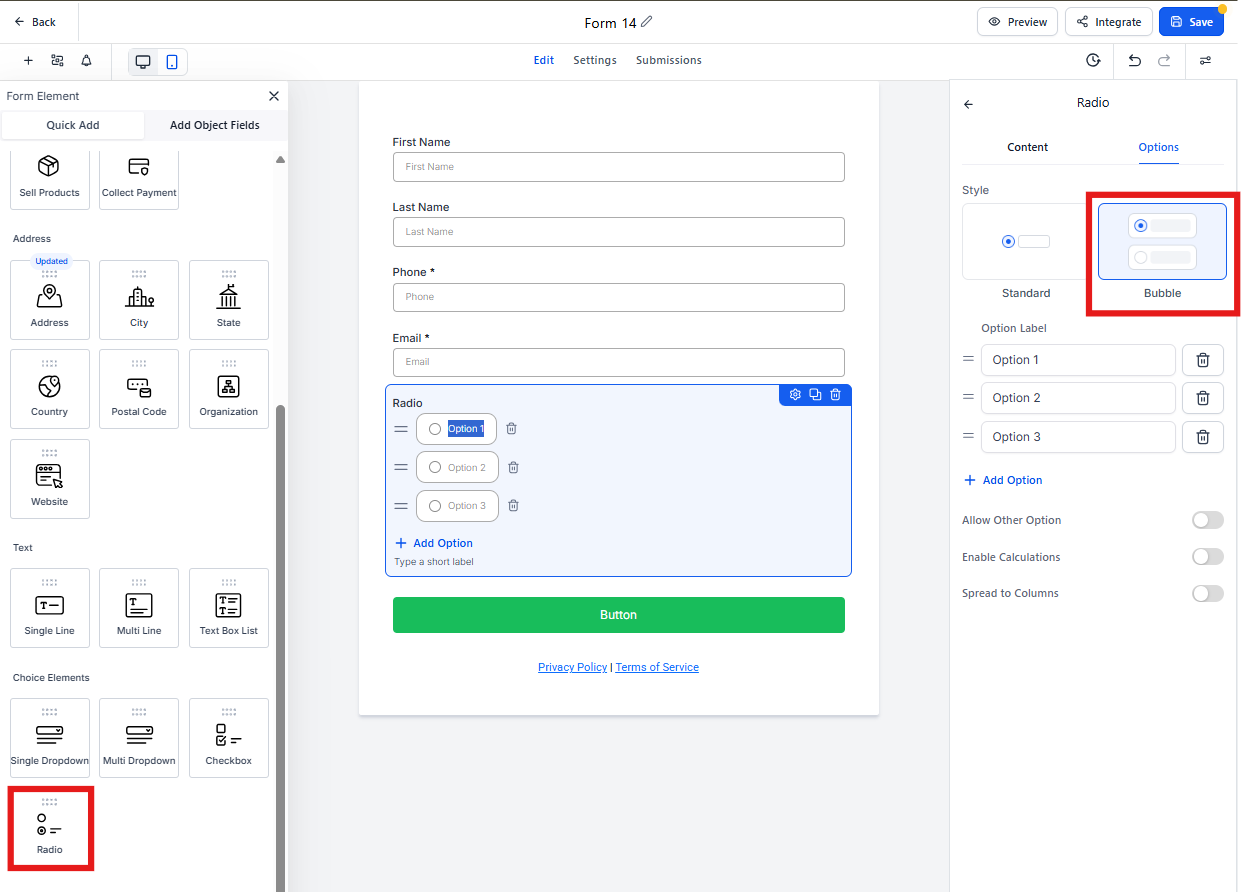
- Drag a Radio or Checkbox field onto the canvas, or click an existing one
- In the right sidebar, select Options
- Under "Style," choose Bubble
- Click Save, then preview or publish your form
Your updated bubbles are live!
Frequently Asked Questions
Does Bubble Style slow down page load times?
No. Bubble Style uses lightweight CSS that adds virtually zero overhead to your enrollment pages.
Can I enable Bubble Style for only one option in a multi-choice list?
Bubble applies to the entire field—all choices in that radio button or checkbox group will share the same styling.
Will automations triggered by form submissions continue to work?
Yes. Bubble styling is purely visual and doesn't affect data capture, conditional logic, or automation triggers.
Can I use Bubble Style on tour request forms?
Absolutely. Bubble Style works on any form or survey in Enrollio, including tour requests, enrollment applications, and parent surveys.