
Deleting and Restoring Enrollment Opportunities & Pipelines
Deleting enrollment opportunities and pipelines helps you keep your system organized, while restoration tools ensure you can recover data quickly if needed. Whether you're cleaning up old leads or reversing an accidental deletion, this guide shows you exactly how to do it.
What is Deleting and Restoring Opportunities/Pipelines?
Enrollment opportunities are individual families or children moving through your enrollment process. Enrollment pipelines are the frameworks that organize your enrollment stages—like "Tour Scheduled," "Application Submitted," or "Enrolled."
When you delete an enrollment opportunity, it's removed from your active pipeline view but retained in the system for up to 60 days. This lets you declutter your workspace while preserving the option to recover data if you need it later.
Key Benefits of Deleting and Restoring
- Accidental Deletion Recovery: Restore pipelines and enrollment opportunities within 60 days
- Integrated Audit Logs: Track changes and recover deleted items with full visibility
- Admin Permissions: Only authorized users can delete or restore sensitive data
- Full Pipeline Recovery: Restoring a pipeline brings back all its stages and opportunities
- Decluttered Workspace: Keep your enrollment dashboard focused on active families
Deleting Enrollment Opportunities
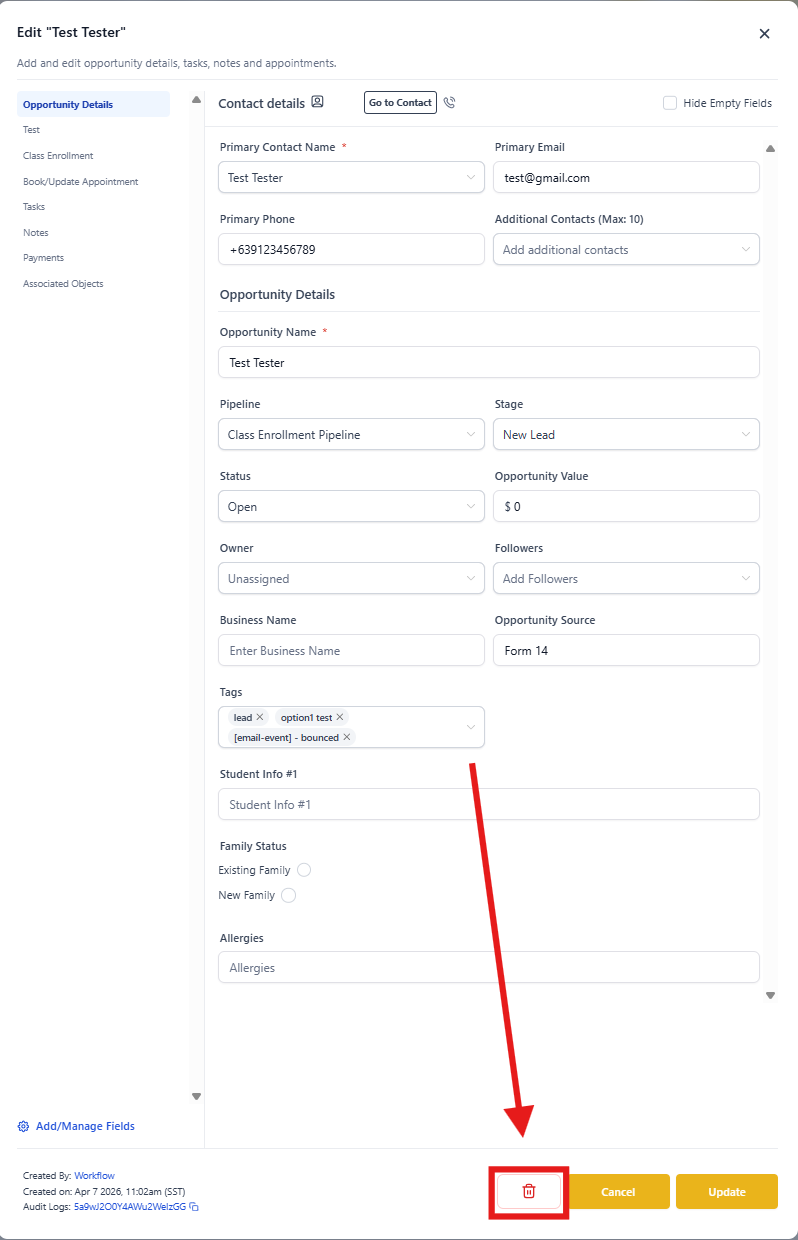
Option 1: Delete a Single Opportunity
- Click Opportunities in the left sidebar
- Make sure the Opportunities tab is selected at the top
- Find the enrollment opportunity you want to delete
- Click on it to open the details page
- Click the Delete icon in the bottom row
- Confirm the deletion when prompted
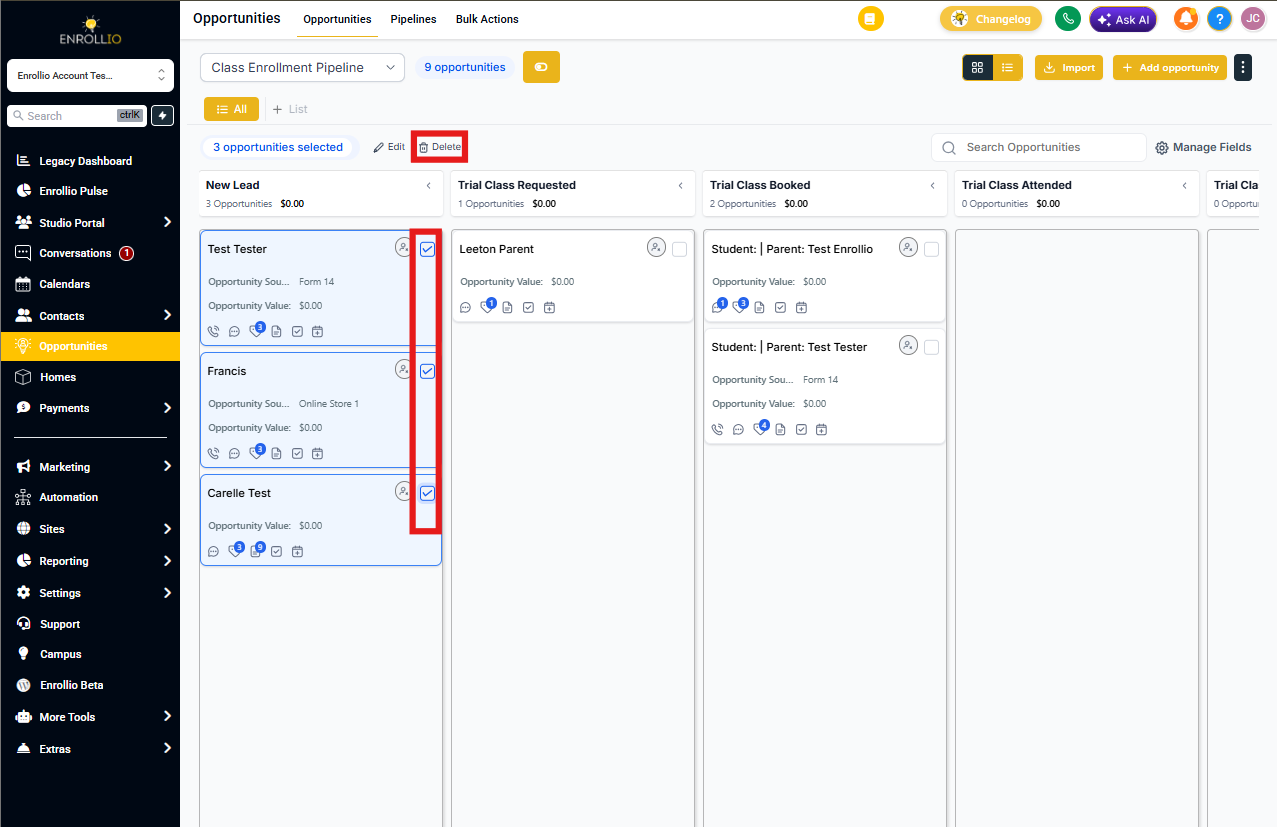
Option 2: Bulk Delete Opportunities
- Go to Opportunities
- Check the boxes next to multiple opportunities you want to delete
- Click Delete from the bulk actions bar at the top
- Type DELETE to confirm the action
- The deletion will process in the background—you'll see a success message with a link to track progress on the Bulk Actions page
Restoring Enrollment Opportunities
Restore via Bulk Actions (Recommended)
- Go to Bulk Actions from the Opportunities section
- Find the delete action you want to reverse
- Click the three-dot menu (⋮) and select Restore
- Confirm the restore action
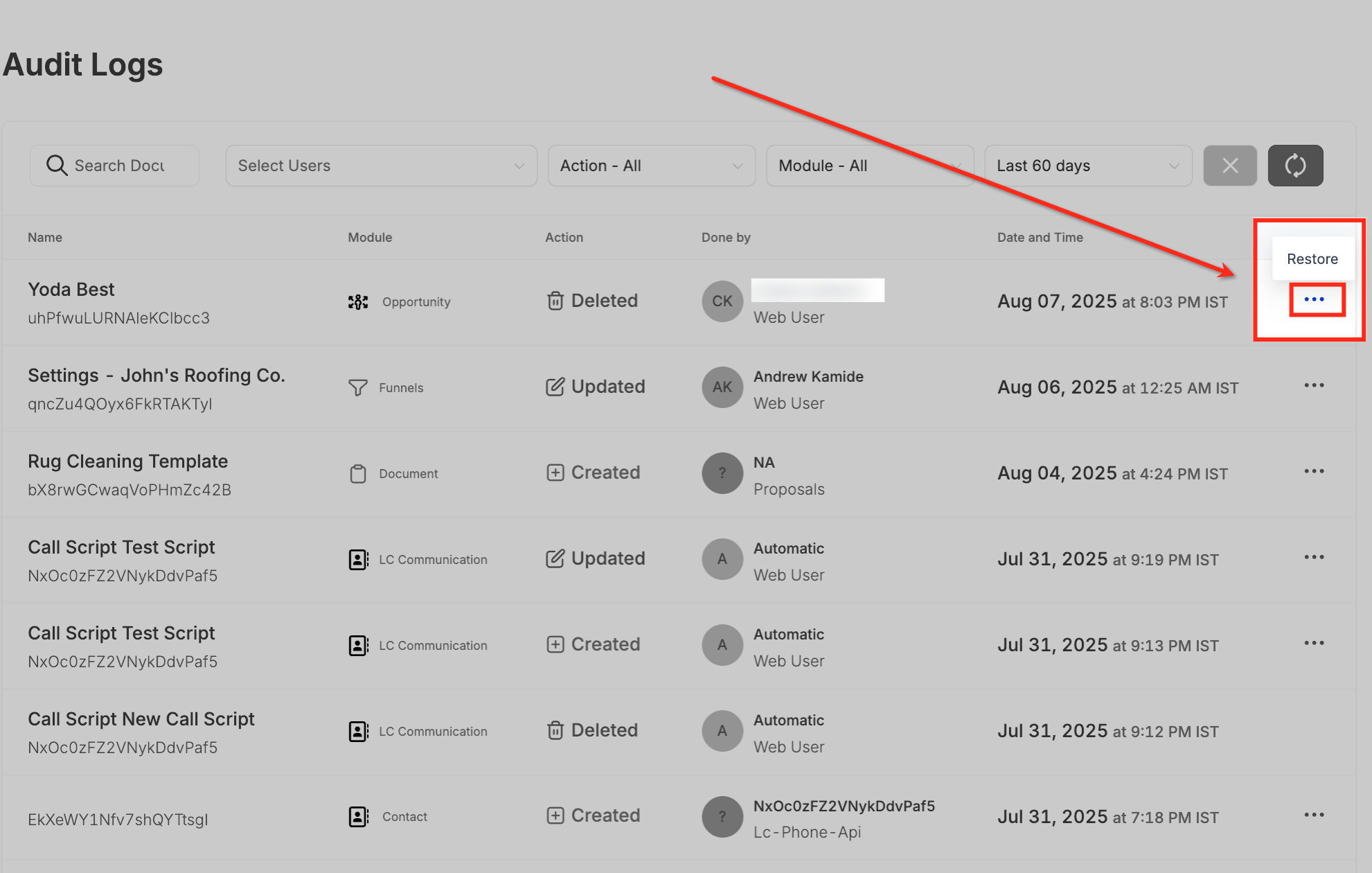
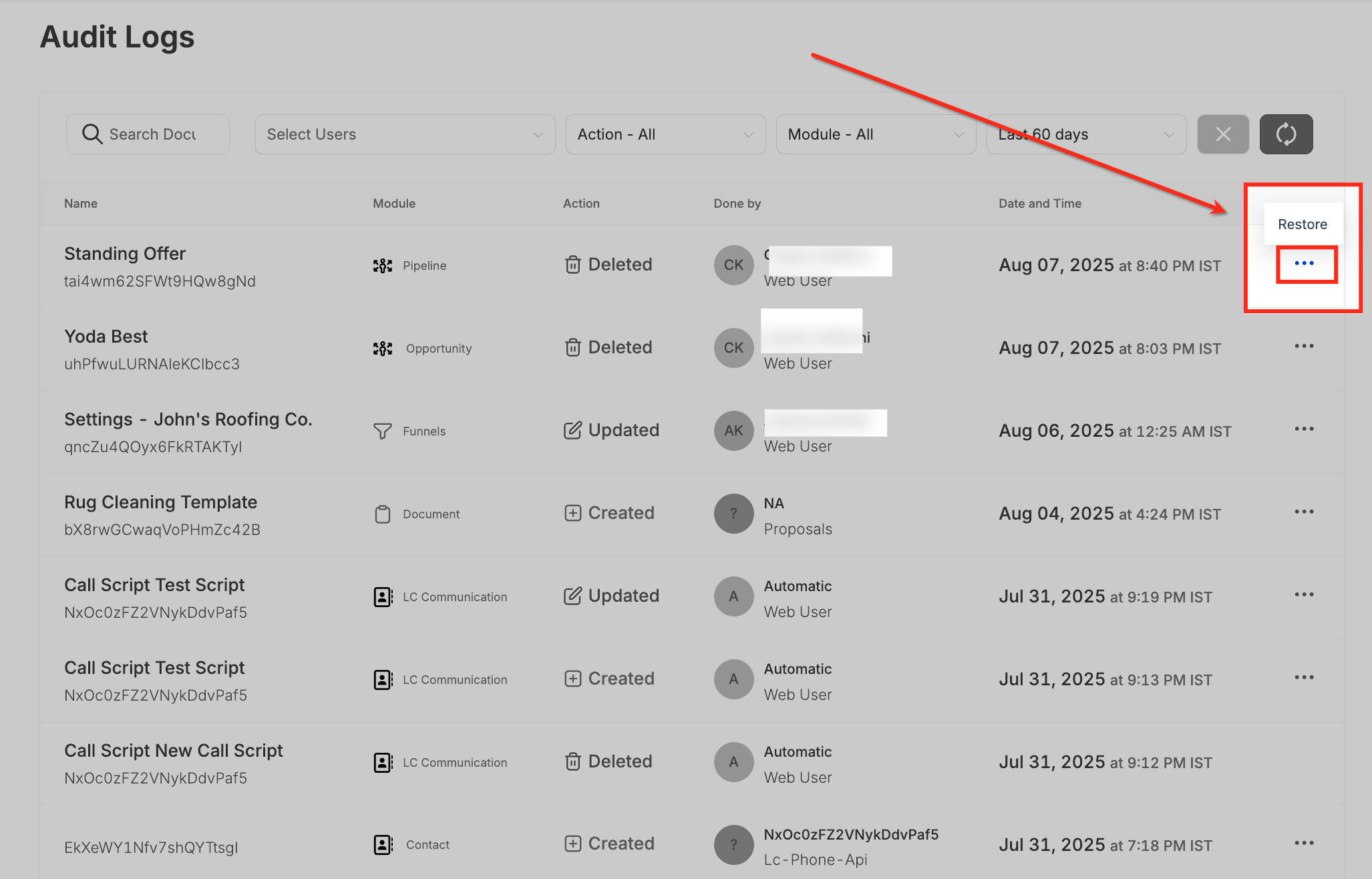
Restore via Audit Logs (Alternate Method)
- Click Settings in the bottom-left sidebar
- Scroll down and click Audit Logs
- Set the Action filter to "Deleted" and the Module filter to "Opportunity"
- This shows all enrollment opportunities deleted in the last 60 days, including who deleted them and when
- Find the opportunity you want to recover and click the three-dot menu on the right
- Select Restore to reinstate it to its original pipeline and stage
Quick Restore Shortcut
As an alternative to Audit Logs, click the three-dot menu at the top-right of the Opportunities page and select Restore Opportunities. This gives you quick access to recently deleted items.
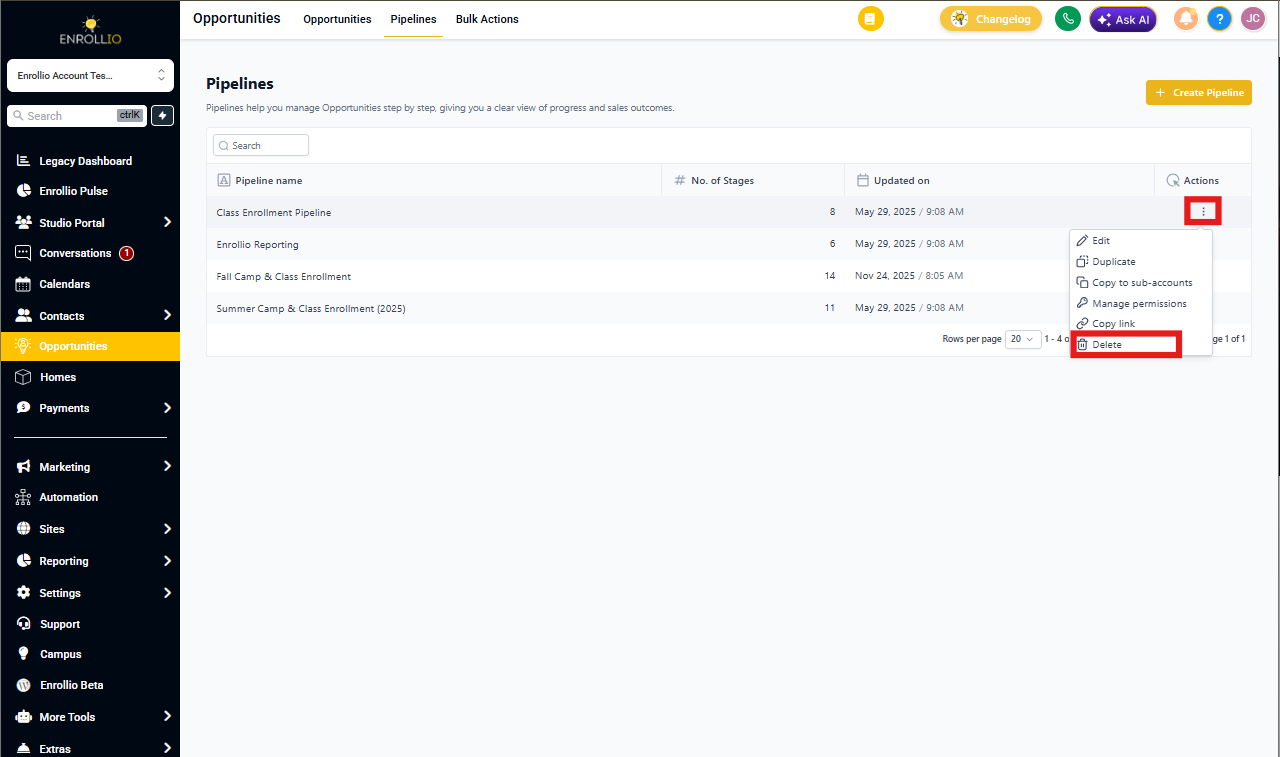
Deleting Enrollment Pipelines
- Click Opportunities in the left sidebar
- Click the Pipelines tab at the top
- This displays all enrollment pipelines in your account
- Click the trash icon next to the pipeline you want to remove
- Confirm the deletion—the pipeline and all associated stages and enrollment opportunities will be removed
Restoring Enrollment Pipelines
- Click Settings in the left sidebar
- Click Audit Logs to view all recorded activity
- Locate the deleted pipeline in the list
- Click the three-dot menu on the right side of the entry
- Choose Restore to bring back the pipeline, its stages, and all enrollment opportunities
Frequently Asked Questions
How long are deleted pipelines and enrollment opportunities recoverable?
Up to 60 days from the time of deletion.
Can I restore just one enrollment opportunity from a deleted pipeline?
No. You must restore the entire pipeline, which will also recover all its associated opportunities and stages.
Who can restore pipelines or enrollment opportunities?
Only Enrollio admins or account admins have permission to perform these actions.
What happens if I permanently delete a pipeline after 60 days?
After 60 days, the data is no longer recoverable from the system.
Is there a log of who deleted or restored a pipeline or opportunity?
Yes. The Audit Logs track all user actions, including who performed each delete or restore operation and when.