
Overview
You can now edit invoices even after families have made partial payments. Update invoice details, tuition items, payment schedules, and center information—without voiding or reissuing the invoice.
What This Feature Does
This feature lets you modify invoices after a payment has already been received. Whether you're adjusting payment terms, updating tax details, or adding a tuition item mid-enrollment, you can make changes directly to a partially paid invoice and keep everything accurate.
Key Benefits
Managing changing family needs is easier with flexible invoice editing:
- Edit invoice details like name, due date, terms, and notes
- Add, remove, or update tuition items—even create new ones on the fly
- Modify the invoice total, taxes, and center details
- Fully control payment schedules, including due dates and amounts
- Resend the updated invoice to parents without reissuing it
How to Edit a Partially Paid Invoice
Once an invoice has received a payment, it enters partially paid status. Here's how to update it:
- Go to the Payments section in your Enrollio Dashboard
- Open the invoice that shows Partially Paid status
- Click Edit next to any of these sections:
- Invoice Details: Update the invoice name, due date, terms, or notes
- Products: Add or remove tuition items, or create a new item instantly
- Amounts and Business Info: Adjust pricing, taxes, or center details
- Payment Schedule: Edit existing schedules or add/delete payment milestones
- Make your changes and click Save
- Optional: Click Resend Invoice to send the updated version to the family
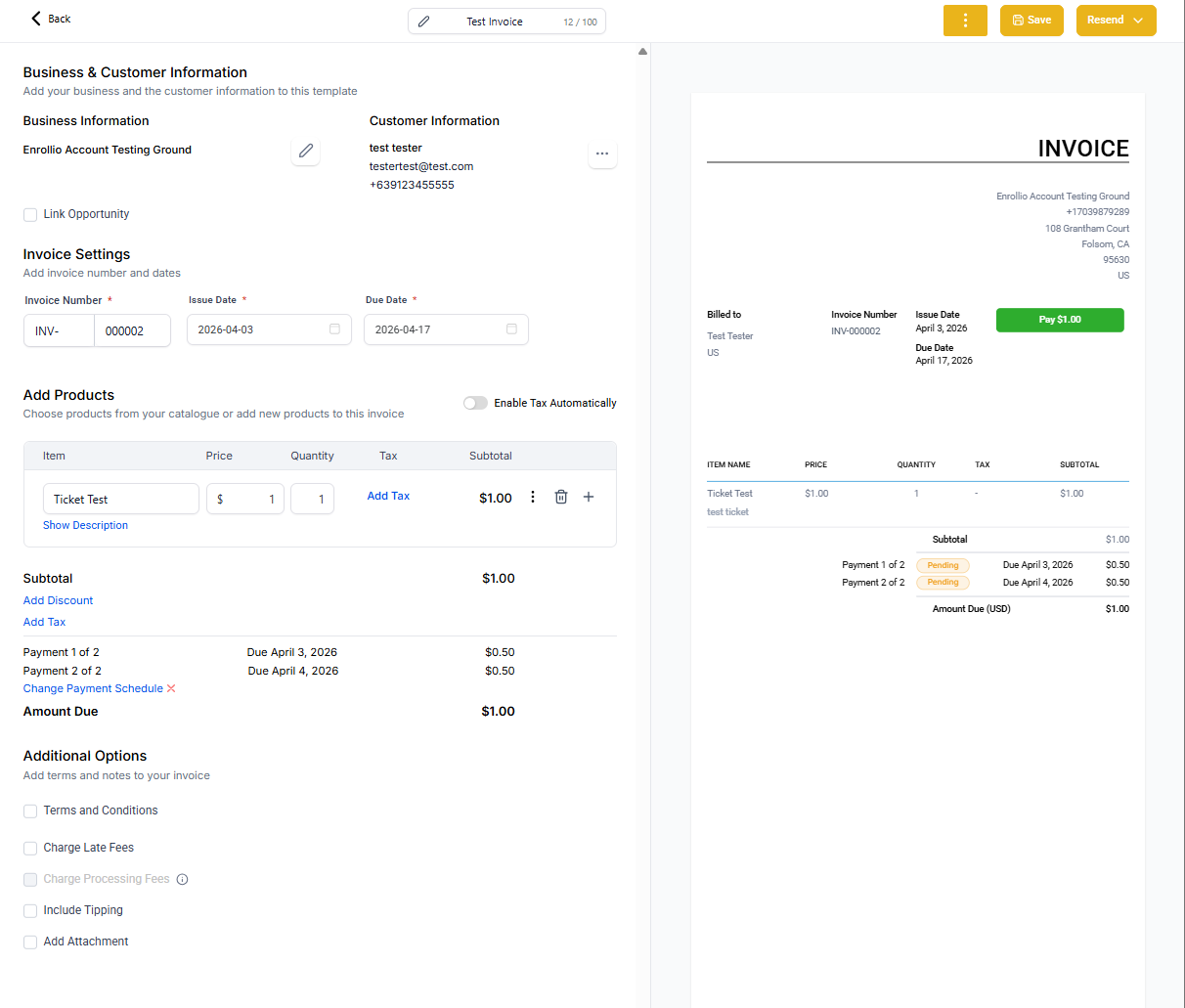
All updates appear immediately and maintain invoice continuity without requiring you to void and reissue.
What You Can Edit
Invoice Details
Make administrative updates without impacting payment records:
- Change invoice name
- Adjust the due date
- Modify terms and notes for clarity or updates
Product Management
Keep billing accurate by adjusting what's being invoiced—even after a payment:
- Add new tuition items or remove existing ones
- Update quantity, description, or unit price
- Create items on the fly as needed
Amounts and Business Information
Ensure accuracy by updating billing and tax-related info:
- Edit the invoice total or apply tax changes
- Update center details if needed for legal or communication purposes
Payment Schedule Management
Stay in sync with families' changing financial situations:
- Add, edit, or delete payment schedule entries
- Modify due dates and amounts within each milestone
- Restructure installment plans without recreating the invoice
Why This Matters for Your Center
Editing partially paid invoices brings major improvements to flexibility and billing accuracy:
- Adapt to Family Requests: Parents may need mid-enrollment updates or changes after their first payment
- Avoid Reissuing Invoices: Maintain clean records and reduce confusion by editing instead of starting over
- Real-Time Adjustments: Make changes on the fly without interrupting your billing or enrollment process
Frequently Asked Questions
Can I edit the invoice after it's fully paid?
No. This feature only applies to invoices in partially paid status.
Will editing the invoice affect payment records?
No, previous payments remain intact and unchanged. Only unpaid portions are updated.
Can I resend the invoice after editing?
Yes. After saving your changes, click Resend Invoice to send the updated version to the family.
Can I change the family on a partially paid invoice?
No. You cannot change the associated family once a payment has been made.
Will families see these changes immediately?
Yes. Once saved and resent, families will see the updated invoice details.
💡 Pro Tip
When you make changes to a partially paid invoice, send a quick message to the family explaining what changed and why. This keeps communication clear and builds trust.
Next Steps
- Open one of your partially paid invoices and explore the edit options
- Review your communication process to ensure families are informed when invoices are updated