
What to Do When Your Meta Account Is Disabled or Restricted
If your Meta (Facebook/WhatsApp Business) account has been banned or restricted, don't panic. Follow these steps to appeal the decision and get your account reinstated.
Submit an Appeal via Meta Business Manager
Meta provides a structured appeal process. Here's how to use it:
Step 1: Access the Account Quality Dashboard
- Go to https://business.facebook.com/accountquality
- Log in with your Meta Business account credentials
Step 2: Select Your Banned Account
- Click on the business asset that's been flagged or banned
- Review the reason Meta provided for the restriction
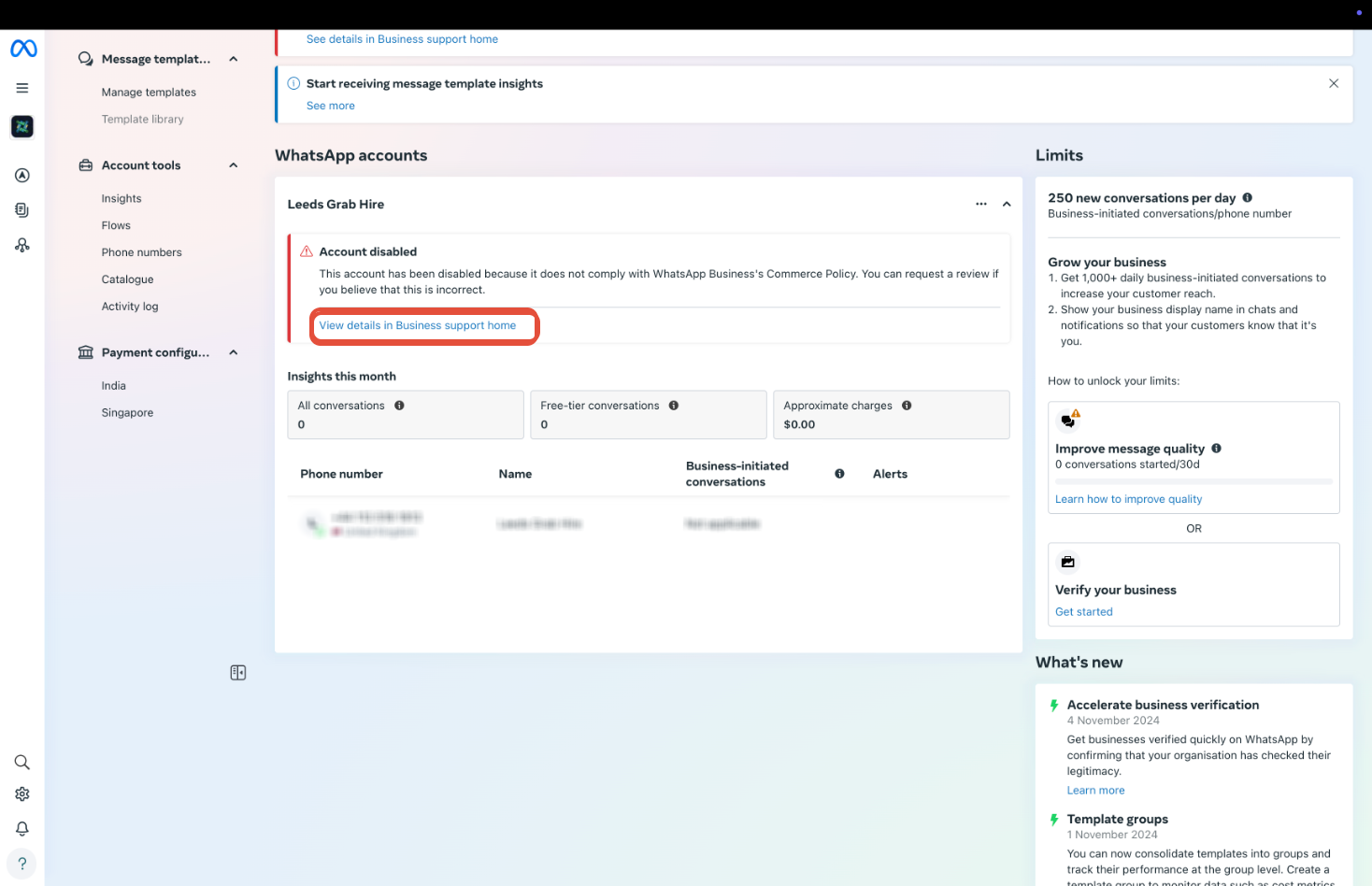
Step 3: Request a Review
- Click "View Details" next to the flagged asset
- Click "Request Review" (if the button is available)
- Fill out the appeal form completely and accurately
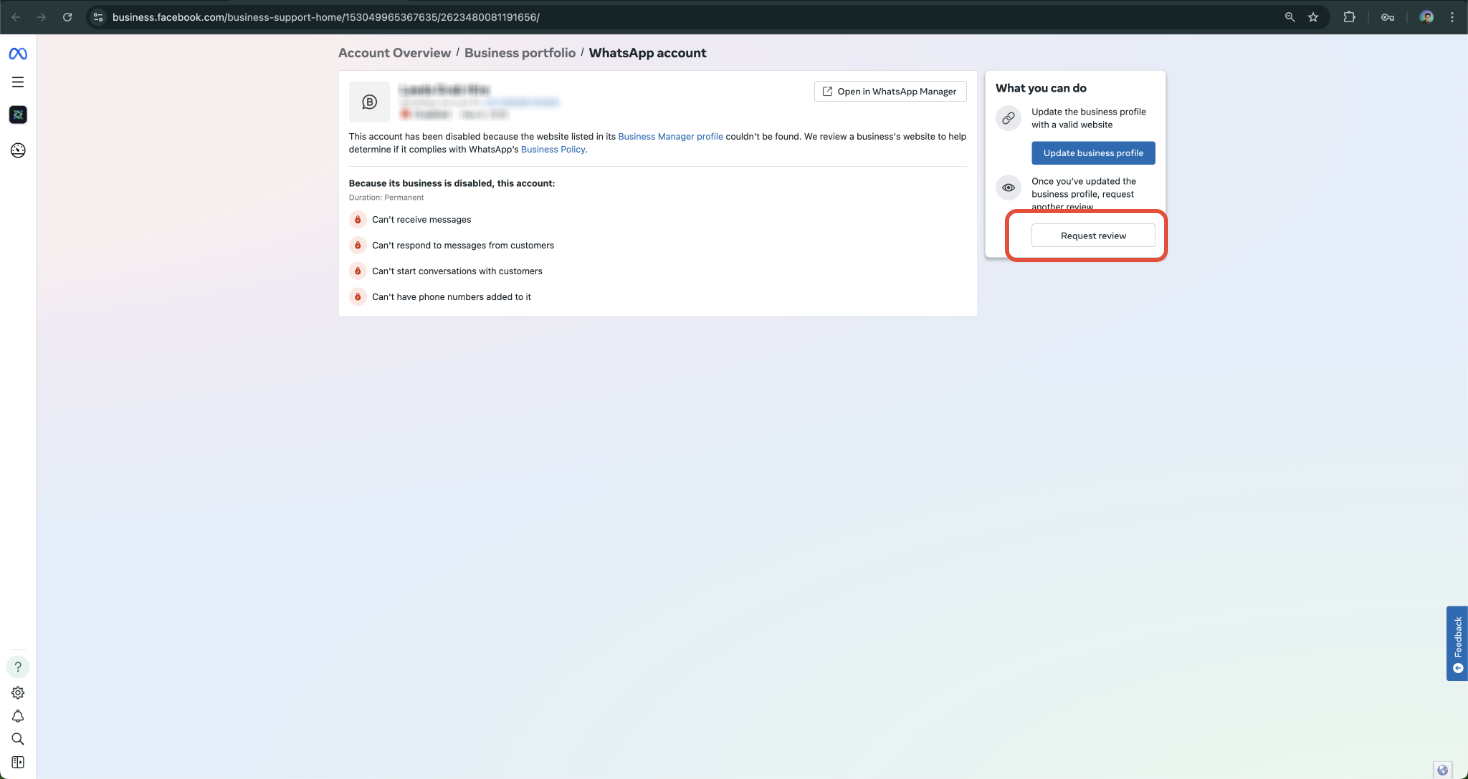
Step 4: Submit Required Documentation
Meta may ask you to provide:
- Valid business verification documents (government-issued license, tax ID, or utility bill)
- Proof of ownership for your domain name or phone number
- A clear explanation of your business and how you use Meta platforms
Appeal Template for WhatsApp Business Accounts
Use this template when submitting your appeal to Meta:
Dear Meta Business Support Team,
I am reaching out to appeal the recent restriction placed on our WhatsApp Business account. Our childcare business is committed to complying with all Meta and WhatsApp Business policies, and we believe this action may have been applied in error or due to a misunderstanding.
Please find below the details of our account:
- Business Name: [Your Business Name]
- Business Manager ID: [Your Business Manager ID]
- WhatsApp Phone Number: [Your WhatsApp Business Number]
- WABA ID (if known): [Your WhatsApp Business Account ID]
- Website: [Your Website URL]
We kindly request a thorough review of our account. If there are any specific actions required on our part to resolve this issue or verify compliance, we are happy to cooperate fully.
Thank you for your time and support. We look forward to resolving this matter quickly.
Sincerely,
[Your Name]
[Your Title]
Step 5: Wait for Meta's Response
Meta typically reviews appeals within a few business days. Avoid submitting multiple appeals — this can actually delay the review process.
How to Avoid Future Bans
Keep your WhatsApp Business account in good standing by following these best practices:
Only Send Approved Messages
Never send spam or unapproved promotional messages to parents. Always use Meta-approved WhatsApp message templates that you've created and submitted through Enrollio.
Complete Business Verification
Make sure your business verification status is complete and up to date in Meta Business Manager. This builds trust with Meta and reduces the risk of restrictions.
Monitor Your Quality Rating
Regularly check your phone number's quality rating:
- Go to WhatsApp Manager
- Click on your phone number
- Navigate to Settings
- Review your quality rating
Pro Tip: A low quality rating is often the first warning sign before an account gets restricted. If you see your rating drop, review your messaging practices immediately and stop any campaigns that might be causing issues.
Frequently Asked Questions
What should I do if my WhatsApp Business account gets banned?
Visit the Meta Account Quality dashboard immediately. Select the banned asset, click "View Details," and submit an appeal through the "Request Review" option.
What documents will I need to submit?
You may need valid business verification documents (tax ID, utility bill, business license), proof of domain or phone number ownership, and a clear explanation of how your childcare business uses WhatsApp.
How long does the appeal process take?
Appeals typically take a few business days to process. Don't submit multiple tickets — this can delay your review.
Can I prevent my account from being banned in the future?
Yes. Only send approved message templates, avoid spam behavior, complete your business verification, and regularly monitor your phone number's quality rating in WhatsApp Manager.
Can I still use Enrollio's messaging features if my WhatsApp gets banned?
Yes. While you work on reinstating your WhatsApp account, you can still communicate with families through Enrollio's built-in SMS and email features.