
What does this error mean?
This error appears during WhatsApp setup when the phone number you're trying to register is already linked to an existing WhatsApp account. WhatsApp allows a phone number to be active on only one account at a time.
To complete setup in Enrollio, you'll need to fully disconnect the number from any existing WhatsApp (consumer or business) account.
Common reasons this happens
- The number is currently active on the WhatsApp consumer app
- The number is linked to a WhatsApp Business App
- The number was previously used for WhatsApp and not properly deleted
- The number was recently migrated and is still in WhatsApp's cooldown period
How to resolve the issue
Step 1: Remove the number from the existing WhatsApp account
On the device where the number is currently active:
- Open WhatsApp or WhatsApp Business
- Go to Settings → Account
- Select Delete my account
- Confirm the phone number and complete the deletion
Important: Simply uninstalling the app won't work. You must delete the account from WhatsApp settings.
Step 2: Wait for WhatsApp to release the number
After deleting the account, wait up to 3 minutes for WhatsApp to fully release the number. In some cases, it may take slightly longer depending on WhatsApp's systems.
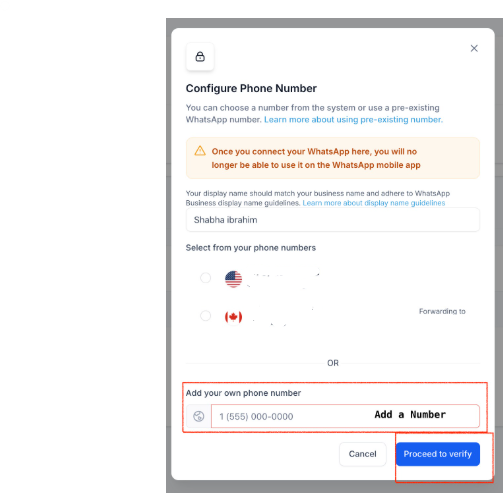
Step 3: Retry setup in Enrollio
- Return to the WhatsApp setup page in Enrollio
- Re-enter the phone number
- Request and verify the OTP again
If the error still persists
Try these additional steps:
- Ensure the number is not active on any other device
- Confirm the number isn't tied to another Meta Business Manager or WhatsApp Business Account
- Wait 10–15 minutes and retry if the number was recently deleted
If the issue continues, contact Enrollio support with:
- Phone number (with country code)
- Screenshot of the error
- Business Manager ID (if applicable)
Best practices to avoid this error
Pro tip: Use a dedicated phone number for your childcare center's WhatsApp messaging. This prevents conflicts with personal or other business accounts.
- Always use a new or unused phone number for WhatsApp setup
- Avoid reusing numbers that were recently connected to WhatsApp
- Don't attempt setup while the number is still active on any WhatsApp app