
WhatsApp Automation: Click-to-WhatsApp Ads & Facebook Page CTA
Turn every ad click into an instant conversation. This guide shows you how to automatically engage prospective families the moment they tap your WhatsApp ad or Facebook page button—no manual monitoring needed.
What is the WhatsApp Click-to-Chat Automation?
This automation triggers instantly when someone reaches out through your Meta Click-to-WhatsApp ad or the WhatsApp button on your Facebook Page. When a parent taps your ad or page call-to-action, Enrollio receives their WhatsApp message, opens a conversation, and launches your pre-built automation—meeting families while their interest is high.
You'll shorten your enrollment cycle and maximize the return on every marketing dollar.
Why Use WhatsApp Automations for Childcare Marketing?
Speed and scale are everything when families are comparing centers. Here's what this automation unlocks:
- Instant Family Engagement: Parents get an immediate reply, keeping them in the conversation instead of moving to the next center
- Cost-Efficient Messaging: Respond within 24 hours and unlock 72 hours of free messaging—both freeform and template messages
- Seamless Follow-Up: Automatically tag families, assign to enrollment pipelines, and nurture leads without manual tasks falling through the cracks
How the Click-to-WhatsApp Trigger Works
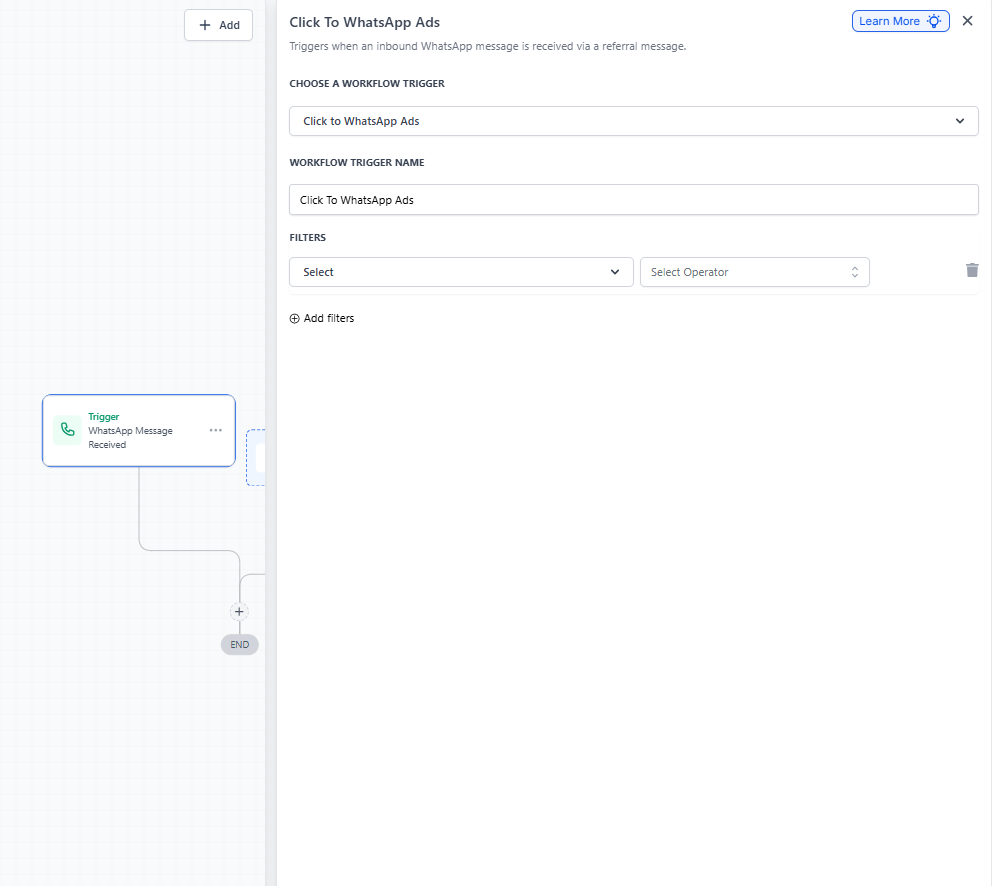
This trigger detects every inbound WhatsApp message that comes from a Meta Click-to-WhatsApp ad or your Facebook Page's WhatsApp button.
It launches your automation the moment the message arrives, maintains context by capturing ad and campaign information, and bridges the gap between your ad spend and personalized family engagement.
Filter by Ad or Post
Filters let you control exactly which ad interactions trigger your automation, giving you campaign-specific control without building duplicate automations.
- Ad ID / Post ID / URL Filters: Restrict the trigger to one specific promotion
- Headline & Source-Type Filters: Narrow activations by ad headline or Meta placement
- Campaign Segmentation: Route families to different enrollment paths based on which ad they clicked
How to Set Up Your WhatsApp Automation
This automation activates when a prospective family using an Android or iOS device messages you through:
- A Click-to-WhatsApp Ad
- Your Facebook Page Call-to-Action (CTA) button
This interaction opens a free messaging window as long as you respond within 24 hours.
Step 1: Add the WhatsApp Trigger
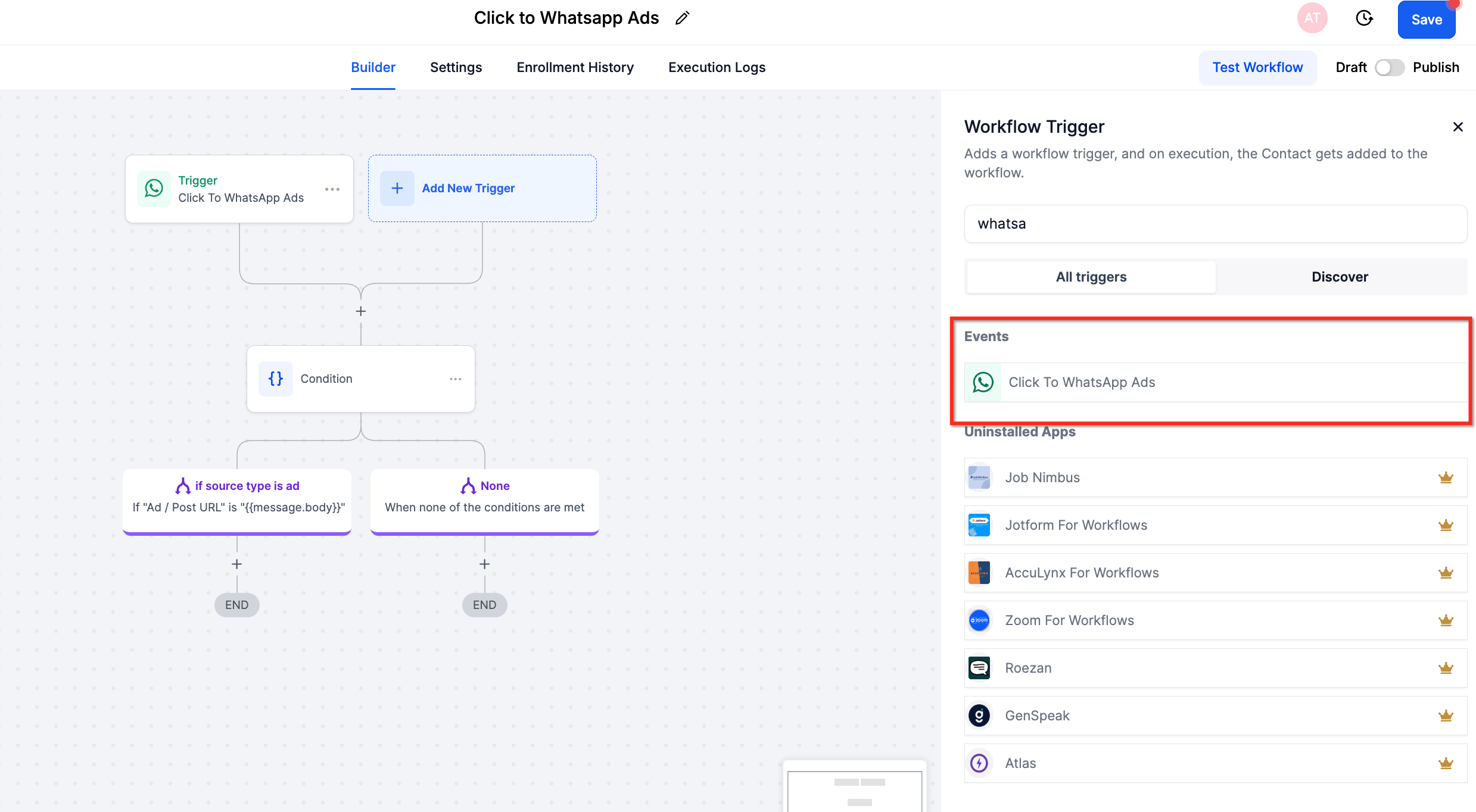
- Navigate to Automations in your Enrollio dashboard
- Click Add New Trigger
- Select Click to WhatsApp Ads
Step 2: Configure Your Filters (Optional)
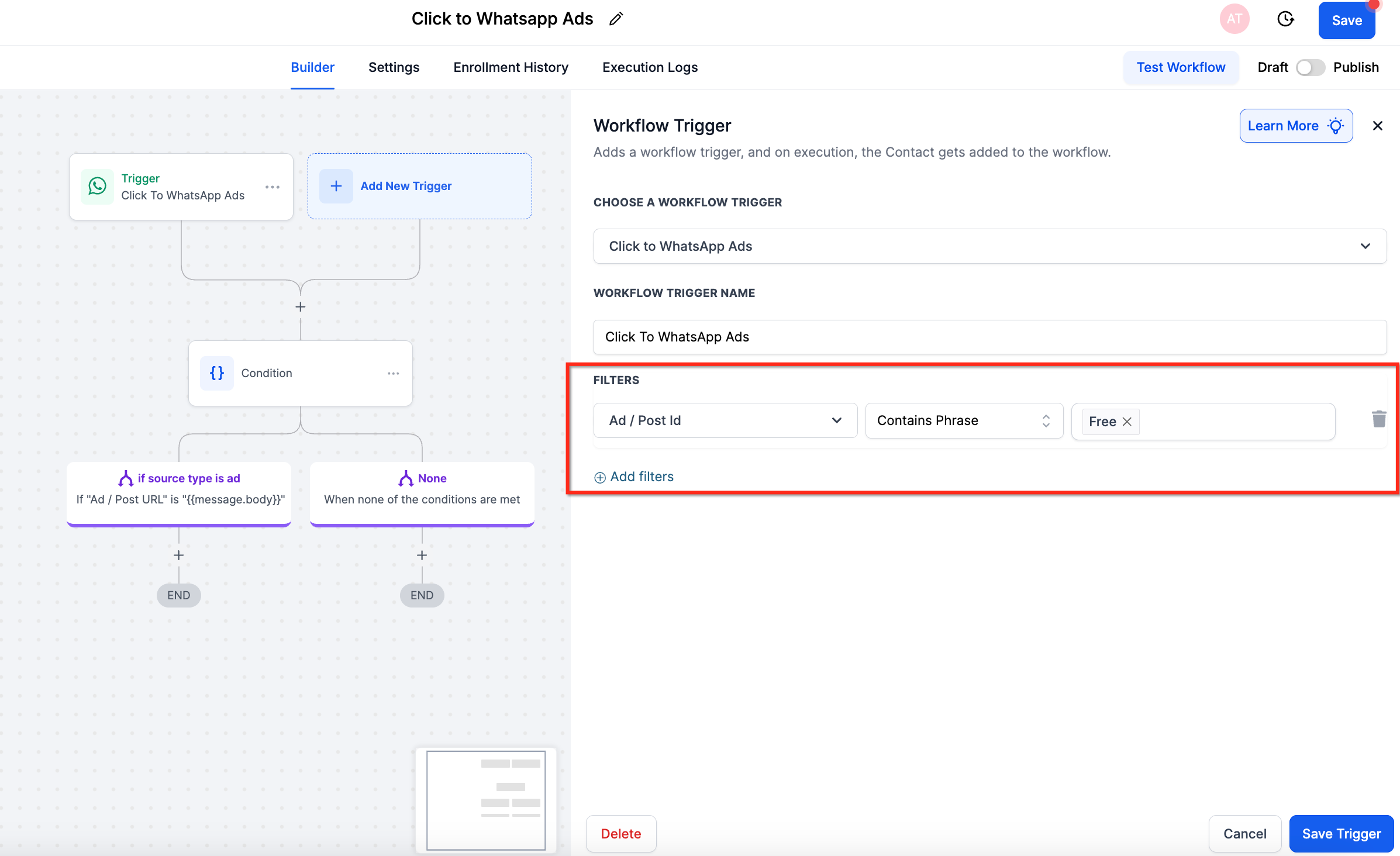
Apply filters to control which campaigns activate this automation:
- Click Add Filters
- Choose from: Ad ID, Post ID, URL, Headline, or Source Type
- Enter the specific values for your campaign
Note: One missed filter can prevent your automation from firing. Test with a live ad before going full scale.
Step 3: Add Your Actions
Build the automation you want to happen when families message you:
- Send WhatsApp Message (instant welcome + next steps)
- Add Tag ("WhatsApp Lead" or campaign name)
- Assign to Enrollment Pipeline Stage
- Create Task for your admissions team
- Send internal notification
Step 4: Save and Activate
Click Save to activate your automation. Test it by clicking your own ad to confirm messages are sending correctly.
Understanding Free Entry Point Messaging
A free entry point conversation opens when a family using Android or iOS messages you via a Click-to-WhatsApp ad or Facebook Page CTA button and you respond within 24 hours.
What Happens When You Respond Within 24 Hours
- The free conversation starts as soon as your message is delivered
- It lasts 72 hours from delivery
- You can send unlimited template and freeform messages at no charge
- All other open conversations with that family close automatically
- No new conversations will open until this 72-hour window expires
What Happens If You Miss the 24-Hour Window
If you don't respond within 24 hours, no free entry point conversation opens. You'll need to use a template message to re-engage the family, which opens a standard marketing, utility, or authentication conversation based on your template category—and you'll be charged for those messages.
Example Timeline
A parent messages you via a Click-to-WhatsApp ad at 10:00 AM. You respond with a template message at 10:00 PM the same day:
- Free entry point conversation: Starts at 10:00 PM and lasts 72 hours
- Template messages: Free during the entire 72-hour window
- Freeform messages: You can send these until 10:00 AM the next day (24 hours from initial contact). After that, the customer service window closes unless the parent messages you again
Note: The 24-hour customer service window is independent of the 72-hour free entry point conversation. If the parent messages you again, a new 24-hour window opens for freeform messages.
Frequently Asked Questions
What is the Click-to-WhatsApp automation trigger?
This trigger activates an automation when a family clicks a Click-to-WhatsApp ad or your Facebook Page CTA button and sends you a message using their Android or iOS device. It's designed to capture high-intent prospective families the moment they express interest.
How do I set up the Click-to-WhatsApp trigger?
Follow these steps:
- Go to Automations → Add New Trigger → Click to WhatsApp Ads
- Apply optional filters (Ad/Post ID, URL, Headline, Source Type) to target specific campaigns
- Add your desired actions (send message, tag family, assign to enrollment pipeline)
- Save and test with a live ad click
What are Free Entry Point Conversations?
A Free Entry Point Conversation is a special WhatsApp session that opens when:
- A family clicks on a Click-to-WhatsApp ad or Facebook CTA
- You respond within 24 hours
When this happens, the conversation is free (no messaging fees), lasts 72 hours from when your message is delivered, and all other conversations with that family close until this session expires.
How are WhatsApp conversations charged?
If you respond within 24 hours: A free entry point conversation opens and you won't be charged for any messages (including templates) during the 72-hour period.
If you respond after 24 hours: No free session opens and you'll need to use a paid template message to re-engage the family.
Can I send both template and freeform messages?
Yes, but timing matters:
- Within 24 hours of the family's message: You can send freeform (conversational) messages
- After 24 hours: Only template messages are allowed unless the family sends another message, which resets the 24-hour customer service window
During the 72-hour free entry point conversation, you can send template messages at any time at no charge.