
Overview
If you're seeing duplicate parent records created when families message you on WhatsApp—even though you've disabled duplicate contacts in your settings—this guide will help you fix it.
What You'll See
- Multiple records for the same parent appearing in your contacts
- "Allow Duplicate Contact" is turned off in your Business Profile settings
- The problem keeps happening anyway
Why This Happens
Enrollio isn't configured to check phone numbers when looking for existing parent records. Without this secondary check, the platform can't recognize that an incoming WhatsApp message belongs to an existing family.
How to Fix It
- Click Settings in your Enrollio dashboard
- Select Business Profile
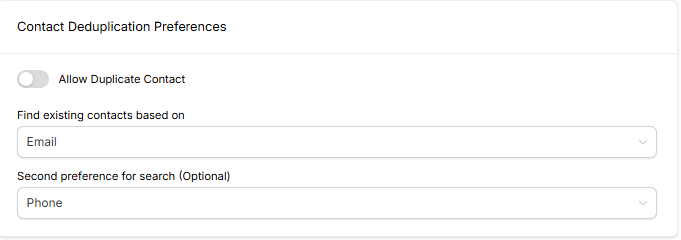
- Scroll to Contact Duplicate Preference
- Under Second Preference for Search (Optional), select Phone
- Save your changes
What This Does
When you set phone number as the secondary search preference, Enrollio will check both email and phone number before creating a new parent record. This prevents duplicates when families reach out via WhatsApp.
Still Seeing Duplicates?
If you're still experiencing issues after updating this setting, reach out to Enrollio support. We'll help you clean up any existing duplicates and ensure your contact matching is working correctly.