
Your WhatsApp Business display name is how your childcare center's name appears when you message parents. Once approved, you can change it anytime. This guide walks you through the process.
Who This Guide Is For
This guide is for childcare centers using the WhatsApp Business Platform. If you're unsure whether you're using the WhatsApp Business Platform or the WhatsApp Business App, review the differences first before proceeding.
Before You Begin
Make sure you have the following in place:
- ✔️ A business portfolio created in Meta Business Manager
- ✔️ An active WhatsApp Business Platform account set up through a Business Solution Provider (BSP)
- ✔️ A connected phone number linked to your WhatsApp Business account
- ✔️ Your business qualifies for a display name review (learn more about eligibility)
How to Change Your Display Name
For Regular Business Accounts
Follow these steps to update your display name:
- Go to Meta Business Manager and select your business
- Click on WhatsApp Manager
- Select the account where you want to update the display name
- In the left menu, click Phone Numbers
- Under the Name column, hover over your current display name and click the pencil icon
- In the Edit Display Name section, enter your new display name
- Click Next to submit the change for approval
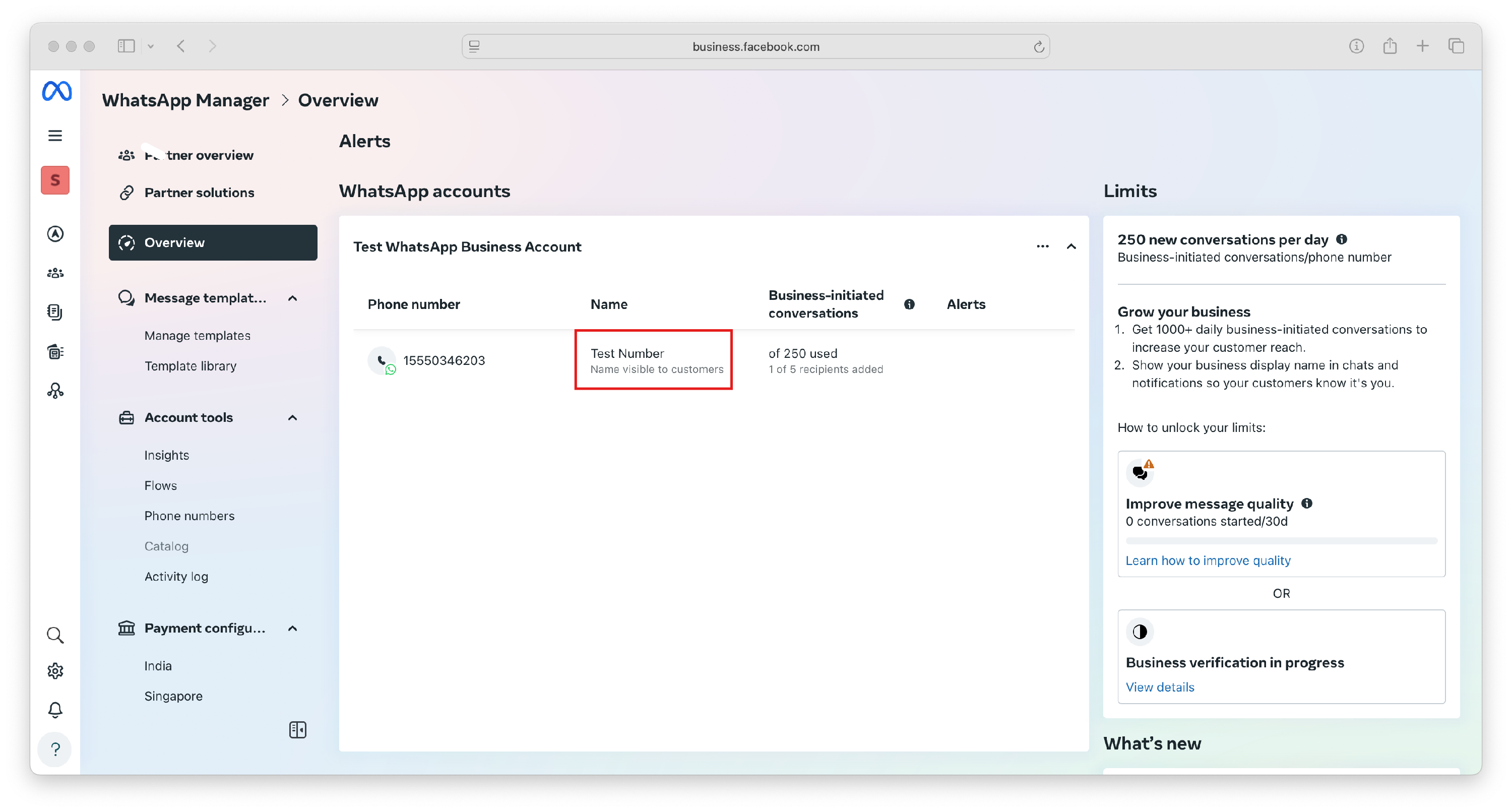
For Official Business Accounts (OBA)
If your center has an Official Business Account (indicated by a blue verification badge), contact WhatsApp Direct Support to request a display name change.
After Your Display Name Is Approved
Once approved, you need to update your registration using the appropriate method:
- Cloud API Users: Register the number using the Registration endpoint (no certificate needed)
- On-Premises API Users: Register the new display name using the Account endpoint
What to Expect
If your business is NOT verified: Your display name will be confirmed immediately, and the certificate will be available for download.
If your business IS verified: Your display name will show a "Pending Review" label under Certificate in the Phone Numbers section. Once approved, a "View" button will appear so you can download the certificate.
Important Things to Know
Change Limits: You can change your display name up to 10 times within a 30-day period. After 30 days, a new cycle begins with the same limit.
Certificate Expiration: The new display name certificate is only valid for 14 days. If it expires, you'll need to resubmit your display name for approval.
Getting Started: Display name approval is no longer required to start using WhatsApp Business. However, approval is necessary if you want your center's name displayed instead of your phone number.
Frequently Asked Questions
Who can change their WhatsApp Business display name?
Any childcare center using the WhatsApp Business Platform can change their display name. The process differs based on your account type — regular business accounts update through WhatsApp Manager, while Official Business Accounts must contact support.
How long does approval take?
The approval process typically takes a few minutes to a few hours, though in some cases it may take longer.
Can I change my display name multiple times?
Yes, you can change your display name up to 10 times within a 30-day period. Once you reach this limit, wait for a new 30-day cycle to begin.
What if my certificate expires?
The display name certificate is only available for 14 days. If it expires, submit your display name for approval again.
Do I need approval to start using WhatsApp?
No, display name approval is no longer required to get started. However, you'll need approval if you want your center's name to appear instead of your phone number when messaging parents.