
Enrollio lets you automatically reply to comments on your Facebook posts — but what if you want each reply to feel personal and relevant to what the parent actually said?
With Enrollio AI, you can generate custom responses tailored to each comment instead of using the same canned reply every time.
How It Works
Instead of pre-writing every possible response, you give Enrollio AI instructions on how to respond. The AI reads the parent's comment and crafts a reply that matches your tone and answers their question.
Setting Up AI-Powered Comment Replies
Step 1: Create Your Automation
- Go to Automations in your Enrollio dashboard
- Create a new automation with the trigger: Facebook - User comments on a post
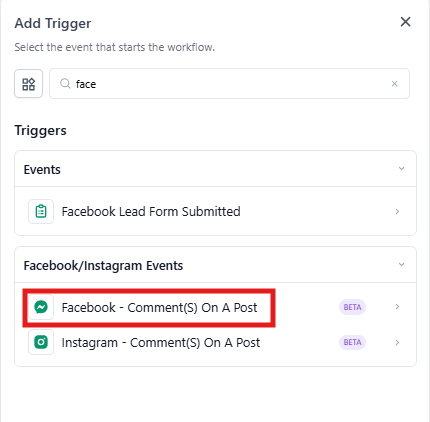
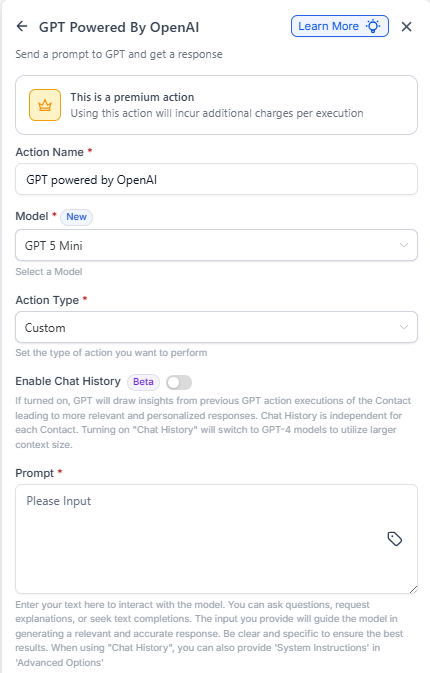
Step 2: Add the Enrollio AI Action
- Click Add Action
- Select Enrollio AI powered by OpenAI
- Set the Action Type to Custom
- Write your prompt — this tells the AI how to respond
Example prompt:
"You are a friendly childcare center representative. Read the comment below and write a helpful, warm response that answers their question. Keep it under 50 words and invite them to schedule a tour if appropriate."
- In the prompt field, click the custom value picker
- Select Facebook Comment Body — this inserts the actual comment text
- Save the action
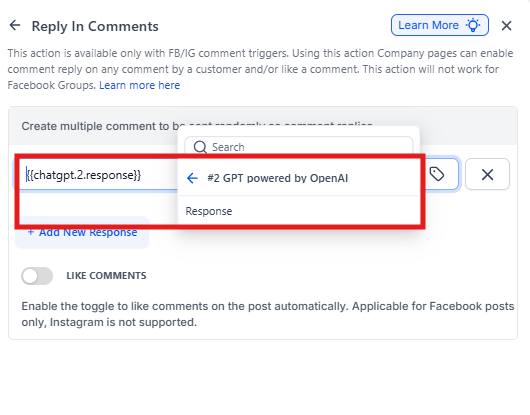
Step 3: Add the Reply Action
- Click Add Action again
- Select Respond on Comment
- In the response field, click the custom value picker
- Select the AI response from the previous step
- Save your automation
Pro Tips
💡 Be specific in your prompt: Tell the AI your center's tone (professional, playful, warm), any policies to mention, and when to offer a tour booking link.
💡 Test first: Leave a test comment on one of your posts to see how the AI responds before going live.
💡 Works for Instagram too: Use the same setup with the Instagram - User comments on a post trigger.
Why This Matters
Parents scrolling Facebook expect quick, personalized responses. AI-powered replies let you:
- Respond instantly, even outside business hours
- Match each reply to the parent's specific question
- Maintain a consistent, professional tone
- Free up your staff from monitoring social media 24/7
The result? More engaged families and more tour bookings from your social media presence.