
If your Facebook Lead Ads integration has stopped working
When your Facebook Lead Ads suddenly stop flowing into Enrollio, it's usually due to an expired access token. This happens when Facebook requires you to reconnect your account — typically after a password change, security update, or just because the token has reached its expiration date.
Don't worry — this is a quick fix.
How to reconnect your Facebook integration
- Go to Settings in your Enrollio account
- Click Integrations in the left menu
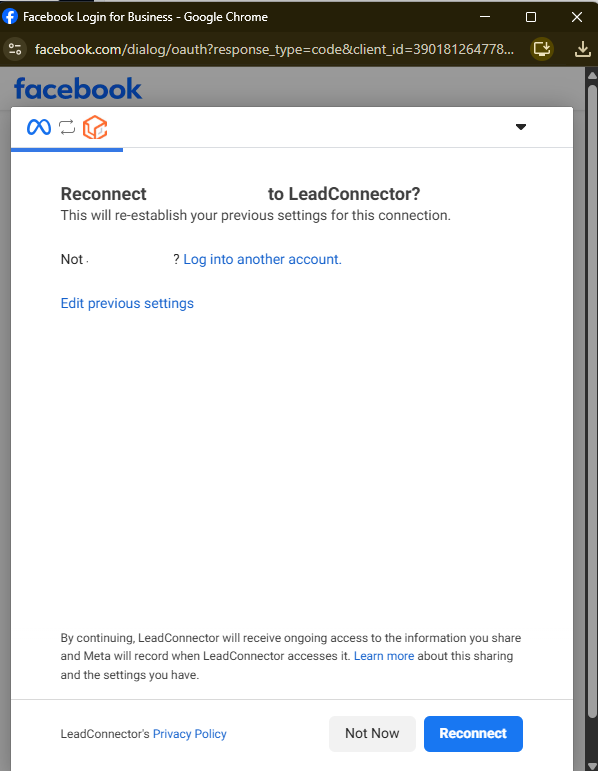
- Find Facebook and click Reconnect
- Log in to Facebook when prompted and grant permissions
- Confirm your Facebook pages are connected
Test your connection
After reconnecting, submit a test lead through one of your Facebook Lead Ads to make sure new prospective families are flowing into Enrollio correctly.
Pro Tip: Set a recurring calendar reminder every 60 days to check your Facebook integration status. This helps you catch token expirations before they interrupt your lead flow.
Still having issues?
If reconnecting doesn't solve the problem, check these common issues:
- Facebook page permissions: Make sure you're an admin on the Facebook page running the ads
- Lead form setup: Verify your lead form is still active in Facebook Ads Manager
- Automation settings: Confirm your automation that processes Facebook leads is turned on
If leads still aren't coming through, contact Enrollio support — we'll help you troubleshoot.