
Facebook Lead Ads Integration & Troubleshooting Guide
The Facebook Lead Ads integration lets you collect interested families directly from Facebook and automatically add them to Enrollio. When parents fill out a lead form on Facebook, their information flows straight into your platform—no manual data entry required.
This means you can start following up with prospective families immediately through calls, texts, or email automations, all from one place.
What's Covered in This Article
- What is the Facebook Lead Ads integration?
- Who should use this integration?
- Key benefits for childcare centers
- Requirements before you start
- Supported custom fields
- How to connect Facebook Lead Ads to Enrollio
- Troubleshooting common issues
What is the Facebook Lead Ads Integration?
Facebook Lead Ads integration connects your Facebook advertising directly to Enrollio. When prospective families click on your ad and fill out a form, their contact information automatically appears in your Enrollio account as a new prospective family.
This eliminates the manual step of copying information from Facebook into your system and ensures you never miss a lead.
Who Should Use This Integration?
This integration is perfect for childcare centers that:
- Run Facebook ads to attract new families
- Want to respond to inquiries faster
- Need to reduce manual data entry
- Want all family information in one organized place
- Run small teams without dedicated marketing staff
If you're already using Enrollio to manage tours and enrollments, adding Facebook Lead Ads creates a seamless path from ad click to enrollment.
Key Benefits for Childcare Centers
Automatic Lead Capture
Prospective families flow directly from Facebook into Enrollio. No more logging into Facebook, downloading spreadsheets, or copying information by hand.
Faster Follow-Up
The moment a parent submits their information, you can trigger welcome texts, schedule tour invitations, or assign the family to a staff member—all automatically.
Better Lead Quality
Track which Facebook ads bring in families who actually enroll. See the full journey from first ad click to signed enrollment agreement in one place.
Organized Family Data
Every prospective family from Facebook appears in your enrollment pipeline with complete contact information, making follow-up simple and organized.
Higher Conversion Rates
When you can respond to inquiries within minutes instead of hours or days, you're more likely to book tours and fill open spots.
Requirements Before You Start
Before connecting Facebook Lead Ads to Enrollio, make sure you have:
Facebook Page Access
You need admin access to the Facebook page where you run ads. If someone else manages your page, ask them to give you admin permissions. Learn how to add page admins on Facebook.
Ownership Match
The same Facebook user should own both the page and the ad account. For business-level integrations, this is required. More on ad account roles.
Proper Permissions
You need admin or manager permissions on both the Facebook page and ad account. You also need Lead Access Permission to pull lead data into Enrollio (this is a Facebook requirement). See Facebook page roles.
Ad Account Connection
Verify your Facebook page is connected to the correct ad account. Go to your ad account settings and check the connected page. Navigate ad account settings.
Business Manager Access
Enrollio needs access to your Facebook Business Manager and the business page where you run lead ads.
If you use the New Pages Experience:
- Open Business Manager
- Click Users → People in the left navigation
- Find the person who will integrate the page with Enrollio
- Click their name and verify they have Admin or Employee access
- If they're not listed, add them as a user first
Note: The Business Manager role is different from the Page Role. The person connecting Enrollio must be an admin of both.
Pro Tip: The new Pages experience isn't available for all pages yet. Some may still use the classic Pages experience. Learn about classic Pages.
Supported Custom Fields
When you create custom fields in your Facebook Lead Ad form, make sure they match these supported field types in Enrollio:
- TEXT — for names, addresses, etc.
- LARGE_TEXT — for longer responses or comments
- NUMERICAL — for numbers like age or number of children
- PHONE — for phone numbers
- MONETARY — for budget information
- SINGLE_OPTIONS — for single-choice questions
- DATE — for desired start dates or birthdays
- DROPDOWN — for dropdown selections
- RADIO OPTIONS — for radio button choices
- CHECKBOX — for multiple selections
When building your lead ad form in Facebook, use these field types to ensure information maps correctly into Enrollio.
How to Connect Facebook Lead Ads to Enrollio
Important: Only the user who completes this integration will be able to see the connected Facebook page in Enrollio's page dropdown. They must be an admin of the Facebook page.
Step 1: Access Integration Settings
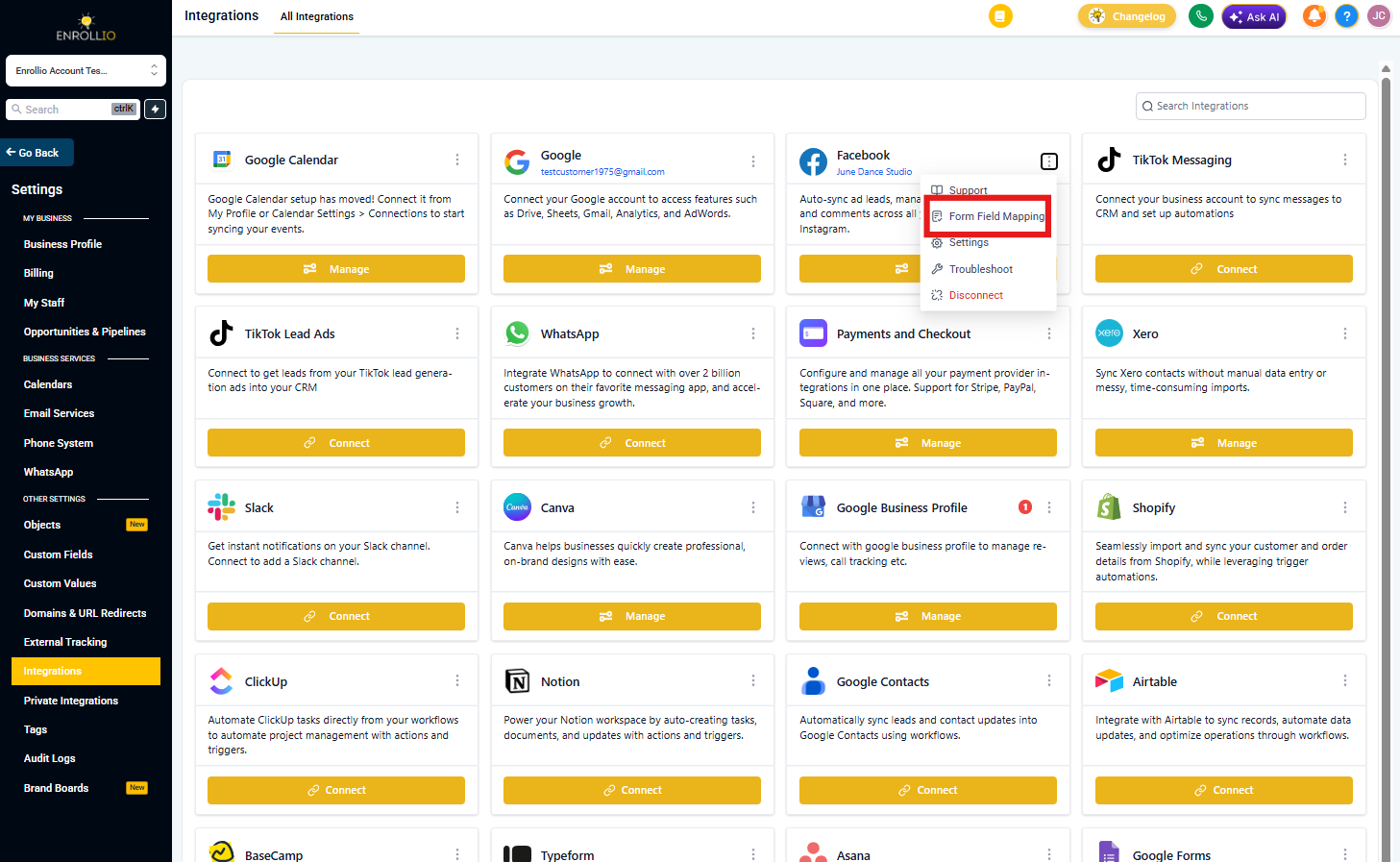
- In Enrollio, click Settings
- Click Integrations
- Find Facebook Form Field Mapping
Step 2: Connect Your Facebook Account
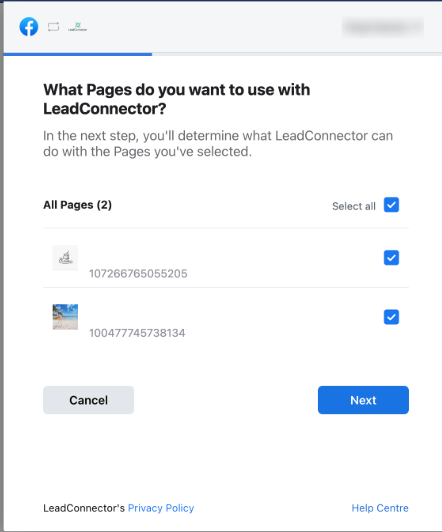
- Click Connect Facebook
- Log in to Facebook when prompted
- Grant Enrollio the requested permissions
- Select the Facebook page that runs your lead ads
Step 3: Map Your Lead Form Fields
- Select the lead form you created in Facebook Ads Manager
- Match each Facebook form field to the corresponding Enrollio field
- Verify a blue checkmark appears next to the form name when mapping is complete
- Click Save
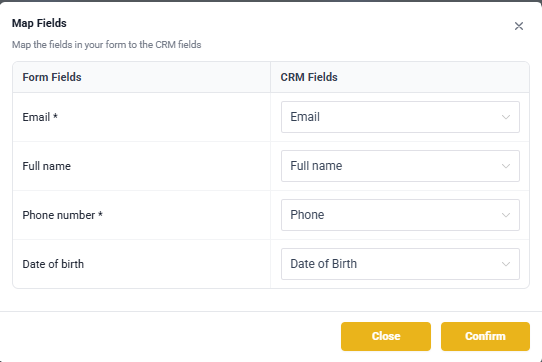
Pro Tip: Map parent name, phone number, and email at minimum. You can add optional fields like desired start date, number of children, or specific program interest to route leads more effectively.
Troubleshooting Common Issues
Why Aren't My Lead Ads Appearing in Enrollio?
If leads from Facebook aren't showing up in your account, check these items:
1. Verify You're an Admin
Confirm you have admin access to the Facebook Business Manager. How to add an admin.
2. Check the Correct Form is Selected
- Go to Facebook Ads Manager
- Find your active lead ad
- Note which lead form it's using
- In Enrollio, go to Settings → Integrations → Facebook Form Field Mapping
- Verify the same form is selected and has a blue checkmark
3. Test Your Form Mapping
Submit a test lead through your Facebook ad to confirm the connection works. The test lead should appear in Enrollio within a few minutes.
Facebook Token Has Expired
Facebook access tokens expire periodically for security. When this happens, your leads stop syncing.
How to fix:
- Go to Settings → Integrations → Facebook Form Field Mapping
- Click Reconnect Facebook
- Log in and reauthorize Enrollio
- Verify the blue checkmark reappears next to your form
Your lead sync will resume immediately.
Common Facebook Connection Errors
Page Quality Issue
Facebook may restrict lead ads if your page has quality issues. Check your page quality score in Facebook Business Manager and address any violations.
Permission Issue
This means you don't have the required permissions on the Facebook page or ad account. Ask the page owner to grant you admin access and Lead Access Permission.
Instagram Connection/Messages
If you're also using Instagram lead ads, make sure your Instagram account is properly connected to your Facebook page.
To verify Instagram connection:
- Go to your Facebook Business page
- Click Settings
- Click Instagram in the left menu
- Verify your Instagram account is connected
Messenger/Instagram Not Syncing All Messages
Enrollio syncs lead form submissions, not ongoing message conversations. If you're expecting message threads to appear, note that only the initial lead form data transfers to Enrollio.
Missing Pages
If you don't see your Facebook page in the Enrollio dropdown:
- Verify you're an admin of that page
- Log out of Enrollio and Facebook, then reconnect
- Check that the page is active (not archived or deleted)
- Ensure you granted all permissions when connecting
Need More Help?
If you've worked through these troubleshooting steps and leads still aren't syncing, contact Enrollio support with:
- Your Facebook page name
- The name of the lead form you're trying to connect
- Screenshots of your Facebook Ads Manager and Enrollio integration settings
- Any error messages you're seeing
We'll help get your Facebook leads flowing into Enrollio so you can focus on enrolling families instead of managing spreadsheets.