
Manage Comments in Social Planner
Manage comments on your social media posts directly from Social Planner! You can view and respond to Facebook, Instagram, and LinkedIn comments without leaving Enrollio.
This article covers how to use comment management along with its capabilities and limitations.
What is Comment Management?
Comment Management in Social Planner lets you view and respond to comments from your posts in one dashboard. Instead of jumping between social media platforms, manage conversations directly where you schedule and plan your childcare center's content.
Key Benefits of Comment Management
- One-Stop Inbox: View every comment alongside your scheduled posts
- Real-Time Engagement: Keep engagement consistent by liking and replying to comments from prospective families
- Conversation Context: Manage deeper discussions with threaded replies
- Time-Savings: Respond to parent inquiries without leaving Social Planner
What You Can Do in Comment Management
These capabilities help you respond faster to families, keep conversations organized, and highlight important interactions without leaving Enrollio.
Replying to Comments
Respond to any top-level comment directly from Social Planner. Your replies preserve author names, emojis, and GIFs for a native feel.
Fast, on-brand replies strengthen relationships with families and can drive additional engagement or direct messages.
Liking Comments
A quick "like" lets families know you've seen and appreciated their input. Every like is recorded on the platform and contributes to post engagement metrics, further improving reach.
Responding to Threaded Comments
Threaded replies keep multi-person conversations organized. Click the arrow beside a parent comment to view and answer sub-threads so your replies appear exactly where the discussion is happening.
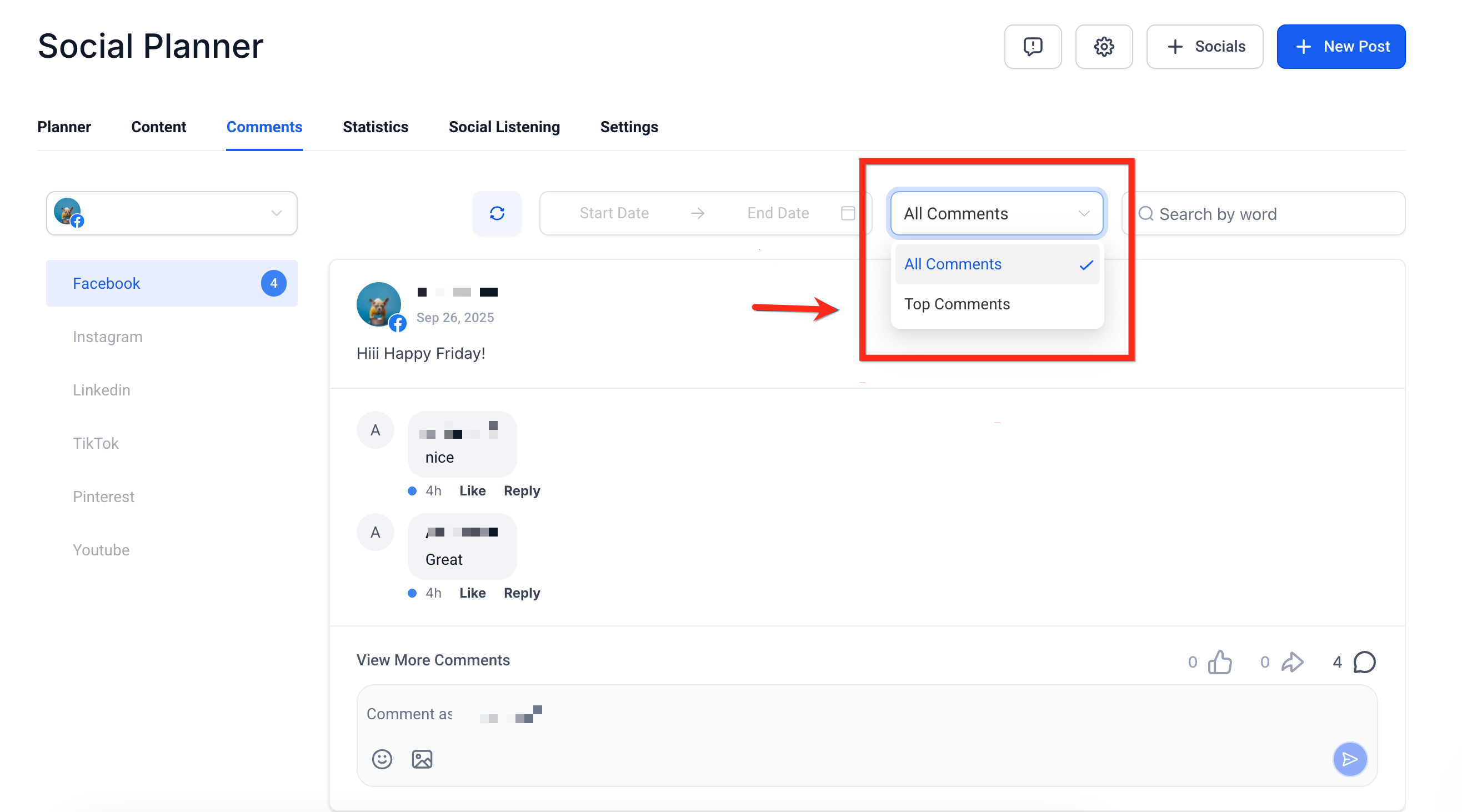
Smart Filters (Latest vs Top)
Use the dropdown above the inbox to switch views:
- Latest: Shows the most recent activity so you never miss new questions from prospective families
- Top: Sorts by "most relevant" order, surfacing high-engagement comments first
Using Mentions in Comment Replies
Tag Facebook Pages or public profiles by typing "@" plus at least three characters. A list of matching public pages appears, letting you credit partners or acknowledge families without leaving Enrollio.
How to Use Comment Management
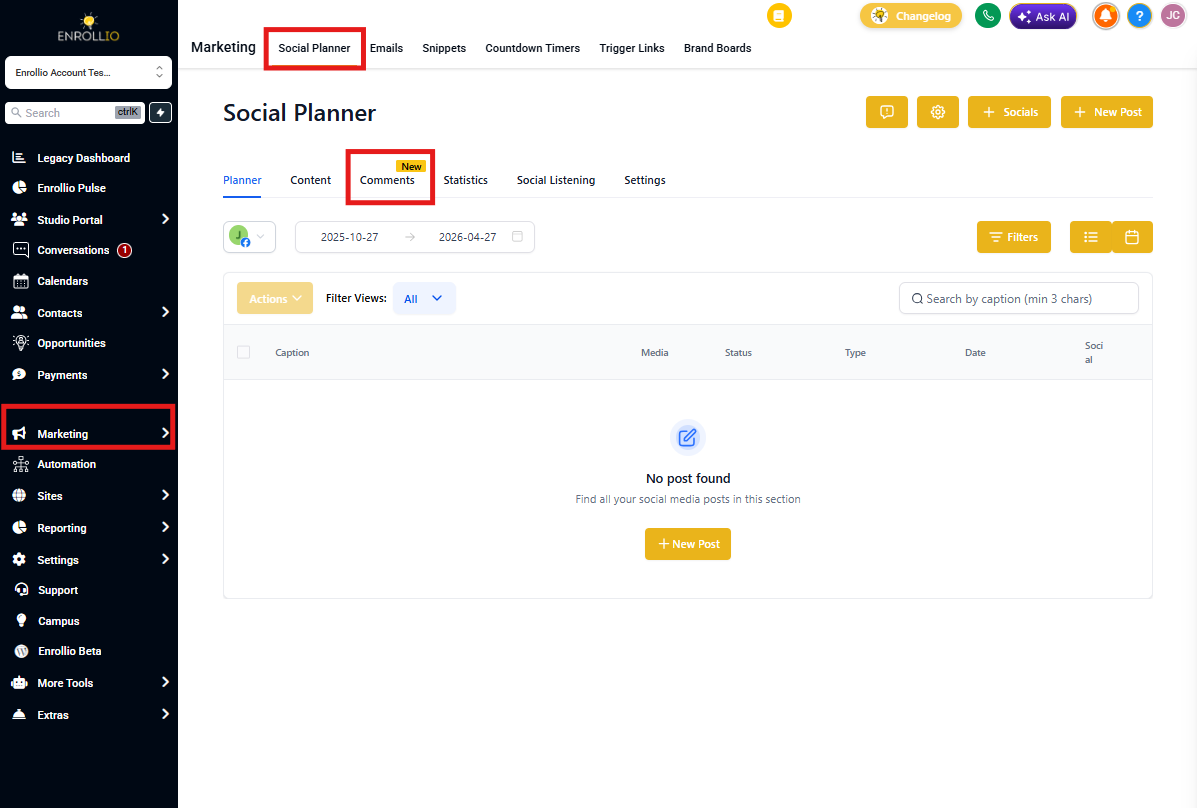
Step 1: Open Comments in Social Planner
Go to Marketing → Social Planner → Comments
Step 2: View and Engage with Comments
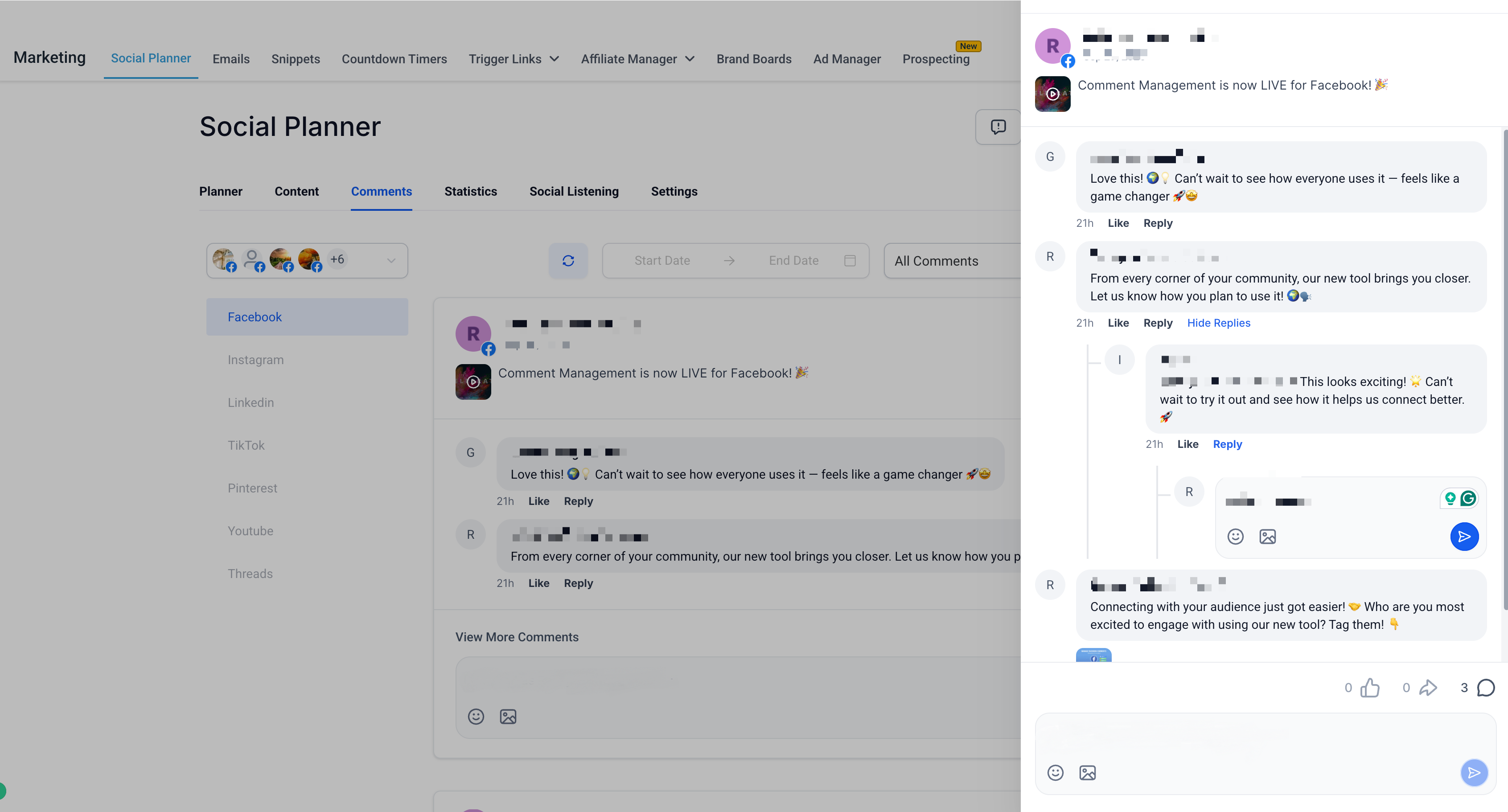
Here, you can:
- Read comments from posts published via Social Planner
- Reply directly to users
- Like comments
- Add emoji and images in replies
- Reply to threaded (nested) comments for deeper discussions
- Click View More for an expanded comment view
Step 3: Filter Between Latest and Top Comments
Use the dropdown filter to choose how you want to view comments:
- Latest: Shows the most recent comments first
- Top: Highlights the most engaging or relevant comments
Platform Capabilities Overview
Comment Management inside Social Planner now supports Facebook, Instagram, and LinkedIn, with more platforms coming soon.
Supported Features:
- View comments on posts published via Social Planner
- Reply to comments using text, emojis, and images (up to 10MB)
- Threaded replies supported (multiple levels)
- Like comments
- Mentions supported using "@" + minimum 3 characters for search
- Filter comments by Latest or Top
- Emoji support available in replies
- Image uploads supported (up to 10MB per Facebook limitations)
- Search comments (minimum 3 characters)
- API support available
- Media in comments (GIFs, thumbnails) visible but not clickable
Limitations:
- Nested comment counts are not displayed (only top-level counts appear)
- Thumbnails, images, videos, and GIFs in comments are not clickable
- Options to add GIFs, stickers, or avatars in replies are not supported
- Image uploads above 10MB are not supported (Facebook API limit)
- Search requires a minimum of 3 characters
- Comments on posts published natively on Facebook will not appear
- Hide/Delete actions are not supported
Supported Features:
- View comments on posts published via Social Planner
- Reply to comments using text, emojis, and images (up to 10MB)
- Threaded replies supported
- Like comments
- Mentions supported only when typing the exact @username (search not available)
- Filter comments by Latest or Top
- Emoji support available in replies
- Image uploads supported (up to 10MB per Instagram limits)
- Search comments (minimum 3 characters)
- Media in comments visible but not clickable
Limitations:
- Mentions do not support search; you must type the exact @username (Instagram API limitation)
- Thumbnails, images, videos, and GIFs in comments are not clickable
- Image uploads above 10MB are not supported
- Search requires a minimum of 3 characters
- Hide/Delete actions are not supported
- API support for Instagram comment management is limited, which restricts advanced actions
- Comments on posts published natively on Instagram will not appear
Supported Features:
- View comments on LinkedIn Page posts published via Social Planner
- Reply to comments using text and emojis
- Support for one level of threaded replies
- Like comments
- Mention other LinkedIn users by searching for their usernames
- Filter comments similar to Facebook and Instagram (Latest, Top)
- Search comments (minimum 3 characters)
- View all comments inside the unified inbox
Limitations:
- Only LinkedIn Pages are supported; personal profiles cannot be connected (API restriction)
- Threaded replies are limited to one level
- Image uploads in replies are not supported
- Thumbnails, images, GIFs, and videos in comments are not clickable
- Comments on posts published natively on LinkedIn do not appear in Social Planner
- Hide/Delete comment actions are not supported
- Search requires a minimum of 3 characters
- Replies must be within LinkedIn's 3000-character limit
Frequently Asked Questions
Q: Can I see comments from other platforms?
Not yet. Currently, only Facebook, Instagram, and LinkedIn comments are supported. Other platforms are coming soon.
Q: Will I see comments on posts published directly on Facebook, Instagram, or LinkedIn?
No. Only comments on posts published via Social Planner will appear here.
Q: Can I delete or hide comments?
Not at the moment. You can only like or reply to comments.
Q: Can I reply with images and emojis?
Yes, we support replying with emojis and images on all three platforms.
Related Articles
- Getting Started with Social Planner
- Track Social Performance with Social Analytics
- Social Planner: Disconnected Account Notifications