
How to Publish Instagram Reels with Social Planner
Want to boost your childcare center's visibility on Instagram? Instagram Reels are your secret weapon for connecting with prospective families through short, engaging videos.
Showcase your classrooms, share daily activities, highlight your amazing teachers, or give tours of your facility — all in fun, creative 15-second to 15-minute clips that help families get to know you before they even schedule a tour.
Before You Start
Make sure you have:
- An Instagram Professional account connected to Enrollio — Personal or creator accounts won't work for Reels publishing
- Videos uploaded to your Media Library — Upload your content before creating the Reel
Important: All video posts publish to both your Instagram Feed and Reels tab automatically.
Why Use Instagram Reels for Your Childcare Center?
Reach more families: Reels appear on Instagram's Explore page, helping families who don't follow you yet discover your center.
Show your personality: Give families a real feel for your center's culture, staff, and daily activities through quick video snippets.
Get discovered: Instagram's algorithm recommends Reels to users based on their interests — perfect for reaching families actively looking for childcare.
Easy to consume: Busy parents can quickly scroll through Reels during their commute or lunch break, making it easy for them to engage with your content.
How to Create an Instagram Reel
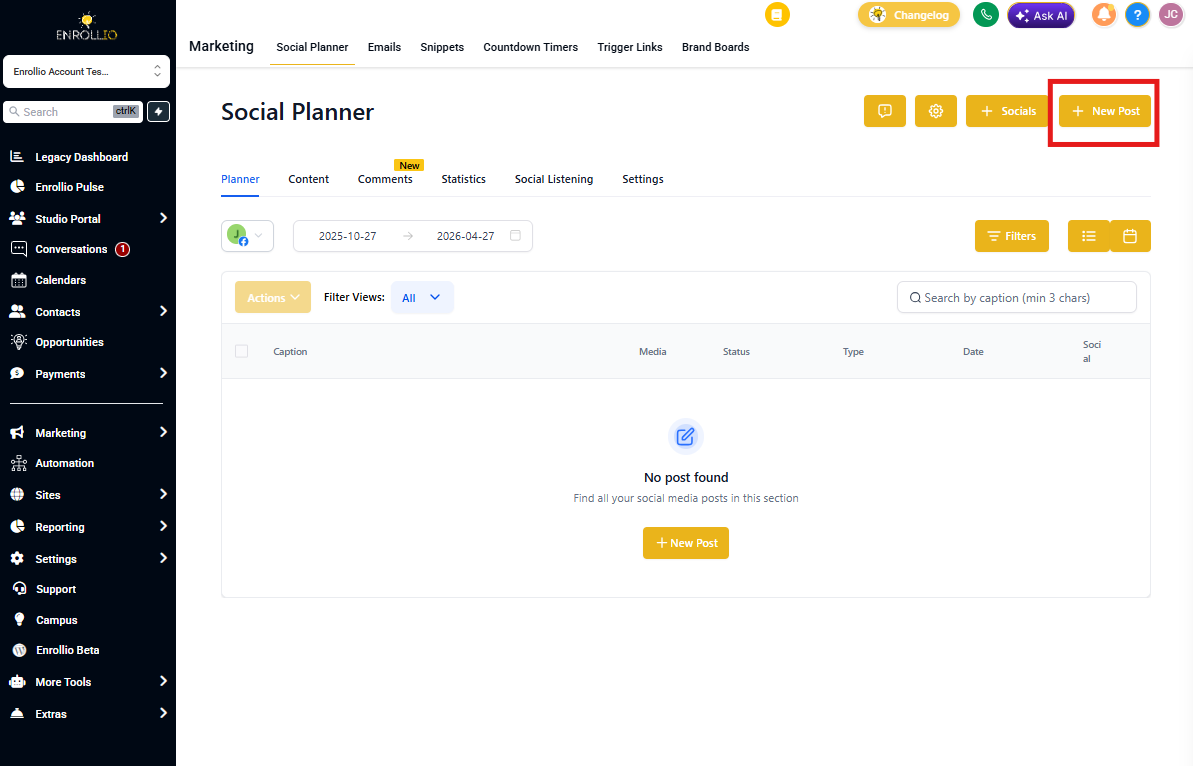
Step 1: Click Marketing → Social Planner → New Post
Step 2: Under Publish, select your Instagram account. You must choose an Instagram Professional account for Reels to be available.
Step 3: Select Reels as your Instagram content type
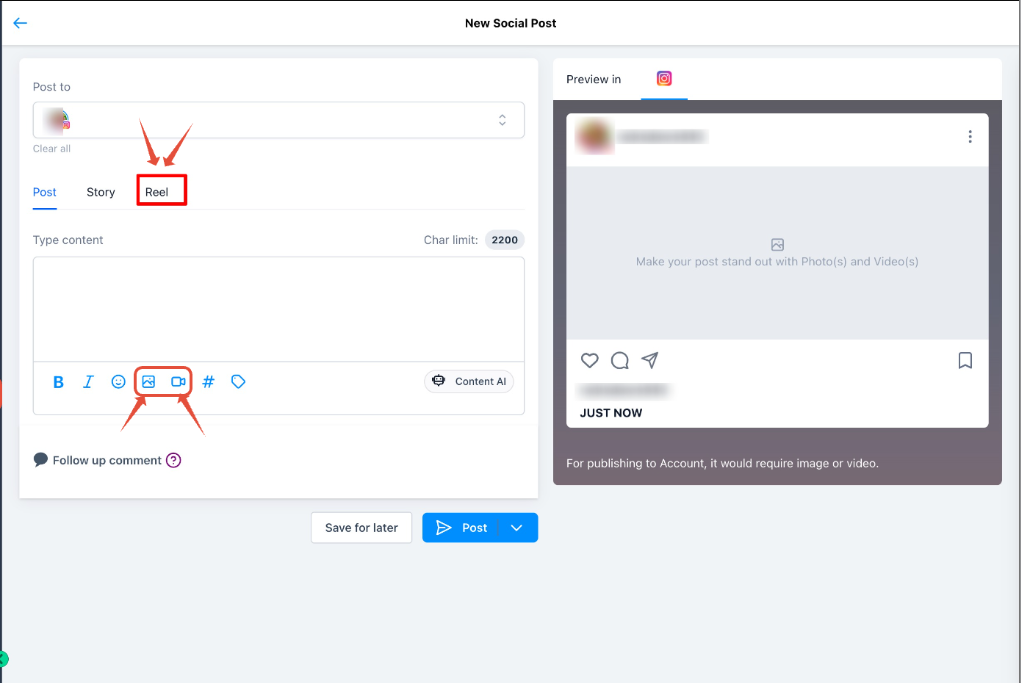
Step 4: Upload up to 10 images or videos for your Reel
Step 5: Choose Post Now or Schedule for Later. You can also save as a draft.
Scheduled Reels appear under the Scheduled Posts tab.

📝 Pro Tip: Caption Character Limits
Instagram counts special characters and emojis differently than what you see in Enrollio. Some emojis may count as multiple characters. If your post fails to publish, try shortening your caption or removing special characters.
Technical Requirements for Instagram Reels
- Video size: Up to 1GB (thumbnail: 8MB max)
- Aspect ratio: 9:16 recommended (vertical video)
- Duration: 3 seconds minimum, 15 minutes maximum
- Format: MOV or MP4
- Resolution: 1920px maximum width
Frequently Asked Questions
Can I use Instagram Reels with any Instagram account?
No, you need an Instagram Professional account. Personal or creator accounts don't support Reels publishing through Enrollio.
How many images or videos can I include in a Reel?
You can include up to 10 images or videos in a single Reel.
Can I schedule Reels for later?
Yes! After creating your Reel, choose "Schedule for Later" and pick your desired date and time.
Where do my Reels get posted?
Your Reels publish to both your Instagram Feed and Reels tab automatically — you don't need to choose.
Is there a limit to how many Reels I can create?
No limit! Create as many Reels as you want to engage families and showcase your center.
💡 Content Ideas for Childcare Reels
- Quick classroom tours
- Daily activity highlights (art projects, outdoor play, circle time)
- Teacher spotlights
- Parent testimonials
- Special events and celebrations
- Behind-the-scenes prep work
- Educational tips for parents