
Understanding WhatsApp Contact Validation
Enrollio automatically tracks whether each family's phone number is active on WhatsApp. This helps you reach families on their preferred messaging platform and avoid sending messages to numbers that aren't on WhatsApp.
Think of it as a real-time check that keeps your parent communication list accurate and your message delivery rates high.
How the Valid WhatsApp Field Works
Every contact in Enrollio has a "Valid WhatsApp" status with three possible values:
- Is Valid – This phone number is active on WhatsApp. Your messages will reach this family.
- Is Invalid – This phone number isn't available on WhatsApp. Messages won't go through.
- Is Not Validated – The system hasn't confirmed WhatsApp availability yet. This happens when you haven't messaged this family on WhatsApp before.
Why This Matters for Your Center
Using this field helps you:
- Message only families who actually use WhatsApp
- Reduce failed message attempts that waste time and credits
- Keep your parent contact lists accurate and up-to-date
- Focus your outreach on the channels where families are most responsive
How Enrollio Updates WhatsApp Status
The system updates each family's WhatsApp status automatically based on message activity. You never need to update this manually.
Status Changes to "Is Valid" When:
- You successfully deliver a message – When your WhatsApp message reaches a family, their status updates to "Is Valid"
- A family messages you first – When a parent initiates a WhatsApp conversation with your center, their status instantly becomes "Is Valid"
Status Changes to "Is Invalid" When:
Message delivery fails or encounters issues with Meta's WhatsApp service. This typically means the phone number isn't registered on WhatsApp.
Status Stays "Is Not Validated" When:
You haven't exchanged any WhatsApp messages with this family yet. The system can't confirm their WhatsApp status without at least one message attempt or incoming message.
Adding the Valid WhatsApp Column
Display WhatsApp status directly in your contact list for quick reference:
- Go to Contacts
- Click Columns
- Select Valid WhatsApp from the list
The column now appears in your contact view, showing each family's WhatsApp status at a glance.
Creating a Smart List for WhatsApp Campaigns
Build a smart list that automatically includes families you can reach on WhatsApp. This list updates in real-time as families' WhatsApp status changes.
Step-by-Step Instructions:
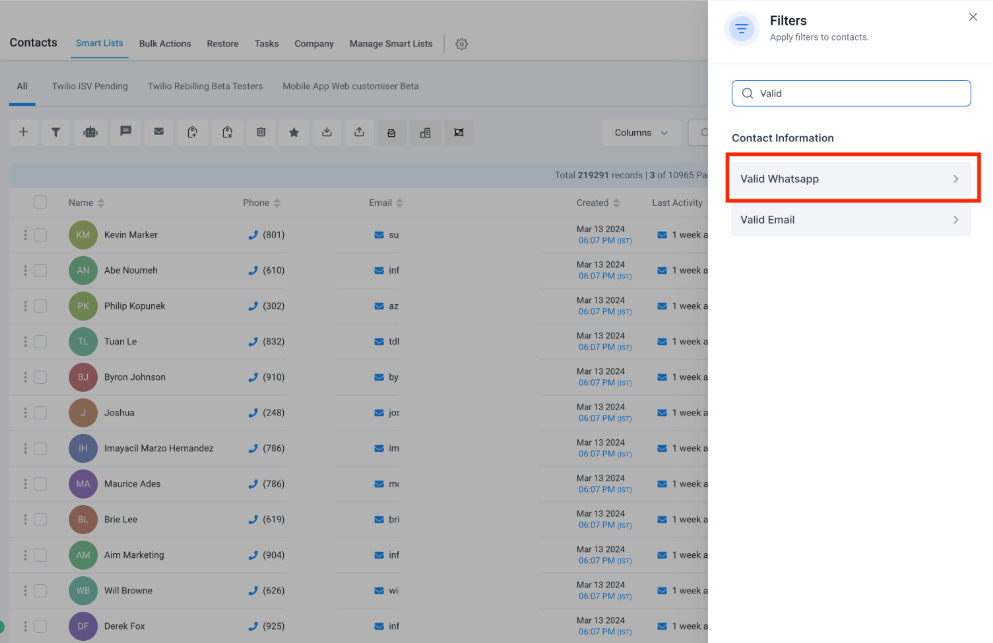
- Go to Contacts and click More Filters
- Search for Valid WhatsApp
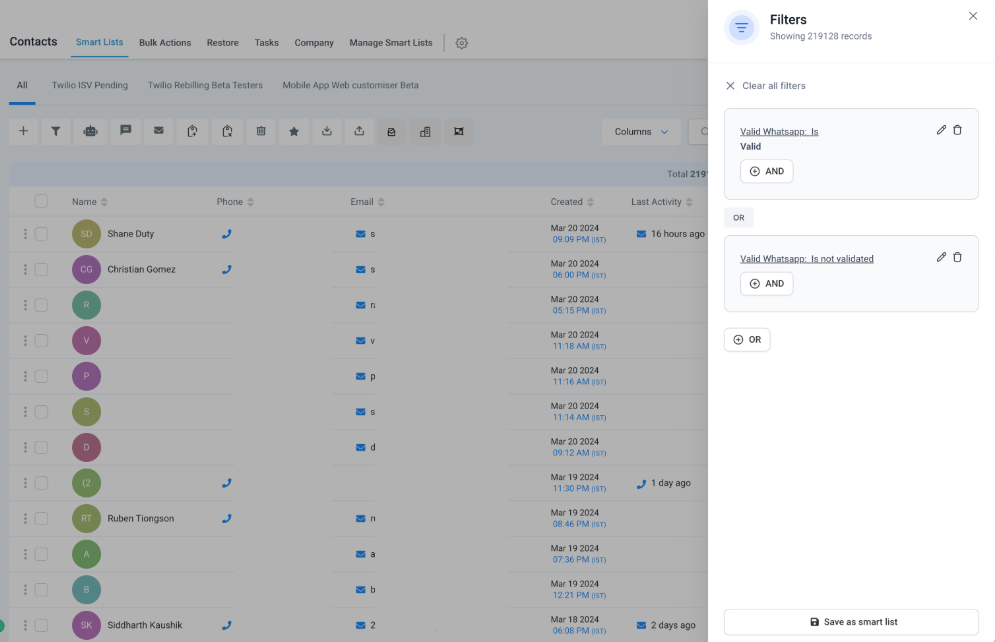
- Select Is Valid and click Apply
- Click OR condition
- Select Is Not Validated
- Click Save as smart list
- Name your list (example: "WhatsApp Contact List" or "WhatsApp Campaign Audience")
Why Include "Is Not Validated" Contacts?
Including "Is Not Validated" contacts gives Enrollio a chance to check if these families are on WhatsApp. The first message you send will validate their status. If they're on WhatsApp, they'll receive your message and their status will update to "Is Valid."
This approach helps you gradually validate your entire parent database while still reaching families with confirmed WhatsApp numbers.
Using Smart Lists in Your WhatsApp Campaigns
Once you've created your WhatsApp smart list, select it as the audience when sending WhatsApp campaigns. Your messages will only go to families who can receive them, improving your delivery rates and engagement.
The smart list updates automatically, so you'll always be messaging the right families without manual list maintenance.
Frequently Asked Questions
How often does the WhatsApp status update?
Updates happen in real-time whenever a message is sent or received. There's no delay or batch processing—status changes immediately based on message activity.
Can I manually change a family's WhatsApp status?
No, the system manages this automatically based on actual message delivery. Manual updates aren't necessary or available, which ensures accuracy.
What happens if a family's WhatsApp number changes?
If a parent updates their phone number and you send them a WhatsApp message, the system will automatically validate the new number and update their status accordingly.
Should I remove "Is Invalid" contacts from my database?
Not necessarily. These families might still respond to text messages or email. The WhatsApp status only tells you about their WhatsApp availability—they're still valid contacts for other communication channels.
How do I know if my WhatsApp campaigns are reaching families?
Check your campaign delivery reports. Using a smart list with validated WhatsApp contacts will show significantly higher delivery rates than sending to your entire database.
What if I want to exclude "Is Not Validated" contacts?
When creating your smart list, select only "Is Valid" instead of adding the OR condition. This gives you a more conservative list of confirmed WhatsApp users, but you won't validate new numbers through your campaigns.