
YouTube is one of the most powerful platforms for reaching families searching for childcare. Whether you're sharing virtual tours, parent testimonials, or day-in-the-life videos, scheduling your YouTube content directly from Enrollio saves time and keeps your marketing consistent.
How to Schedule a YouTube Video or Short
- Go to Marketing > Social Planner.
- Connect your YouTube account through Google Integrations and select your channel. To verify your Google account has a YouTube channel, sign in to your YouTube account settings page. Your channel will be listed there, or you'll see an option to create one if you don't have a channel yet.
- Click Create New Post.
- Select your YouTube channel from the list.
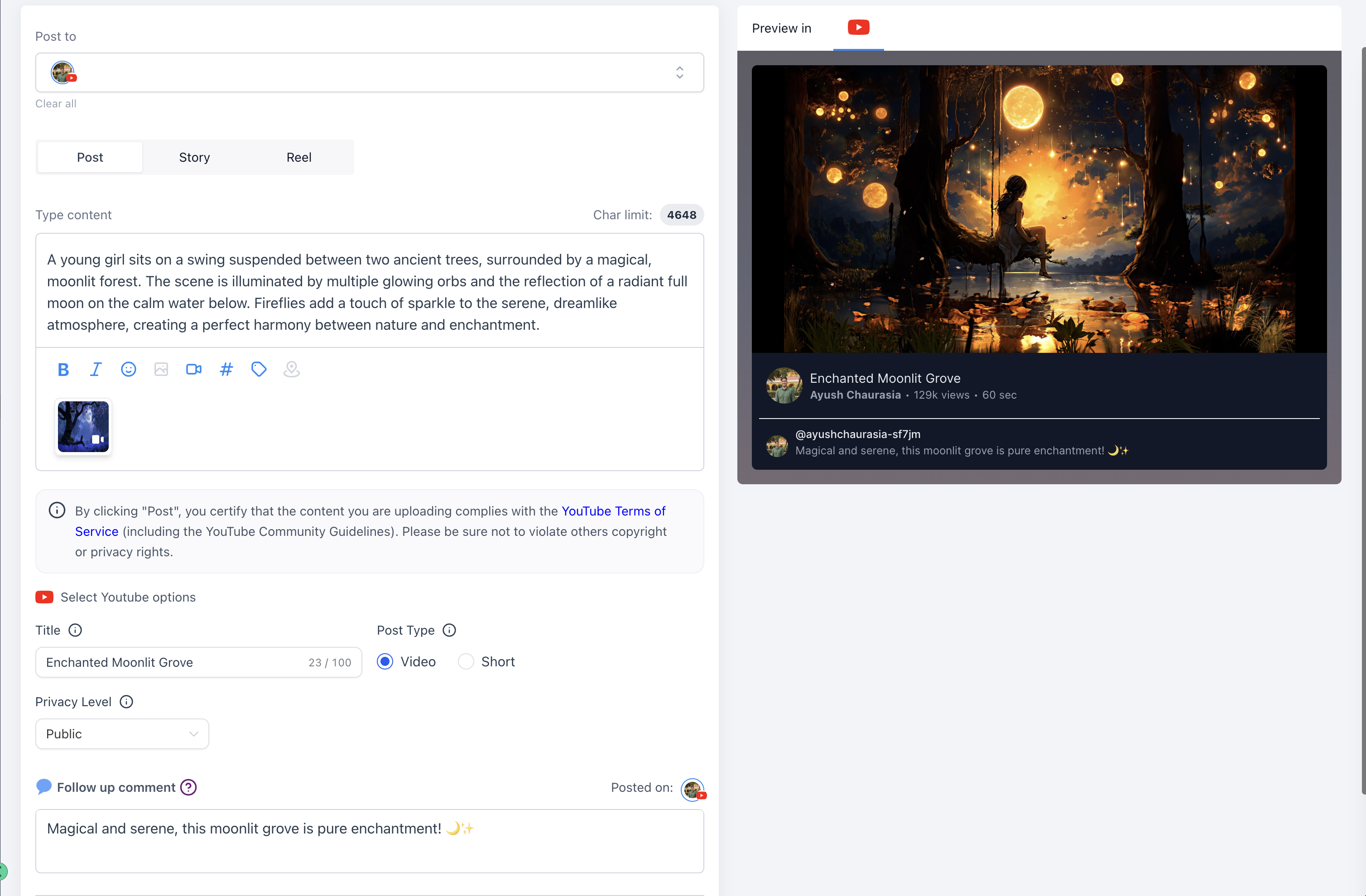
- Write your video description in the caption field. Include relevant hashtags like #childcare, #preschool, or #daycarelife.
- Choose either Video or Shorts.
- Add a title for your video or short. (When you select Shorts, #shorts is automatically added to the title.)
- Set your privacy level: Public, Private, or Unlisted.
- Optionally, add a follow-up comment to appear after your post goes live.
- Schedule your post for the date and time you want it to publish.
Pro Tip: Your YouTube connection stays active until you manually disconnect it—no need to worry about tokens expiring.
Video Specifications
- File size: Up to 1GB for both videos and shorts
- Shorts length: Up to 3 minutes
- Shorts aspect ratio: Vertical (9:16 recommended)
- Thumbnails: PNG or JPEG, up to 2MB (available for videos only, not shorts)
Note: Custom thumbnails are only supported for YouTube videos, not shorts. Make sure your account is verified to upload custom thumbnails.
What to Post
Use YouTube to give families a window into your childcare center:
- Virtual tours showing your classrooms and play areas
- Parent testimonials sharing their experience with your center
- Staff introductions helping families get to know your team
- Day-in-the-life videos showcasing daily activities and learning
- Quick tips for parents on child development or preparing for childcare
Shorts work great for quick, engaging content that families can watch on the go. Regular videos are perfect for in-depth tours or longer testimonials.