
Managing your childcare center's online reputation across multiple platforms is essential for attracting new families. Enrollio makes it easy to connect all your review platforms—Google, Facebook, Yelp, and more—so you can monitor and respond to parent feedback from one central location.
This guide will walk you through integrating review platforms into your Enrollio account to streamline your reputation management.
Key Benefits of Integrating Review Platforms
- Centralized Management: View all your reviews from different platforms in one dashboard—no more jumping between sites.
- Faster Response Time: Respond to parent reviews across all platforms without logging into each one separately.
- Better Reputation Monitoring: Keep track of what families are saying about your center and address concerns quickly.
- Time Savings: Enrollio automatically pulls in new reviews, so you don't have to manually check each platform.
How to Integrate Review Platforms
Step 1: Navigate to Reputation Settings
- Click Reputation in your left-side menu
- Select Settings from the top menu within the Reputation page
- Click on the Integrations tab
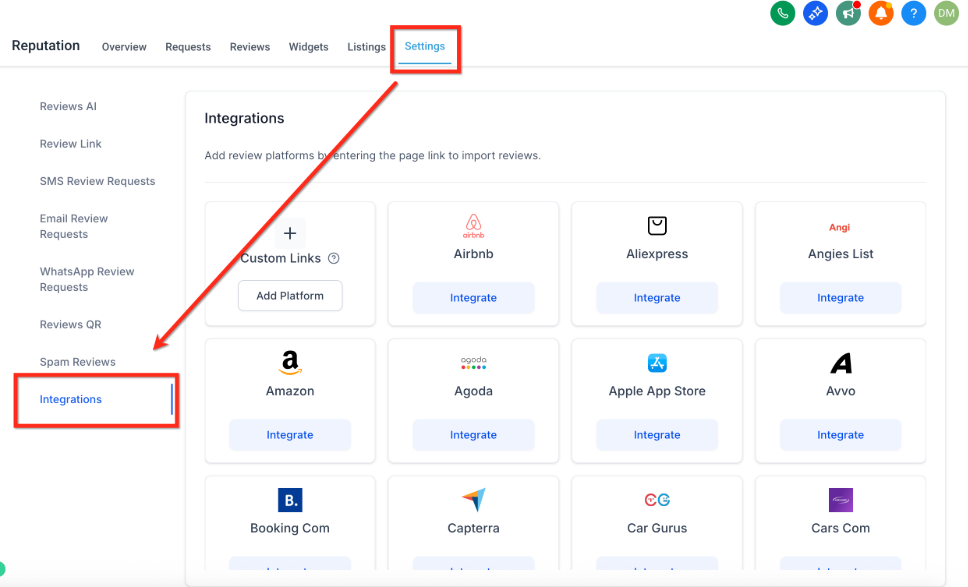
Step 2: Add Your Review Platform URLs
- On the Integrations page, you'll see fields for each supported review platform
- Enter the specific URL for your business's review page (for example, your Google Business Profile URL or your Facebook page)
- Make sure the URL points directly to your center's public review page
- Click the Integrate button
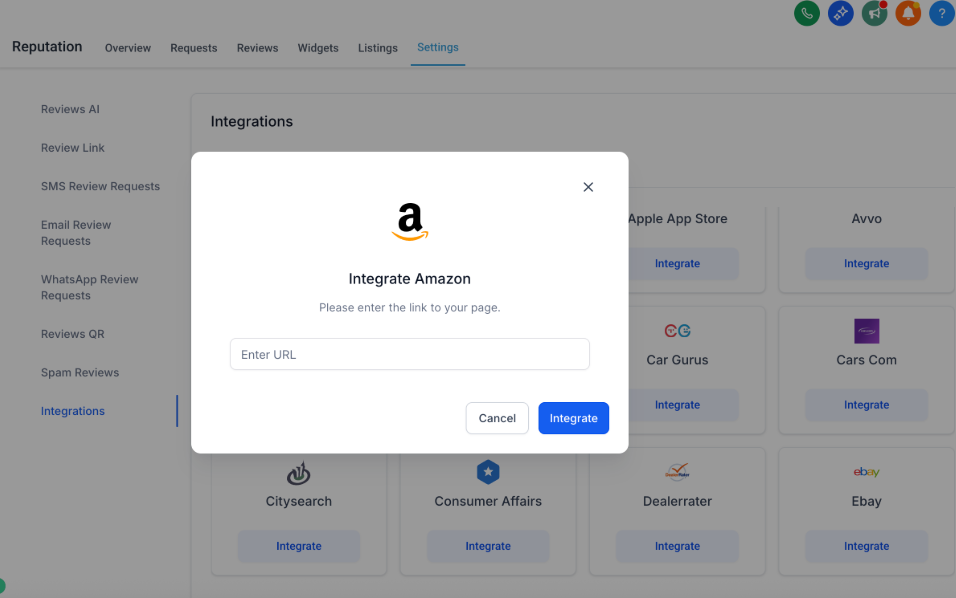
Enrollio will automatically pull in your latest reviews from that platform and display them in your dashboard. Repeat these steps for each additional review platform you want to connect.
Pro Tip: Start by integrating your most active review platforms first—typically Google and Facebook for childcare centers. You can always add more platforms later.
Supported Review Platforms
Enrollio integrates with these popular review platforms:
- Google Business Profile
- Yelp
- TrustPilot
- TripAdvisor
- Better Business Bureau
- Angie's List
- HomeAdvisor
- Zillow
- Thumbtack
- Care.com
- Caring.com
- FourSquare
- Yellow Pages
- Glassdoor
- Indeed
- And many more
Note: Each platform has specific requirements for valid review page URLs. If you're unsure how to find your public review URL, visit that platform's help center for guidance.
Troubleshooting Integration Issues
If you're having trouble connecting a review platform, try these steps:
Verify the URL: Double-check that you're using the correct public-facing URL for your business's review page. The URL should be the one parents would use to find and read reviews of your center.
Check Your Permissions: Make sure you have admin access or the necessary permissions to manage reviews on that platform.
Clear Your Browser Cache: Sometimes clearing your cache and refreshing the page resolves integration issues.
Contact Support: If the problem continues, reach out to our support team. We'll help you get your review platforms connected.
Managing Reviews After Integration
Once you've integrated your review platforms, all your reviews will appear in one place within Enrollio's Reputation dashboard. From there, you can:
- Read reviews from all platforms in one view
- Respond directly to parent feedback
- Monitor trends in your center's reputation
- Track new reviews as they come in
By connecting your review platforms to Enrollio, you'll save time and stay on top of your center's online reputation—helping you attract more families and build trust in your community.