Clone a Facebook Ad Campaign
Cloning a campaign creates an exact copy of your existing Facebook ad campaign, letting you quickly replicate its structure, settings, and creative elements. This is especially useful when you're scaling successful campaigns or testing new variations.
Why Clone a Campaign?
Save Time and Effort
Quick Duplication: Skip the setup process entirely. All your settings, targeting, and creatives copy over automatically.
Faster Testing: Running A/B tests with different audiences, locations, or creatives? Cloning lets you set up variations in seconds instead of rebuilding each campaign manually.
Maintain Consistency
Uniform Structure: Your cloned campaigns keep the same structure, budget allocation, and optimization settings as the original. This consistency matters when you're scaling or want to maintain proven approaches.
Replicate Success: If a campaign is bringing in tour bookings and enrollments, cloning preserves those winning settings and increases your chances of repeating that success.
Scale Your Reach
Expand Quickly: Ready to reach more families? Clone your successful campaign and make small adjustments—like targeting new neighborhoods, increasing your budget, or adjusting your audience.
Target Multiple Audiences: Create separate variations for different parent segments, ad placements, or devices without losing your original campaign structure.
Simplify Multi-Location Campaigns
Adapt for New Markets: Running ads across different cities or regions? Clone your campaign and quickly adjust location, language, and budget for each area without starting over.
Localize Your Messaging: Keep your campaign structure consistent while tailoring ad copy and images to resonate with families in different communities.
Handle Seasonal Campaigns
Reuse Seasonal Promotions: For recurring events like back-to-school enrollment or summer camp registration, clone last year's successful campaign and make minimal updates.
Streamline Regular Campaigns: If you run similar campaigns regularly—like open house promotions or enrollment deadline reminders—cloning speeds up your setup process significantly.
Track and Compare Performance
Easy Comparison: Clone a campaign and make small adjustments to see which version brings in more tour bookings. This gives you clear insights into what works best.
Organized Management: Cloning maintains your campaign hierarchy, making it easier to manage multiple ad sets and ads within the same framework.
When to Clone a Campaign
- Scaling successful campaigns: Your campaign is generating quality tour bookings—clone it to reach more families without starting over.
- Testing different audiences: Clone your campaign to target different parent segments (first-time parents, parents with toddlers, etc.) and compare results.
- Expanding to new areas: Clone and modify campaigns to reach families in different neighborhoods or cities.
How to Clone a Campaign
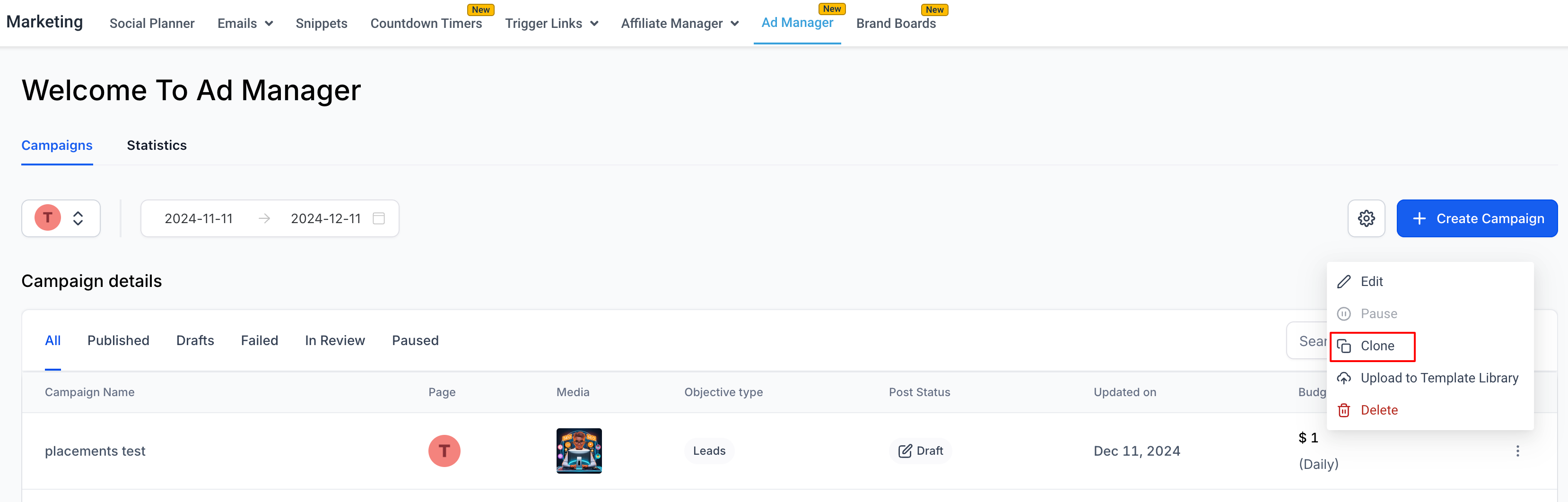
- In Ad Manager, find the campaign you want to duplicate.
- Click the three dots (ellipses) next to the campaign name.
- Select Clone from the menu.
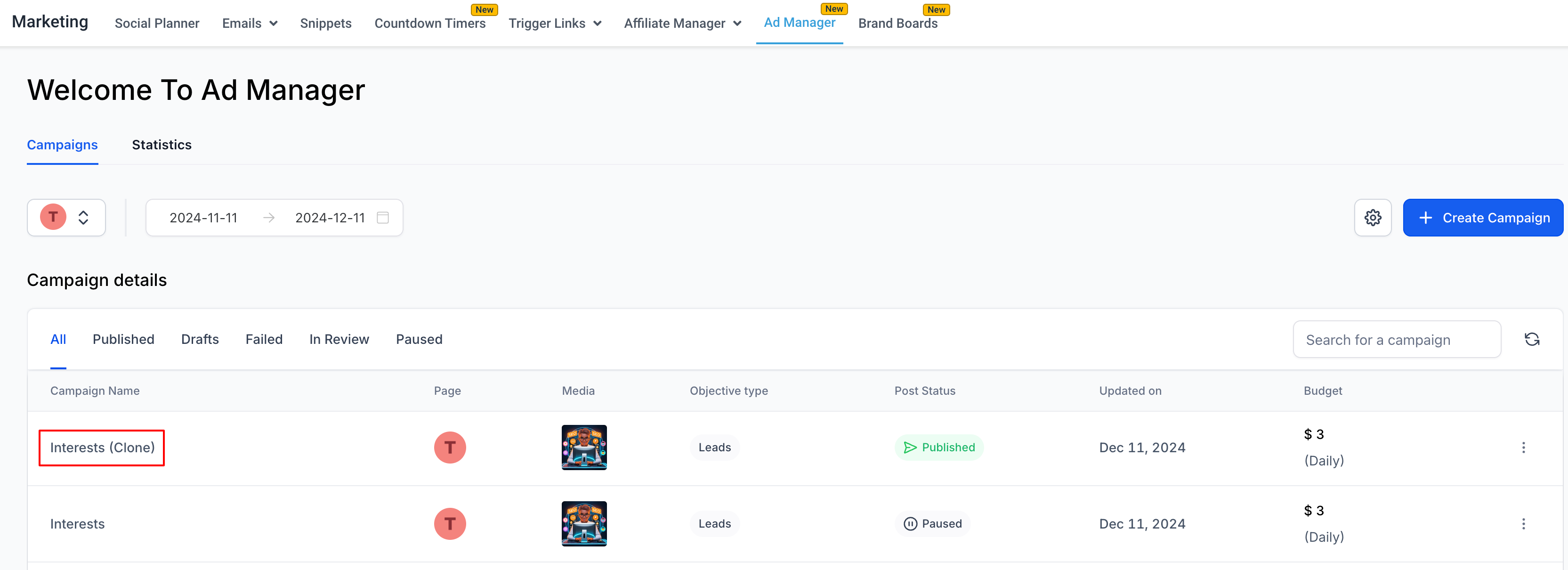
An exact copy of your campaign appears at the top of your campaign list with "(clone)" added to the name. From here, you can make any adjustments before launching.
Pro Tip: After cloning, rename your campaign immediately so you can easily identify which audience or location it targets. For example: "Spring Enrollment - Downtown (clone)" becomes "Spring Enrollment - Westside."